What are End-to-End AI Solutions & What Do They Include?
March 31, 2026
An end-to-end AI solution takes an AI feature from raw data to real product outcomes. It covers data, models, integration, deployment, monitoring, and governance as one connected system. Teams use it when “just call an API” stops working for quality, cost, latency, or compliance.
Most AI failures do not come from the model. They come from messy data, weak integration, poor evaluation, and missing guardrails. End-to-end work fixes those gaps. It turns experiments into a product capability that teams can ship, observe, and improve.
This guide breaks down the core components, the build process, and the common tech stack. It also gives a practical way to decide if your SaaS product needs a full end-to-end AI program.
Key Takeaways About End-to-End AI Solutions
End-to-end AI solutions cover the entire lifecycle of an AI-powered capability, from data and models to deployment, integration, and optimization.
They help businesses move beyond isolated experiments and turn AI into a reliable part of everyday operations.
A strong end-to-end solution includes more than model development. It also requires infrastructure, governance, monitoring, workflow integration, and ongoing iteration.
These solutions are especially useful when AI needs to support high-value, repeatable processes across a product or business function.
End-to-end AI is usually the right fit when AI supports a core workflow, requires accuracy and governance, connects multiple systems, and needs ongoing monitoring and improvement. A lighter API-based approach is often enough for lower-risk, generic, or early-stage use cases.
For SaaS teams, success depends less on the model alone and more on how well AI fits into the product, systems, and user experience.
The goal is not just to launch AI features, but to deliver measurable business impact at scale.
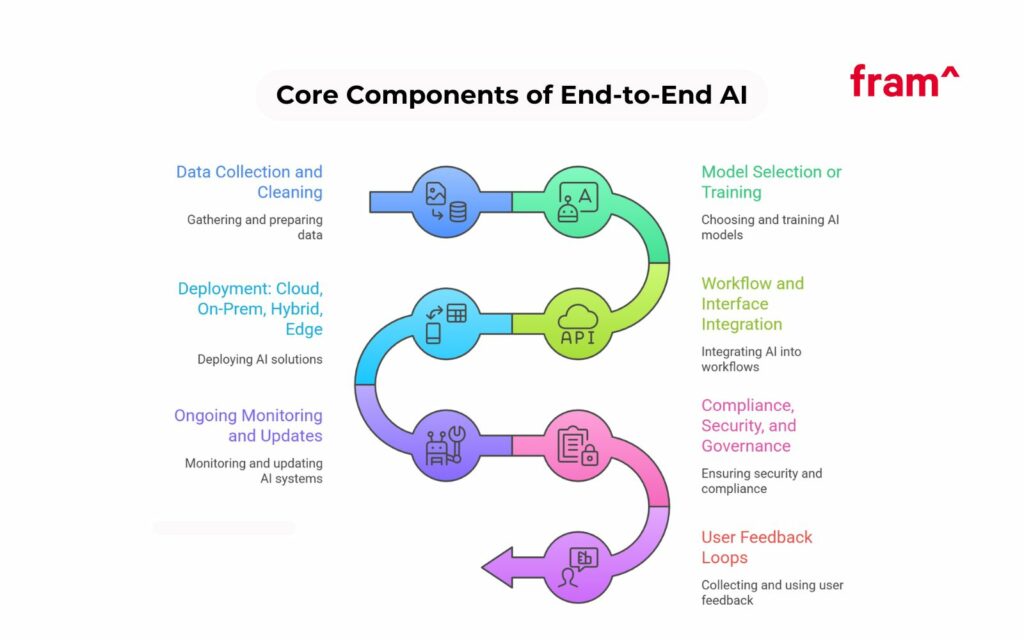
An end-to-end AI solution looks like a pipeline plus a product layer. The pipeline moves data into models and pushes outputs into real workflows. The product layer adds UX, safety, and feedback loops to make the features more reliable.
Some teams start with a single model endpoint and grow from there. Others start with a full architecture plan. Either way, the same components show up once the feature reaches production.
Data collection and cleaning
Every AI system starts with a data source. That data may come from tickets, chats, product catalogs, images, audio, logs, CRM records, or documents. Teams usually combine structured data with unstructured data.
Cleaning steps change based on the domain but the goals stay consistent.
You need consistent fields, consistent labels, and clear ownership. A process to remove duplicates and stale versions is also vital. Most importantly, make sure the changes can be tracked and traced, this includes what changed and when.
For text, teams normalize encoding, remove boilerplate, and split long documents. For images, teams standardize resolution and file formats. For audio, teams standardize sample rates and clip lengths.
A strong data pipeline keeps a record of every transformation. It stores raw data, cleaned data, and training-ready data as separate assets.
Model selection or model training
Some use cases fit ahosted foundation model. Others need fine-tuning, distillation, or a custom model. The choice depends on accuracy targets, latency targets, and data sensitivity.
Generative AI fits tasks like drafting, summarizing, and conversational UX. Predictive analytics fits tasks like churn risk and fraud scoring. Tasks like object detection and image recognition can be done with computer vision. And audio AI handles speech recognition and call analytics.
Many products now combine multiple model types. A single user request can trigger a large language model, a retrieval step, and a classifier. Some products add autonomous AI agents that execute multi-step workflows. That design needs careful control of tools, permissions, and evaluation.
Workflow and interface integration
A model output only matters once it lands in the product. Integration work often takes longer than model work.
Teams define where AI appears in the UI and where it runs in the backend. They decide what the user can edit, approve, or reject. They decide what gets logged and what stays private.
A good integration includes clear affordances. Users need to know when AI acted and what it used. Users need a fast undo path and a clear way to give feedback.
For customer service, the integration may sit inside a ticket view. For eCommerce, it may sit in a product management console. For fintech, it may sit in a fraud review queue.
Deployment in cloud, on-prem, or hybrid cloud
Deployment ties directly to cost and latency. It also ties to data residency and regulatory needs.
Cloud-based services work well for early stages. They simplify scaling and speed up shipping. On-prem deployment fits strict data control needs. Hybrid cloud fits teams that store data on-prem but run some inference in the cloud.
Edge AI adds a new shape. Teams run inference near devices to cut latency and reduce bandwidth. That pattern shows up in retail analytics, manufacturing inspection, and in-app AI assistants.
Hardware decisions matter more once inference volume grows. GPU accelerators, memory bandwidth, and batch strategy can cut cost per request. Many teams now plan for a mix of accelerators, fromAMD Instinct™ GPU accelerators to NVIDIA systems.
On the NVIDIA side, some deployments target platforms tied to Grace™ CPUs and systems such asNVIDIA GB300 NVL72. On the AMD side, teams track new accelerators such as theMI350 series. In data centers, liquid cooling can become a requirement once racks reach high power density.
Ongoing monitoring and updates
Production AI changes over time. Data shifts. User behavior changes. Model performance drifts. So teams need monitoring from day one.
Monitoring starts with product metrics. It then adds model metrics.
Product metrics include conversion, time saved, ticket deflection rate, and user satisfaction. Model metrics include accuracy, hallucination rate for generative output, and confidence calibration for classifiers. System metrics include latency, error rate, and cost per request.
Updates follow a loop. Teams collect feedback, label new data, retrain or tune, then ship improvements behind controlled rollouts. A mature program treats AI quality as a living service, not a one-time release.
Compliance, security, and governance
AI introduces new risks. Data leaks, prompt injection, unsafe output, and model misuse all show up in production.
Security work includes access controls, encryption, audit logs, and secrets management. Teams set rules for data retention and data deletion. Teams define where prompts and outputs can be stored. Teams treat model access as a privileged service.
Compliance work depends on the industry. Healthcare and fintech carry strict requirements. Enterprise buyers often ask forSOC 2 Type II certification. Some teams align their AI governance with emerging guidance likeNIST AI-600-1, then map internal controls to buyer questionnaires.
Governance also includes model documentation. You need model cards, data lineage, evaluation reports, and incident processes. Cyber resilience matters here. A model outage can degrade core workflows, so teams plan failover paths.
User feedback loops
Feedback closes the gap between lab accuracy and real user value. It also acts as a safety mechanism.
A practical system captures three types of feedback.
Explicit feedback. Users rate outputs, edit drafts, and flag errors.
Implicit feedback. Users accept, reject, or ignore suggestions.
Outcome feedback. The business sees what happened after the AI suggestion.
Teams turn feedback into training data and evaluation cases. Teams then use it to improve prompts, routing, retrieval, or fine-tuning.
How To Know If Your SaaS or Software Business Needs End-to-End AI
A simple question guides the decision.
Do you need predictable outcomes under real production constraints? Yes means you need an end-to-end plan.
Here are common signals that the “quick AI add-on” path will not hold up.
You are integrating AI into your core product
AI sits at the edges in early experiments. It drafts emails or summarizes notes. Then teams push it deeper.
If AI becomes part of the main workflow, you need reliability. You need uptime targets, clear fallbacks, and tight monitoring. You need evaluation tied to business outcomes, not model demos.
Core product AI often needs low latency. Many SaaS teams set a target such as sub-second responses for UI suggestions, then allow longer paths for background work. That split shapes architecture and model choices.
You have industry-specific compliance or UX needs
Generic tools rarely match regulated UX and audit needs. A fintech team needs traceability for decisions. A healthcare team needs strict data handling. An enterprise B2B team needs tenant isolation and strong access controls.
A single hosted endpoint does not solve those needs by default. You need governance, logging rules, and safe deployment patterns.
You need custom logic beyond consumer pre-trained models
Pre-trained models do well with general language. They struggle with domain-specific terms, product-specific policies, and internal workflows.
Custom logic can mean fine-tuning. It can mean retrieval over your knowledge base. It can mean tool calling inside a controlled environment. It can mean multi-step AI agents that follow strict rules.
If your product requires consistent formatting, strict policy adherence, or structured outputs, then you need an engineered system around the model.
You have fragmented workflows that need automation
Many SaaS teams face a messy reality. Data lives in CRMs, ticketing tools, spreadsheets, and internal docs. Humans copy and paste between systems. Errors creep in.
End-to-end AI helps once you connect the full flow. That includes data pipelines, API connectors, and orchestration. It also includes human review paths for sensitive actions.
A strong system can triage tickets, tag products, draft replies, and route tasks. It can then log outcomes and learn from edits.
What Does an End-to-End AI Implementation Process Look Like?
End-to-end work is a roadmap, not a single build sprint. The goal is a production capability that improves over time.
A clear process reduces risk and keeps scope under control.
Roadmap Overview
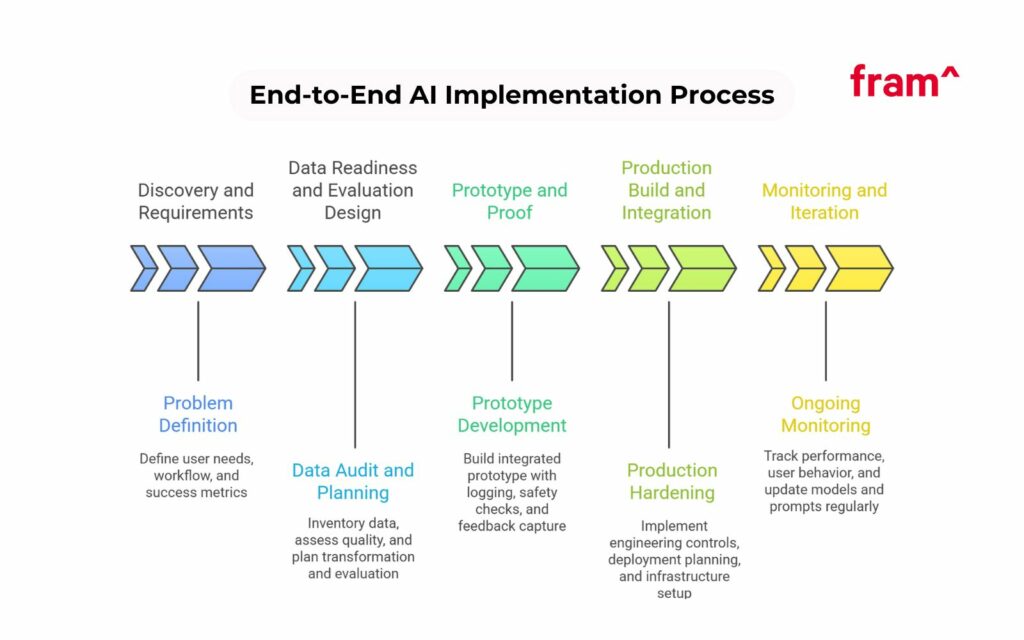
Most teams follow five phases.
First, discovery and requirement gathering.
Second, data readiness and evaluation design.
Third, prototype and proof work.
Fourth, production build and integration.
Fifth, monitoring and iteration.
You can run phases in parallel, but the order matters. Teams that skip evaluation design pay for it later.
1) Define the problem in product terms
Start with the user and the workflow. Define the job to be done. Then define success metrics.
A customer service use case may target shorter handle time and higher first-contact resolution. An eCommerce use case may target faster product tagging and fewer catalog errors.
Pick one primary metric and two supporting metrics. Tie them to a baseline. Put the baseline in writing.
Ask one question and answer it right away. What does “good” mean for this AI feature? Good means it beats the current baseline on the chosen metric and meets latency and safety constraints.
2) Audit data and build a data plan
List your data sources and owners. Measure coverage, quality, and freshness. Identify gaps.
Many teams discover label issues here. Labels exist, but they do not match the real task. Or labels exist, but they drift across teams. Fixing that early saves months later.
Set a plan for data collection and data transformation. Decide how you will store raw data and cleaned data. Decide how you will handle deletes and retention. Decide what you will log in production.
3) Choose model strategy and evaluation method
Model strategy should follow constraints.
If the task needs strict domain language, consider fine-tuning or retrieval. If the task needs fast responses at scale, consider smaller models or distillation. If the task needs on-device inference, plan for edge AI and hardware limits.
Evaluation needs a test set that mirrors real usage. Build it from real data, then clean it for privacy. Add hard cases. Add policy cases. Add failure cases.
For generative AI, evaluation mixes automatic checks and human review. Automatic checks validate structure, citations, or JSON formatting. Human review checks factuality and tone.
4) Build a prototype with real integration
A prototype proves the flow. It does not just prove the model.
Build the smallest version that touches real data and a real UI path. Add logging. Add basic safety checks. Add feedback capture.
For some teams, a visual canvas helps map steps and outputs. For others, code-first pipelines work better. The goal stays the same. Build something users can try.
5) Production hardening and deployment
This phase turns prototype code into a service.
Add CI checks and a release process. Add rate limits, retries, and timeouts. Add secure secret handling. Add tenant isolation rules. Add audit logs.
Decide where inference runs. For cloud, plan capacity and cost. For on-prem, plan GPU allocation and scaling. For hybrid cloud, plan data flow boundaries.
If inference runs in a data center at scale, plan infrastructure early. GPU servers likePowerEdge AI servers and broader stacks likeDell AI Factory can fit teams that want an integrated hardware and software path. Some orgs also roll their ownHPC infrastructure. In high density racks, liquid cooling becomes a practical constraint, not a nice extra.
6) Monitoring, iteration, and lifecycle management
After launch, treat the system as a product service.
Track user behavior analysis. Track cost per request. Track drift. Track safety incidents. Track customer experience metrics.
Create a cadence for updates. Many teams run weekly prompt and retrieval tweaks, then run larger model updates on a monthly or quarterly cycle. The right cadence depends on traffic and risk.
AI lifecycle work includes model versioning, rollback, and sunset plans. It includes re-training triggers based on drift and feedback.
Some Industry-Specific Use Cases for End-to-End AI Solutions
Use cases vary by industry, but the pattern repeats. AI reads inputs, predicts or generates outputs, and drives an action in a workflow.
Below are practical examples tied to common SaaS needs.
eCommerce
ECommerce teams deal with messy catalogs and fast change. End-to-end AI fits well here since it can join data pipelines, models, and workflow tools.
Product tagging and attribute extraction
AI can extract attributes from titles, descriptions, and images. It can tag category, color, material, and style. Computer vision helps with image recognition and object detection for product photos.
A good system combines a text model with a vision model. It then runs validation rules. Low confidence items are flagged for review. That reduces catalog errors and improves search quality.
Product descriptions and content creation
Generative AI can draft product descriptions in a consistent style. It can write variants for different channels. It can also help with translation and keeping units consistent.
Teams add guardrails here. They ban unsupported claims. Key facts need to be validated against structured data. Then teams log edits for feedback.
Support automation for order issues
AI assistants can summarize chats, draft replies, and route tickets. A triage model classifies intent. A generative model drafts the response. A policy layer enforces refund rules and escalation triggers.
End-to-end design matters since mistakes cost money and trust.
Fintech
Fintech use cases often sit in high-risk workflows. That pushes teams toward stricter governance and traceability.
Fraud detection and risk scoring
Predictive analytics models score transactions and accounts. The system then routes cases to review queues. The key is explainability for reviewers, even if the model stays complex.
Teams track false positives and false negatives. They add feedback from analyst decisions and monitor drift tied to seasonality and attack shifts.
Document processing and data extraction
Fintech products process bank statements, IDs, invoices, and tax forms. Data extraction often starts with OCR, then moves into model-based parsing and entity extraction.
A strong system supports both scanned PDFs and digital PDFs. It tracks confidence per field. It allows manual correction. It stores corrected fields as training data.
Customer service and compliance workflows
Fintech support teams deal with account locks and disputes. AI can triage and draft responses. It can generate internal notes and summaries for compliance review.
This space benefits from strict access control, logging, and cyber resilience planning.
Healthcare
Healthcare adds privacy, strict correctness needs, and heavy domain language.
Clinical document summarization and routing
AI can summarize notes, referrals, and lab reports for staff workflows. It can route tasks to departments. It can extract key entities like medications and diagnoses.
Teams often run on-prem or private cloud deployments. They also add strong data protection controls and careful retention rules.
Scheduling and patient communication
Virtual assistants can answer routine questions and help schedule visits. They can handle follow-ups and reminders. They need safe conversational UX and escalation paths to humans.
Speech recognition and audio AI can help for call centers. Some systems add voice synthesis.Tacotron 2 appears in research and reference stacks for TTS work, though production systems vary by vendor and constraints.
Imaging support tasks
Computer vision can support image triage and quality checks. It can flag missing views or poor scans. These workflows need careful validation and clear boundaries. The system should support staff, not replace clinical judgment.
Edtech
Edtech systems handle learner data and content at scale. End-to-end AI helps personalize experiences and reduce manual work for staff.
Personalized practice and recommendations
Models can predict learner mastery and recommend exercises. They can generate hints and explanations. They can track what improves learning outcomes, not only engagement.
Content generation for quizzes and explanations
Generative AI can draft questions, rubrics, and lesson summaries. A review layer keeps quality high. A governance layer controls what sources the model can use.
Student support and tutoring assistants
AI assistants can answer course questions and guide students through tasks. Retrieval over course content reduces errors. A safe design prevents the assistant from inventing policies or deadlines.
B2B and consumer SaaS
This group covers many products, from CRM to HR to developer tools. End-to-end AI often becomes a platform inside the company.
A classifier can route tickets by intent, urgency, and topic. A summarizer can compress long threads into a short brief. A generative model can draft replies with the right tone.
Workflow automation with AI agents
Autonomous AI agents can chain steps such as “read ticket,” “check account status,” “draft reply,” then “open a task.” This is powerful and risky.
Teams add tool permissions and step limits. They add human approval for risky actions. They track every action with audit logs.
Code generation and developer assistance
Code generation features can draft snippets, tests, and docs. They need strong UX and safe defaults. They also need evaluation tied to correctness, not only style.
When Should You Build vs Buy?
Build vs buy is a business decision and a risk decision. Many teams use a hybrid path.
Buy tools for speed. Build parts that define your product advantage.
Buy when speed matters more than differentiation
If you need a standard chatbot, a hosted solution may fit. If you need basic summarization, APIs can work. If your team lacks ML ops depth, buying can reduce risk early.
Buying often includes hosted model endpoints, vector databases as a service, and monitoring tools. It can include managed platforms likeAzure OpenAI Service for teams already tied to Azure.
Build when you need control, cost predictability, or domain performance
Build makes sense when unit economics matter. It makes sense when data cannot leave your environment. It makes sense when quality needs domain tuning and strict evaluation.
Building also makes sense when you need custom orchestration and custom UX. Many end-to-end solutions live or die on integration, not on model choice.
A practical hybrid path
Many teams start with APIs and then add custom parts.
They start with a hosted LLM for fast iteration. They build retrieval over their content. They add structured evaluation and monitoring. They later move parts of inference to dedicated hardware to cut costs.
As traffic grows, they plan an AI compute engine that fits their throughput needs. That can mean batching, quantization, and routing across model sizes. It can also mean moving to data center inference stacks, with GPU accelerators and tuned serving.
Build vs Buy: how to choose the right approach for end-to-end AI
Factor
Build in-house
Buy / partner with an AI solutions provider
Speed to launch
Usually slower, especially if your team is building architecture, workflows, and safeguards from scratch
Usually faster because core systems, delivery processes, and implementation experience already exist
Customization
Higher control over features, workflows, models, and infrastructure
Good customization is possible, but may be shaped by the provider’s process, stack, or delivery model
Internal expertise required
High — you need product, data, engineering, and operational capabilities to support the full solution
Lower internal lift, though your team still needs to define goals, approve workflows, and support rollout
Upfront cost
Often higher at the start due to hiring, experimentation, infrastructure, and longer implementation cycles
Often more predictable in the short term, especially for pilots or scoped deployments
Long-term cost
Can become more efficient over time if AI is a major strategic capability and usage scales
May cost more over time if you rely heavily on external support or proprietary systems
Control and ownership
Maximum control over data flows, architecture, roadmap, and deployment decisions
Less control, depending on contract terms, platform limitations, and technical dependencies
Scalability
Strong if your internal team can support infrastructure, monitoring, and iteration
Strong if the provider has mature deployment, monitoring, and support processes
Compliance and governance
You are responsible for designing security, auditability, and risk controls internally
A strong partner can accelerate compliance planning, but you still need internal oversight
Maintenance and optimization
Your team owns performance monitoring, retraining, updates, and issue resolution
The provider can handle much of the ongoing support, depending on the engagement model
Best fit
Best when AI is a core differentiator and you want deep control over the long-term roadmap
Best when you need to move quickly, reduce delivery risk, or fill capability gaps
In general, building makes more sense when AI is central to your product, and you have the internal team to support it long term.
But buying or partnering is often the better choice when speed, execution, and lower delivery risk matter more than full control from day one.
What Does a Common Tech Stack for End-to-End AI Solutions Look Like?
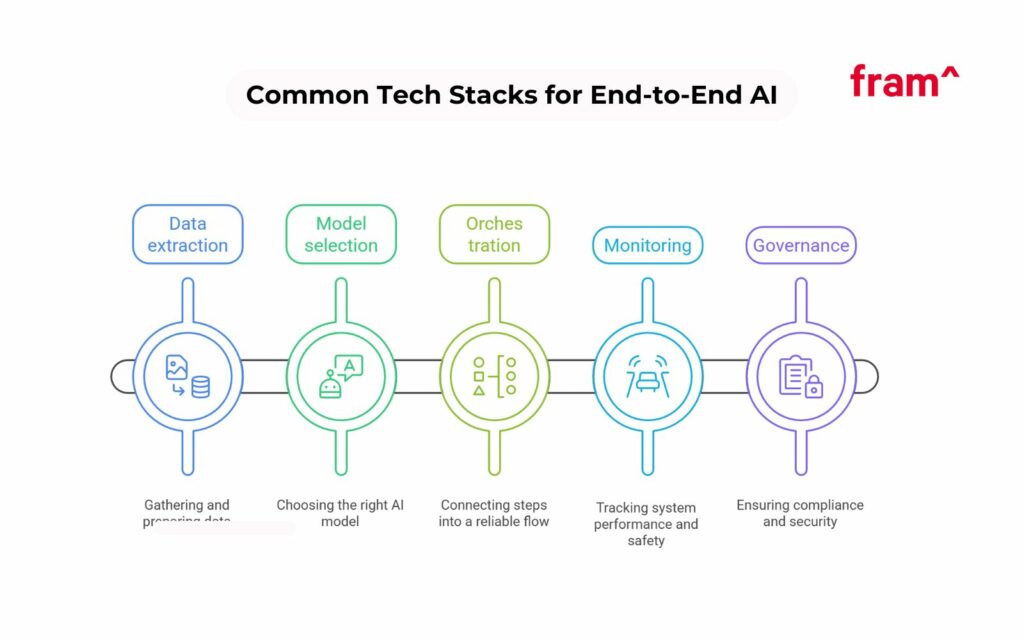
Tech stacks vary, but the categories stay consistent. You need data extraction, models, orchestration, monitoring, and governance.
This section lists common tools and patterns. Use it as a map, not a shopping list.
Data extraction
Data extraction turns real-world content into usable inputs.
For documents, teams use OCR, layout parsing, and entity extraction. OCR handles scanned PDFs and images.Model-based parsers handle tables, fields, and long-form text.
For product data, teams use API connectors to pull from PIM systems, ERPs, and marketplaces. For support data, teams pull from ticketing tools and chat logs.
Data transformation sits on top. Teams clean, normalize, and store data in a warehouse or lake. They keep raw and cleaned layers separate. They keep lineage metadata.
Models
Model choice depends on task type.
Generative AI models support summarization, drafting, and conversational UX. Classifiers support routing, intent detection, and policy checks. Vision models support object detection, depth and motion estimation, and gesture detection. Audio AI supports speech recognition and call analysis.
Many teams use a model router. The router picks a model based on cost, latency, and accuracy. Smaller models handle easy cases. Larger models handle hard cases.
Domain adaptation sits here too. That can mean fine-tuning, embeddings trained on domain text, orprompt engineering tied to your product rules. Code generation features often combine retrieval of internal code patterns with strict output schemas.
Orchestration
Orchestration connects steps into a reliable flow.
In a simple system, a backend service calls a model and returns output. In a complex system, a workflow engine coordinates steps like retrieval, reranking, generation, and validation.
Some teams use distributed workload frameworks for scalable serving. Ray Serve is one example for teams that want scalable model serving and routing. Teams pick orchestration tools based on their existing stack and skill set.
Orchestration also covers agent control. Tool calling needs strict permissions. Actions need logging and approval paths. A good design keeps agents inside narrow lanes.
Monitoring
Monitoring tells you if the system works and stays safe.
At minimum, track latency, error rates, and cost. Then track quality.
Quality tracking needs evaluation sets and production sampling. It also needs user feedback integration. You want dashboards that show performance by tenant, by use case, and by model version.
Teams often add alerting for spikes in unsafe output, spikes in refusal rates, and spikes in tool failures. They tie this to incident response.
Governance
Governance sits across the full system.
It includes data access controls and retention rules. It includes audit logs. It includes model and prompt versioning. It includes security testing for prompt injection. It includes red teaming for unsafe output.
Many enterprise buyers ask for formal controls and evidence.SOC 2 Type II can matter. Policy alignment to standards can matter. Teams often map their internal controls to frameworks, then reuse those answers in sales cycles.
Governance also includes human experts in review loops. Humans approve risky actions and label edge cases. That keeps the system grounded in real operations.
Differences Between End-to-end AI vs API-only AI vs MLOps vs agentic automation
These terms are often used together, but they solve different problems.
Here’s a simple way to think about it:
API-only AI is the fastest starting point – giving you access to a model.
MLOps is the operational layer that helps you reliably run and maintain machine learning systems.
Agentic automation is useful when AI needs to take actions across a workflow with multi-step task execution.
End-to-end AI is the broader solution that connects all of these technology elements together into a real business outcome.
Approach
What it is
What it includes
Best for
Main limitation
End-to-end AI
A full AI solution designed, integrated, deployed, monitored, and optimized around a business outcome
Data pipelines, models, orchestration, integrations, security, monitoring, governance, feedback loops
Companies that need AI to power a real workflow, product feature, or operational process
More complex to plan and implement than a simple AI feature
API-only AI
A lightweight way to add artificial intelligence by calling a third-party model through an API
Model access, prompts, basic app integration
Fast experiments, simple copilots, summarization, classification, or low-risk features
Limited control, weaker differentiation, and often not enough for production-grade workflows
MLOps
The practices and tooling used to deploy, monitor, version, and maintain machine learning systems
Model deployment, observability, retraining pipelines, versioning, testing, monitoring
Teams already building custom machine learning systems that need reliability and scale
MLOps is not a full business solution by itself; it supports delivery and maintenance
Agentic automation
AI systems that can reason through tasks, choose actions, and complete multi-step workflows with tools
Use cases that require dynamic decision-making across tools or systems
Can become unreliable or risky without strong controls, clear boundaries, and monitoring
FAQs About End-to-End AI Solutions
Is it possible to do something similar with APIs?
Yes. APIs can cover a large share of early work. You can ship features fast with cloud-based services, then harden the system over time. The key is building the layers around the API. You still need evaluation, monitoring, and feedback capture.
APIs work best when your use case stays generic. They struggle once you need domain-specific behavior and strict guarantees.
Can we integrate AI into our existing SaaS stack or will it require rearchitecture?
Most SaaS teams can integrate AI into their current stack. They add a service layer for inference and orchestration. They add data pipelines for training and evaluation. They add UI components for feedback and review.
Large rewrites happen when the product lacks clear workflow boundaries. Teams fix this by isolating AI features behind services and feature flags.
Is end-to-end AI basically the same as MLOps?
End-to-end AI includes MLOps, but it goes further. MLOps focuses on training, deployment, and monitoring for models. End-to-end AI adds product integration, UX design, feedback loops, and governance. It ties the whole system to business outcomes.
Is this only for enterprise companies?
No. SaaS startups can benefit early, even with a small team. The scope changes. A smaller team can start with a lean version. They can run one pipeline, one evaluation set, and simple monitoring.
The need depends on the role AI plays in the product, not on company size.
Which industries use end-to-end AI solutions effectively?
Industries with repeated workflows see strong value. Customer service, eCommerce ops, fintech review queues, and content-heavy products often see fast wins. Regulated industries gain value once they add governance and audit trails.
If I need something custom, is it possible to run a POC or pilot before a full build?
Yes. A pilot is often the best first step. It proves value on real data and real workflows. It also reveals edge cases and operational constraints.
A good pilot includes an evaluation plan and a clear exit criteria. It should include a path to production design, not only a demo.
Is End-to-End AI Right For You?
End-to-end AI fits teams that want to move beyond model experiments and into reliable outcomes. It fits products that need domain performance, safe automation, and clear governance. And it fits teams that want AI to live inside real workflows, with monitoring and feedback that drive steady improvement.
If you want to explore your options, fram^ specializes in helping partners build and launch production-grade AI, securely, modularly, and fast. Check out our AI Implementation services to learn more.
Automated ticket triage is the process of using software to sort, tag, prioritize, and route incoming support tickets with minimal human effort. It turns the first mile of support into a repeatable system. The goal stays simple: get the right ticket to the right team fast, with the right context. Most support teams feel the […]
AI integration works best when product teams start with one measurable workflow, choose the simplest technical pattern, and pilot the feature before full rollout. Artificial intelligence improves software in specific, measurable ways: sharper search, generative content, real-time recommendations, and faster support. But none of those happen by accident. Every gain comes from applying machine learning […]
Every AI coding tool ad ends at the same place: a working product in 48 hours. What they skip is week eight, when real users arrive, payment flows fail silently, and an enterprise prospect asks for your SOC2 documentation. If you’re reading this, you may be somewhere in that gap. Maybe you tried Lovable, Cursor, […]