Automated Ticket Triage: A Framework for Industry-Tuned Support Automation
July 31, 2026
Automated ticket triage is the process of using software to sort, tag, prioritize, and route incoming support tickets with minimal human effort. It turns the first mile of support into a repeatable system. The goal stays simple: get the right ticket to the right team fast, with the right context.
Most support teams feel the same pain in different forms. Tickets arrive from email, chat, a web form, or Microsoft Teams. They come in bursts along with missing details. A good triage layer keeps response times predictable, reduces avoidable backlog growth, and helps protect Service Level Agreement (SLA) compliance.
Table of Contents
Key Takeaways on Automated Ticket Triage
If you’re short on time, here are the main points to know:
Automated ticket triage routes support tickets faster. It uses software to sort, tag, prioritize, and assign tickets with less manual effort.
Rule-based routing works until edge cases pile up. Keywords and filters help early on, but vague, multi-intent, or high-risk tickets need more context.
Agentic AI goes beyond classification. It can summarize tickets, assign fields, request missing information, detect risk signals, and escalate cases when needed.
Good triage depends on a clean taxonomy. Clear categories, owners, priority levels, required fields, and escalation paths make automation safer and more accurate.
Human-in-the-loop safeguards are essential. Low-confidence, sensitive, legal, security, or high-risk tickets should route to a human for review.
The best use cases vary by industry. Healthtech needs privacy-aware routing, fintech needs fraud escalation, ecommerce needs order and logistics routing, edtech needs burst handling, and consumer apps need sentiment-aware support.
Start small, then expand. Begin with routing and summaries, measure wrong-route rate and reopen rate, then add deeper workflow actions once the system proves reliable.
The Traditional Ticket Triage Process
Manual triage looks easy on paper. In real support queues, it is time-consuming and creates uneven outcomes across agents.
At a high level, the classic flow follows the same steps across a service desk, a support desk, or a customer support team:
Many teams start with a mix of human review and rule-based ticket routing. A common setup looks like this:
Tickets enter a ticketing system.
A Level 1 agent reads the request.
The agent sets ticket fields, selects a category, and assigns a priority level.
The agent routes the ticket to the right group, or tries a first reply.
The ticket escalates to Support Engineers if the issue needs deeper access.
Rule-based routing helps at first. You map keywords to ticket categorization rules. You add ticket filters for “billing,” “bug,” “outage,” and “access.” You add custom fields for product, plan, and environment. Then edge cases pile up: vague requests, missing fields, unusual product issues, and tickets that match more than one rule.
A quick question to test your current process: do two different agents route the same ticket to two different teams? This can happen in many queues, and that creates a gap, which is the core triage problem.
How Agentic AI Improves Ticket Triage
Agentic AI improves ticket triage by combining language understanding with controlled workflow actions. Instead of only classifying a ticket, it can summarize the issue, assign fields, route the ticket, request missing information, or escalate the case when risk signals appear.
Speed matters at the start of the funnel. Benchmarks vary by channel, but the most common metrics for service desks to track are “speed of answer” for calls and “time to first response” for tickets. HDI has publishedbenchmark discussion around speed of answer and how much it varies across service desks.
Agentic AI also helps on cost. Every extra touch adds labor.Cost per ticket is usually measured as monthly operating expense divided by monthly ticket volume. When a system routes work to the correct level early, that means less rework and bounce-between-team delays are reduced.
Self-service and a solid Knowledge Base change the math even more. MetricNet benchmarking figures get cited often in ITSM circles: about$2 per self-help transaction versus around $22 for an IT-service-desk-handled ticket. Once ticket volume grows, even small deflection gains can have a major impact.
Teams also care about resolution times and Customer Satisfaction. Vendors publish their own outcomes, so treat them as reported results, not universal guarantees. For example, Vagaro, a Zendesk customerreported resolving 44% of incoming support requests and cutting resolution time by 87%, with CSAT reported at 92%. These numbers show what becomes possible once triage, routing, and knowledge are wired together.
Agentic AI adds pattern recognition across historical ticket data. It spots duplicate tickets, recurring root causes, and hidden clusters in customer inquiries. Then it can act. That “act” part is what sets the difference between a classifier and an agent.
Key Components of Ticket Triage Automation with Agentic AI
A practical agentic triage stack does three jobs: reading the ticket, deciding what to do next, and performing actions in the ticketing system. That includes ticket summaries, ticket routing, adding fields, and escalation.
The best designs keep decisions visible and traceable. They log why the system chose a route, a priority, or a spam label. That audit trail keeps support teams confident in the system.
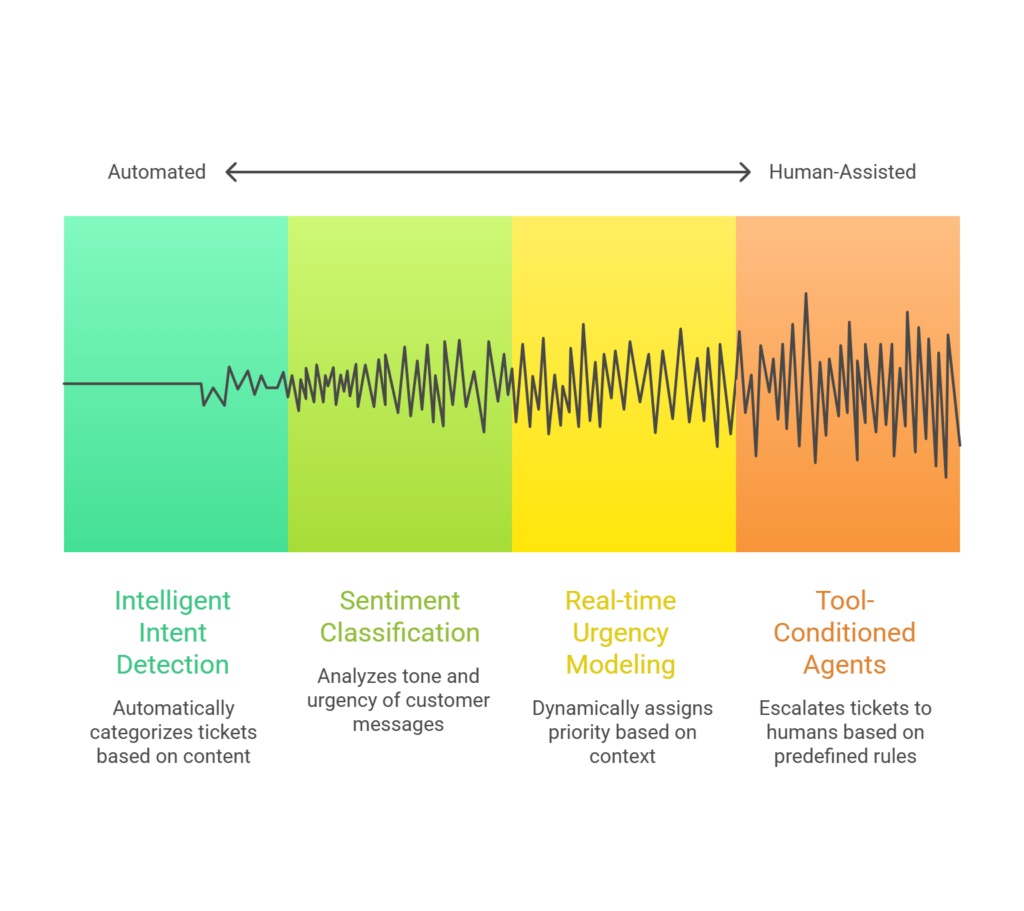
Routing: Intelligent intent detection
Intent detection answers one question: what is this ticket about?
Modern systems use embeddings and classification models to map text to a ticket type or topic. The model reads the subject, body, and any form inputs. It then assigns a category like “password reset,” “billing dispute,” “bug report,” or “outage.”
A clean routing output usually includes:
Predicted ticket categorization label
Confidence score
Suggested assignment group
Suggested tags and custom fields
Many ticketing systems now offer built-in AI triage features. For example,Atlassian introduces AI that classifies, prioritizes, and routes tickets inside Jira Service Management.
Routing also benefits from ticket summaries. A short summary can reduce handoff time for Support Engineers. It also reduces repeated clarifying questions across a long thread.
Sentiment classification and context analysis
Sentiment classification answers a different question: how does this feel, and how urgent does it sound?
A triage agent reads tone cues like frustration, urgency, and risk language. It also checks user history. It looks for signals like:
A high-value customer flag
Recent failed attempts on the same issue
Prior escalations
A security-sensitive topic
Context analysis also includes the ticket’s channel and metadata. A “refund now” message on social can have a different customer experience impact than the same text sent by email.
Spam detection and spam filtering belong here too. A triage layer should filter obvious junk before it enters the main queue. That alone reduces ticket backlogs.
Prioritization: real-time urgency modeling and orchestration frameworks
Prioritization decides “what first” across the queue. Many teams tie this to Service Level Agreements. A triage agent can assign priority levels based on issue type, account tier, and risk.
Agentic systems often run inside orchestration frameworks that support stateful flows. LangChain positions LangGraphas infrastructure for long-running, stateful agent workflows.
On the Google side, Google publishesAgent Development Kit docs that cover multi-tool agents and agent teams.
This matters for ticket triage since the “right” path changes based on what the agent learns. A ticket can start as “billing,” then turn into “fraud,” then move to compliance review. A stateful flow captures that progression.
Escalation: tool-conditioned agents and human-in-the-loop safeguards
Escalation adds a safety valve.
Tool-conditioned agents work best with a strict action set. In triage, those tools often look like:
Human-in-the-loop safeguards protect customers and protect the business. A clean design uses clear thresholds. For example:
Signal
Action
sentiment_score < -0.7
Escalate to a human
classification_confidence < 0.5
Route to the triage queue
security_keywords_detected
Route to the security team and lock public replies
These guardrails also help with legal and policy tickets. A routine request can quickly turn into a high-risk issue once the customer mentions fraud, data exposure, or legal action. An agent should detect that shift in language and route the ticket to the correct human review queue instead of treating it like a standard case.
Native AI vs Custom Ticket Triage Agents
Not every support team needs a fully custom triage agent on day one.
If your queue is simple, your categories are clean, and most work happens inside one helpdesk, native AI features may be enough. But if your tickets span multiple systems, regulated workflows, unusual escalation rules, or industry-specific risk signals, off-the-shelf automation can hit limits quickly.
Option
Best Fit
Limitation
Native helpdesk AI
Teams already deep in Zendesk, Jira Service Management, or ServiceNow
Limited control across custom workflows and cross-platform routing
Rule-based automation
Simple, repeatable queues with clear keywords
Breaks down when requests are vague, multi-intent, or high-risk
Custom triage agents
Teams with complex queues, multiple systems, or regulated workflows
Requires clean taxonomy, testing, and governance
The right question is not “Should we use AI?” It is “How much control does this workflow need?”
The video below explains how to think through that decision.
A practical decision framework for choosing between off-the-shelf AI, rule-based automation, and custom AI agents.
Consider this table and check out this video before investing in a ticket triage agent. Simple queues may only need native AI or rule-based automation. Complex queues with multiple systems, regulated workflows, or high-risk escalation paths usually need more control.
Common Agentic Triage Use Cases for Different Industries
Every industry has its own ticket mix, but the categories repeat. A shared taxonomy helps support teams compare volumes across products and channels. ITIL-style categories also show up in many ITSM platforms.
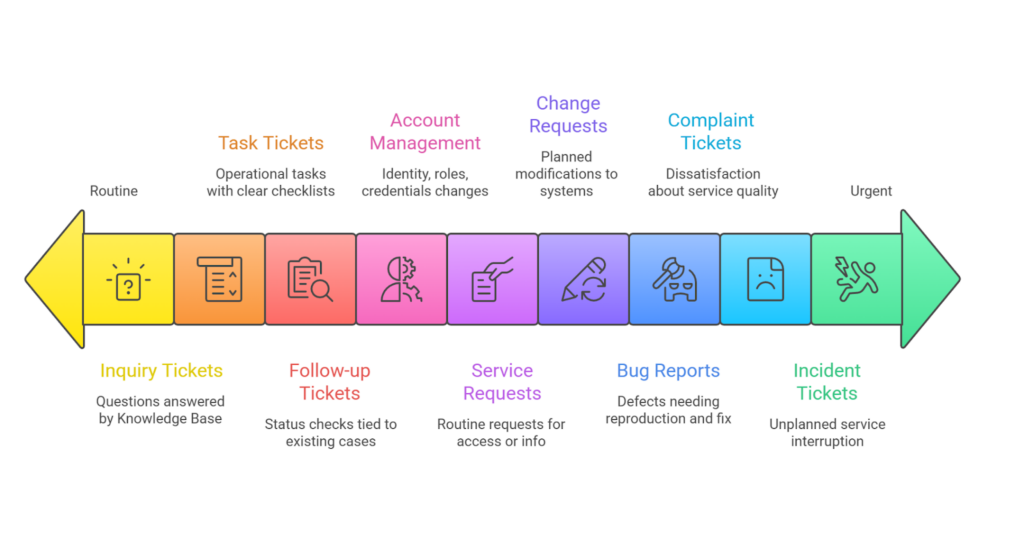
Most support desks see the same core ticket types, even when the details vary by industry:
Incident tickets: Unplanned service interruption or system failure.
Service request tickets: Routine requests for access, installs, or information.
Change request tickets: Planned modifications to systems or services.
Problem tickets: Root cause work for recurring incidents.
Task tickets: Operational tasks with a clear checklist and owner.
Feature request tickets: Product requests that need review and prioritization.
Escalation tickets: High-risk cases that need senior review or a special team.
Bug reports: Defects that need reproduction steps and a fix path.
Complaint tickets: Dissatisfaction about service quality or policy outcomes.
Outage tickets: Wide-impact downtime with alert-driven urgency.
Inquiry tickets: Questions that fit a Knowledge Base answer or quick reply.
Account management: Identity, roles, credentials, and profile changes.
Follow-up tickets: Status checks tied to an existing case.
Internal IT support: Employee tooling, access, and device support.
Security incidents: Abuse, account takeover, data exposure, or fraud signals.
Here’s how common ticket types change across healthtech, fintech, ecommerce, edtech, and consumer apps.
Start with high-volume and high-risk tickets first. These usually have the clearest routing logic and the biggest impact on response times, reopen rates, and escalation quality:
Common and high-risk ticket types by industry
Ticket Type
Healthtech
Fintech
Ecommerce
Edtech
Consumer Apps
Incident tickets
EMR outage routing
Payment gateway failure
Checkout outage
Video class errors
App outage or sync failure
Service requests
Lab system access
KYC status update
Invoice request
Course access restore
Plan upgrade request
Bug reports
Symptom logging bug
Tax calculation bug
Filter or search bug
Playback bug
Login crash report
Complaint tickets
Long hold time
Account hold complaint
Refund delay complaint
No instructor feedback
Ads frequency complaint
Outage tickets
Lab network down
API availability issue
Site-wide outage
Platform offline
Server latency alert
Security incidents
Unauthorized record access
Suspicious login
Fake account spike
Account abuse
Referral abuse
Escalation tickets
Misdiagnosis report
Fraud or legal issue
Refund dispute escalation
Policy appeal escalation
Privacy complaint escalation
Operational ticket types by industry
Ticket Type
Healthtech
Fintech
Ecommerce
Edtech
Consumer Apps
Change requests
Care plan rule edits
Regulatory rule tuning
Shipping policy edits
Curriculum updates
Profile settings changes
Problem tickets
Recurring lab sync issues
Repeat authentication failures
Promo code failures
Grade calculation errors
Repeating push failures
Task tickets
Vaccination reminders
Compliance report pull
Review moderation
Batch enrollments
Scheduled content drops
Feature requests
Multi-provider booking
Cross-border payments
Split shipments
AI tutor request
Dark mode request
Account management
Portal role changes
Device trust updates
Address change
Student role change
Device permissions change
Follow-up tickets
“Any update?”
“Any update?”
“Return processed?”
“Quiz regraded?”
“Bug fixed yet?”
Internal IT support
Clinical device login
VPN access
Warehouse tool access
Admin access
Internal CMS access
Now tie these categories to real routing paths:
Healthtech needs privacy-aware routing and tighter access controls.
Fintech needs strong fraud escalation and audit trails.
Ecommerce needs clean routing across order, payment, and logistics systems.
Edtech needs support for seasonal bursts and access issues at scale.
Consumer apps need sentiment-aware handling for public channels.
A second question worth asking: which ticket types create the most reopen events for your team? The answer tells you where triage should start. It also tells you what your Knowledge Base must cover first.
How to Implement Automated Ticket Triage into Your Existing Workflow
Implementation works best as a staged rollout. Start with routing and summaries. Then add priority, duplication checks, and auto-replies. End with deeper workflow actions.
This does not mean your service desk is getting replaced. Most teams integrate agents into existing platforms, then expand coverage over time.
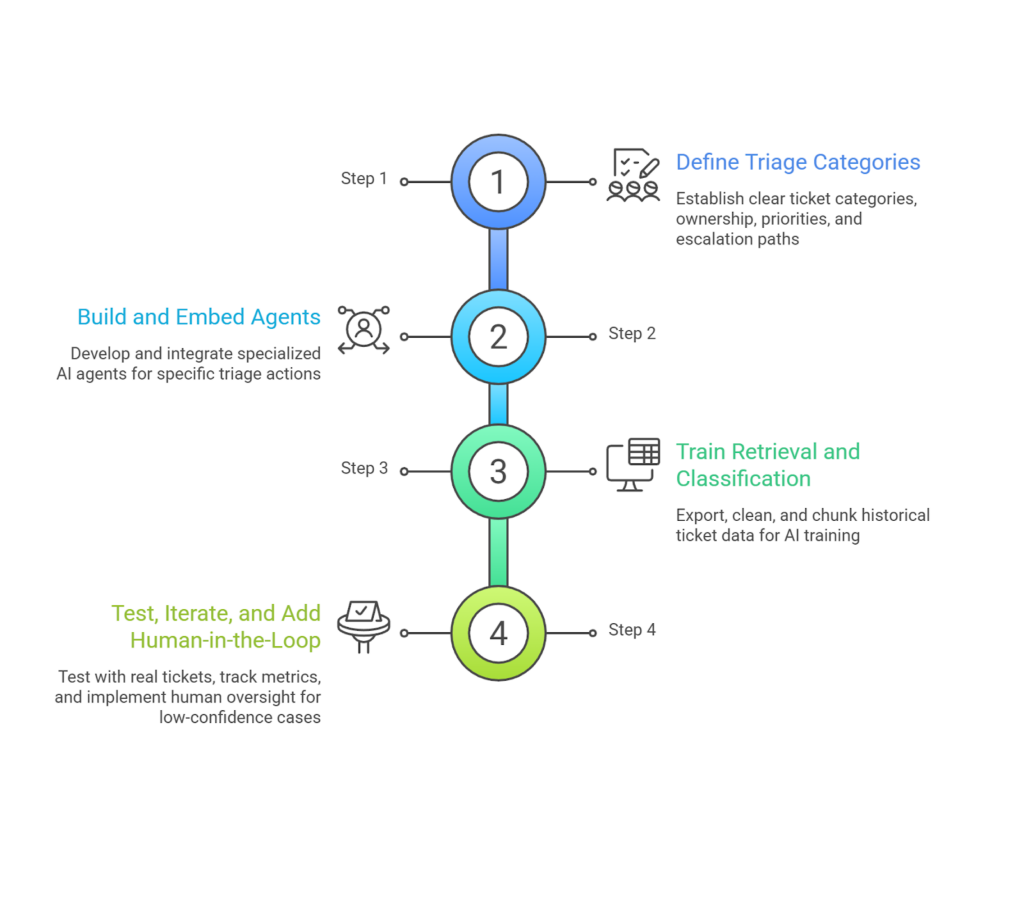
Step 1: Define triage categories and escalation governance
Start with a taxonomy that matches your org chart. Keep it small at first. Start with the smallest taxonomy that captures meaningful routing differences and expand out only when additional categories improve operational outcomes.
Write down:
Ticket categories
Ownership per category
Priority levels and SLA targets
Escalation paths for legal, security, and safety topics
Required ticket fields per category
This is the part most teams skip. When categories, owners, and escalation paths are unclear, the model learns a messy map.
fram^ can help here by turning your current queue into a working proof of concept fast. The main goal here is clarity.
Step 2: Build and embed agents for specific ticket actions
Treat triage as a set of actions, not a single bot. One agent for classifying, one for summarizing, one for requesting missing info, and another for routing.
This “multi-agent system” design keeps each part simple. It also makes testing easier.
At this stage, teams often integrate with tools and platforms they already run. MSPs often live insidePSA platforms like ConnectWise PSA help desk workflows. Others run inside Jira Service Management orITSM platforms such as InvGate Service Management.
Export historical ticket data with categories, tags, and final assignee.
Clean out spam, empty tickets, and one-word tickets.
Chunk ticket bodies and store embeddings for retrieval.
Keep metadata tags like product area, channel, and customer tier.
Retrieval matters for two reasons. It grounds summaries in real past tickets and it also pulls known fixes from a Knowledge Base.
Vendor platforms often package this idea in product terms. For instance, Atlassiantalks about drafting replies and maintaining the Knowledge Base with AI suggestions based on ticket data.
Step 4: Test, iterate, and add human-in-the-loop protocols
Testing needs real tickets and measured outcomes. Track:
First response times
Resolution times
Reopen rate
Wrong-route rate
Escalation rate
CSAT movement
Human-in-the-loop rules should start strict. Route low-confidence tickets to a triage queue. Keep full auto-routing for high-confidence cases.
Vendor research often frames this as time saved in intake. For example, a commissioned Forrester TEI study modeled a 50% reduction in handling time for cases preprocessed by Agentforce, based on interviews and assumptions for a composite organization. Treat that as an illustrative business-case input, certainly not an expected result.
Common Challenges in Automating Ticket Triage and How To Fix Them
Automated triage usually fails for five reasons: weak data, unclear categories, brittle integrations, overcomplicated workflows, or missing governance.
Fragmented APIs
Fragmented APIs create gaps in the story of a ticket. Support teams work across chat, email, CRM, PSA, and ITSM platforms, and each tool stores a different slice of context. A triage agent that only sees one slice will make confident mistakes.
A common failure looks like this. A customer reports a “billing issue” in chat, so the agent routes it to billing. In the CRM, the same customer already has an open security case for an account takeover. The billing ticket is a symptom, not the real issue. If the agent cannot pull CRM context, it routes the ticket wrong, sends the wrong reply, and delays the real escalation.
Fragmentation also breaks identity and routing rules. One system uses account IDs, another uses email, and another uses company name. The agent cannot match the requester to the correct org tier, so it applies the wrong SLA. A high-priority customer lands in a standard queue, and response times slip for the accounts you care about most.
Fix it with an integration map and a narrow action set. Start by making the ticketing system the source of truth for routing decisions. Add one external lookup at a time, like CRM for customer tier, then incident status for outage correlation, then billing for payment state. Keep each tool call explicit and logged, so humans can see which system informed the decision.
Overlapping or ambiguous tickets
Many customer support tickets arrive vague. “It’s not working” is common. A classifier will guess. A triage agent should ask.
Use a clarification agent that replies with two or three targeted questions. It can also prefill custom fields based on the answers. This reduces wrong routing and reduces reopen loops.
Static rules miss nuance, and context-aware triage systems handle urgency, complexity, and agent expertise better. The practical point is simple: ask for missing details early.
Routing latency from overly complex logic
Routing latency happens when a simple routing decision turns into a long chain of checks and tool calls. Each step adds a small delay, and the total delay becomes visible to the customer.
A common example is a password reset ticket. The flow runs language detection, sentiment scoring, entity extraction, a Knowledge Base lookup, a duplicate check, an SLA lookup in CRM, and an asset lookup, then routes the ticket.
The route was clear after intent detection, but the extra steps keep the ticket stuck “in automation” for 30 to 90 seconds. During peak volume, those tool calls also time out, so retries stack and routing slows down even more.
Fix it by measuring step runtime and cutting steps that rarely change the route. Keep an early exit path for high-confidence, low-risk tickets, then reserve deeper lookups for risk cases like fraud, security incidents, and legal disputes.
FAQs on Agentic Ticket Triage
Do we need to replace our current ticketing system?
No. Most teams add triage on top of the current ticketing system. They start with routing, summaries, and ticket categorization. Then they add deeper actions.
How does agentic AI know when to escalate to a human?
It uses explicit rules and risk signals. Confidence scores, negative sentiment, security keywords, and policy flags can trigger escalation. The key is making those triggers visible and auditable.
Can agents handle tickets in multiple languages?
Yes, with the right language detection step and multilingual training data. You still need human review for high-risk categories, like legal and security incidents.
How much data is typically needed to train the systems?
It depends on your category complexity, ticket volume, target accuracy, and whether you use prompting, retrieval, fine-tuning, or a hybrid setup. Most teams should start with their highest-volume categories, label enough examples to test routing quality, and improve the taxonomy over time. You can often get value faster by using retrieval over historical tickets and Knowledge Base content before investing in fine-tuning.
What kind of ROI can we expect?
Self-service can cost less than agent-handled support, but the size of the difference varies substantially by channel, issue complexity, staffing costs, platform costs, and how organizations define a transaction. Measure deflection and fully loaded cost per resolution against your own baseline.
Partner With fram^ for Custom Ticket Triage Agents You Can Count On
Agentic triage works best when it matches your actual support workflow: your ticket categories, escalation rules, Service Level Agreements, data fields, and tools.
fram^ can help you turn your current queue into a working proof of concept. We’ll identify your highest-friction ticket types, define safe automation paths, and build custom triage agents for intent detection, ticket summaries, duplicate detection, spam filtering, and smart ticket assignment.
The end state is simple: tickets enter your system clean, the right team sees them faster, and your backlog stops growing in the dark.
Contact fram^ to map your first automated triage proof of concept.
AI integration works best when product teams start with one measurable workflow, choose the simplest technical pattern, and pilot the feature before full rollout. Artificial intelligence improves software in specific, measurable ways: sharper search, generative content, real-time recommendations, and faster support. But none of those happen by accident. Every gain comes from applying machine learning […]
Every AI coding tool ad ends at the same place: a working product in 48 hours. What they skip is week eight, when real users arrive, payment flows fail silently, and an enterprise prospect asks for your SOC2 documentation. If you’re reading this, you may be somewhere in that gap. Maybe you tried Lovable, Cursor, […]
An end-to-end AI solution takes an AI feature from raw data to real product outcomes. It covers data, models, integration, deployment, monitoring, and governance as one connected system. Teams use it when “just call an API” stops working for quality, cost, latency, or compliance. Most AI failures do not come from the model. They come […]