How to Integrate AI Into Your Product: A 5-Step Guide for Product Teams
June 23, 2026
AI integration works best when product teams start with one measurable workflow, choose the simplest technical pattern, and pilot the feature before full rollout. Artificial intelligence improves software in specific, measurable ways: sharper search, generative content, real-time recommendations, and faster support. But none of those happen by accident. Every gain comes from applying machine learning or generative AI to a well-scoped use case with a clear metric attached.
This guide walks through the five steps we use at fram^ when we consult on and integrate AI features into clients’ existing products and apps, from foundation to production. If you’re interested, we already cover the strategic groundwork, stakeholder alignment and business cases in our AI Implementation Roadmap. Here, we’ll pick up where that one leaves off and go straight into the integration method to help build on top of what you already run.
Key Takeaways to Integrate AI into Your App
Start with one measurable use case. Pick a workflow where AI can improve speed, accuracy, revenue, retention, or support volume. Avoid adding AI just because competitors are doing it.
Audit your data access before choosing a model. Check where the product data lives, who can access it, how clean it is, and whether the AI feature needs real-time or historical context.
Choose the simplest AI pattern that works. Use an API call, retrieval-augmented generation, automation, or fine-tuning based on the problem. Do not build an agent when a simpler pattern can do the job.
Pilot before full rollout. Launch the AI feature to a narrow user group, measure the output quality, review failure cases, and improve safeguards before shipping to everyone.
Table of Contents
Why AI Integration Pays Off Now
AI integration pays off when you tie it directly to a measurable outcome. And generic “add AI” projects rarely survive contact with real users.
Done well, AI technology helps people find information faster, automates repetitive tasks, and supports better decisions with less manual work. The opportunity is real across nearly every product category. So is the risk of building something impressive that nobody actually uses.
Who This Guide Is For
This guide is for product and technology teams that already have a software product and want to add AI without rebuilding the entire system.
It is especially useful for:
Product managers who need to turn AI ideas into clear use cases, success metrics, and product requirements.
Founders who want to test AI features quickly before committing budget to a full build.
Chief technology officers who need to choose the right architecture, data flow, and governance model.
Engineering leads who are responsible for implementation, reliability, security, and long-term maintainability.
You will get the most value from this guide if you already have a product workflow in mind. That could be customer support, search, reporting, recommendations, onboarding, internal operations, or any workflow where users spend too much time finding, creating, checking, or acting on information.
Step 1: Get Your Foundation Ready
Your foundation determines what AI integration can deliver. Weak data and unreliable API-based integration can produce weak AI features, no matter which model sits on top.
Create a Programmable Backend
Building a programmable backend starts with a data audit of every source your AI feature will touch: databases, logs, documentation, and internal application programming interfaces.
For each source, confirm three things. Can the system grant reliable access? Are permissions and rate limits clear? Do inputs and outputs follow a structured format? An API Connector that exposes messy, undocumented endpoints hands that mess straight to your AI feature.
Issue API tokens with scoped permissions for each integration. And add monitoring like Firebase App Check to help verify incoming requests are coming from your app and reduce abuse from unauthorized clients.
Engineer for Constant Iteration
AI features change shape fast once real users touch them. Build your architecture to absorb that change as it happens.
Modular design, clear separation of concerns, and a documented schema matter more here than in most software projects. Your data pipeline should support reprocessing training data without a rewrite. Yet you will retrain models and re-chunk documents more often than expected.
So, be sure to put these four pieces in place early:
Access controls
Logging
Privacy and retention rules
Clear ownership of prompts, workflows, and outputs
Data quality issues and unclear ownership tend to surface only after launch, usually during an incident review. Building governance up front costs less than reconstructing it under pressure.
Step 2: Pick the Use Case, Then the Pattern
For most teams, we’ve found that it’s almost always better to define the use case before choosing the model or platform. Teams that start with a model and search for a problem build features nobody asked for.
Define High-Value Use Cases First
A strong use case ties directly to a business outcome you already track. Look across your product for friction that AI agents or generative AI can remove.
Common high-value starting points include:
AI chatbots for conversational AI support
Support ticket classification
Personalized recommendations and recommendation systems
Content generation, including product descriptions
Fraud detection on suspicious or fraudulent transactions
Sentiment analysis on reviews or support tickets
In many cases, starting with one measurable use case teaches more than launching several partial features.
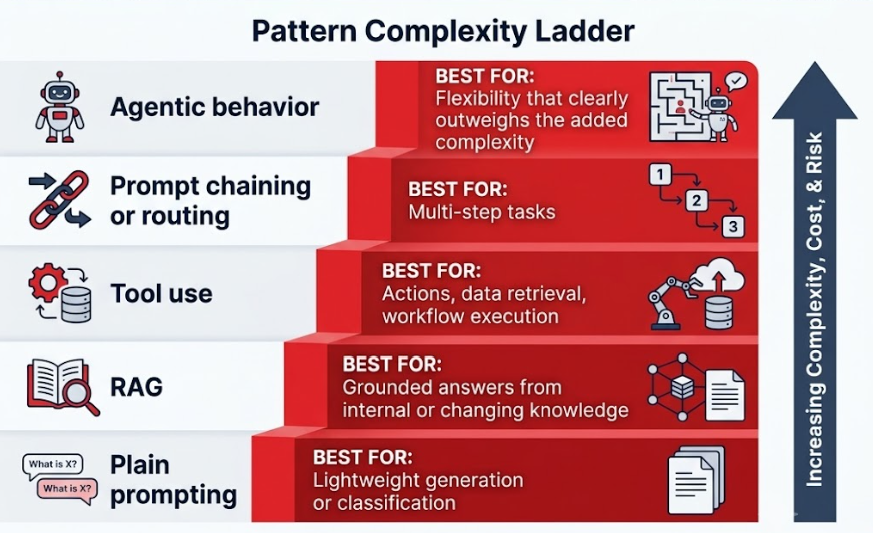
Choose the Simplest Pattern That Fits
The simplest pattern that meets the requirement is often the best place to start. So, the goal is to simply match your pattern to the job at hand.
And this is an advantageous baseline because most teams reach for more complexity than the use case actually needs.
Each step up this table should be earned by a real requirement. Complexity that isn’t earned shows up later as cost and risk.
Select the Right Model and Platform
Your model choice depends on your own constraints, not on leaderboard rankings. Weigh speed, cost, privacy, control, and model accuracy against your specific use case.
Cloud platforms like Google Cloud AI, Microsoft Azure AI, Amazon Web Services, and IBM Watson all offer managed models with different tradeoffs on cost and control. For natural language processing tasks specifically, options like Google Natural Language give you sentiment analysis and entity extraction without training a custom model.
On-device AI changes the calculation entirely. Gemini Nano runs locally on supported Android devices, including some Pixel devices through Android’s AICore Developer Preview and ML Kit GenAI APIs, cutting latency and keeping sensitive data off the network. Firebase AI Logic supports experimental hybrid inference setups that route between on-device and cloud inference depending on the task. Custom AI models require real time budgeted for training data collection and labeling before they pay off.
Step 3: Build the Core AI Architecture
Architecture decisions outlast any single model choice. Get the structure right, and swapping models later becomes a configuration change, not a rebuild.
Define Your Tools Clearly
A model can only act as reliably as the tools you give it. Define every tool with a clear function name, a structured schema, and stable parameters.
Predictable outputs matter as much as predictable inputs. Scope permissions tightly: a support ticket classification tool needs permission to classify tickets, with no ability to delete records or send emails. Server prompt templates help here, keeping the instructions a tool receives consistent across every call.
Orchestrate the Workflow
Build the workflow around the actual task, not an idealized version of it. Most real workflows include prompting, routing, tool execution, fallback logic, and human escalation.
Frameworks like LangChain, LangGraph, or Semantic Kernel can help structure this, though all of them stay optional. But architecture decisions matter more than the framework you pick to express them. If you’re building agentic workflows, look at how agent skills get defined and scoped before you reach for a general-purpose agent framework.
Add RAG Where It Boosts Accuracy
Add retrieval only when your model needs trusted internal knowledge it doesn’t already have. RAG chunks and embeds your documents into vector stores, then retrieves the most relevant pieces at query time.
Put your effort into source selection, chunking strategy, useful metadata, and retrieval relevance. Skip the large retrieval layer for use cases that run fine on prompting or tool use alone. Our RAG pipelines and enterprise RAG guides go deeper into the technical detail.
Step 4: Add Context, Safeguards, and Scale
Context, safeguards, and scaling controls separate a working prototype from a system you can trust in production. Skip any of the three, and reliability suffers as usage grows.
Treat Context as a System Input
Model performance tracks the quality of the context you feed it. Treat context engineering as a first-class system concern, covering instructions, user input, retrieved documents, tool definitions, user history, and policy constraints.
Build that context deliberately, as one coordinated input assembled at request time. A model fed inconsistent or incomplete context produces inconsistent results, even with a strong underlying model.
Add Guardrails and Human Review
Guardrails and ongoing AI monitoring protect both your users and your error rates. Add limits on hallucination-prone outputs, route sensitive requests to a human agent, and enforce rate limits where abuse is likely.
Trust in the system builds slowly and breaks fast. For higher-risk use cases such as fraud, biometric, or financial workflows, consider routing uncertain cases to a human reviewer by default. Our guide on AI adoption challenges covers the compliance pitfalls teams hit most often at this stage.
Give Users Control Over AI Suggestions
Once deployed, users tend to judge AI features on factors like speed, accuracy, trust, time saved, and control. Miss the last one, and the first four stop mattering.
Always give users a way to override, edit, or opt out of an AI-generated suggestion. A recommendation that can’t be dismissed, or a drafted reply that can’t be edited before it sends, erodes trust fast. This sits apart from human-in-the-loop review. HITL routes uncertain internal decisions to your team. User control hands the decision back to the person using your product.
Scale With Agents and Model Routing
Scale your architecture only when real usage justifies it. Model routing can optimize for cost and performance, sending simple queries to cheaper models and harder ones to stronger ones.
Caching cuts latency on repeated queries. Multi-agent systems earn their place in specific, complex workflows, and you should reserve them for those cases. Reaching for a multi-agent system as a default architecture adds cost with little payoff.
Step 5: Evaluate, Launch, and Iterate
Evaluation separates teams that ship a good demo from teams that ship a feature people keep using. Define what good looks like before you scale anything.
Define Success Before You Scale
Write down your evaluation criteria before launch: accuracy, helpfulness, latency, reliability, retrieval quality, and business impact. Vague goals produce vague results.
Tie each criterion to a number you can track. “Improves user experience” becomes “cuts average response time from four minutes to thirty seconds.” Specific targets make every later improvement easier to measure.
Measure continuously once your criteria are set. LLM-as-judge scales your testing across thousands of outputs at a cost human review can’t match. But pair it with human review anyway. Automated scoring catches volume. Human reviewers catch the nuance machines miss.
Launch Narrow First
Launch to a pilot group before you launch to everyone. A proof of concept or limited internal rollout tests your full workflow under real conditions.
This surfaces problems a model-only test would miss entirely: broken fallback logic, confusing UI/UX design, or tools that fail silently under real load.
Monitor What Happens in Production
Production reveals what testing cannot. Track failure patterns, model drift, shifts in user behavior, latency, cost, fallback rates, and workflow bottlenecks.
Run a regular data audit on the inputs your model receives in production. Real user data often drifts from training data quickly in production, and that drift shows up first in your error rates.
Keep Improving After Launch
Getting an AI feature to a solid baseline is usually the fast part. Getting it past that baseline takes sustained, ongoing attention.
Use real-world feedback to refine prompts, retrieval logic, tool behavior, model selection, and guardrails. Schedule model retraining on a real calendar with a fixed review cadence.
AI Integration Examples by Industry
SaaS teams often start with support ticket classification, internal knowledge assistants, summarization, and workflow copilots that take bounded actions.
In document- and policy-heavy environments, RAG patterns are especially useful when answers need to stay grounded in proprietary content.
In fintech and healthtech, AI is often most effective in review-heavy workflows such as document intake, compliance search, exception handling, and decision support, where human oversight and auditability matter.
eCommerce teams tend to apply AI to product discovery, support automation, and catalog assistance, especially where search and recommendation quality directly affect conversion.
Frequently Asked Questions for Product Teams
How much does it cost to integrate AI into a product?
AI integration costs depend on the feature scope, data complexity, model choice, and production requirements. A small proof of concept may only need a narrow workflow, an API integration, and basic evaluation. A production-grade AI feature usually needs data preparation, backend changes, security controls, monitoring, and ongoing model evaluation.
The safest way to control cost is to start with one measurable use case. Define the user problem, expected outcome, required data sources, and acceptable error rate before choosing tools or building infrastructure.
How long does AI integration take?
A focused AI prototype can often be built faster than a full production feature, but production readiness takes longer because the team must test accuracy, edge cases, latency, privacy, and user experience.
For most product teams, the best approach is to split the work into phases: discovery, proof of concept, pilot, and production rollout. This reduces risk because each phase proves whether the feature is valuable before more engineering time goes into it.
How do I know if my product data is ready for AI?
Your product data is ready for AI when the system can access the right information, interpret it reliably, and use it within the correct permission rules. You need to know where the data lives, how often it changes, who owns it, and whether it contains sensitive information.
Start by auditing the data behind the workflow you want to improve. Check quality, completeness, structure, access rights, and update frequency. If the data is fragmented or inconsistent, fix that foundation before building the AI layer.
Should we use an AI API or build a custom model?
Most teams should start with an AI API before building a custom model. APIs are faster to test, easier to maintain, and often good enough for product features like summarisation, classification, content generation, support assistants, and workflow automation.
A custom model may make sense when you need specialised domain performance, strict control over model behaviour, lower long-term inference costs at scale, or proprietary capabilities that general models cannot provide. Even then, it is usually better to validate the use case with a simpler integration first.
When should we not add AI to a product?
You should not add AI when the user’s problem is unclear, the output cannot be evaluated, the data is unreliable, or the workflow needs deterministic behaviour every time.
AI is also a poor fit when a simpler rule-based feature would solve the same problem with less cost and risk. Before adding AI, ask whether the feature improves a real user outcome. If the answer is unclear, start with user research or a smaller workflow improvement instead.
Build AI Into Your App With fram^
At fram^, we’ve used variations of this process with product teams across Southeast Asia and Scandinavia. If you’re scoping an AI feature for your app, our AI implementation services team can help you find the simplest path that actually works.
Automated ticket triage is the process of using software to sort, tag, prioritize, and route incoming support tickets with minimal human effort. It turns the first mile of support into a repeatable system. The goal stays simple: get the right ticket to the right team fast, with the right context. Most support teams feel the […]
Every AI coding tool ad ends at the same place: a working product in 48 hours. What they skip is week eight, when real users arrive, payment flows fail silently, and an enterprise prospect asks for your SOC2 documentation. If you’re reading this, you may be somewhere in that gap. Maybe you tried Lovable, Cursor, […]
An end-to-end AI solution takes an AI feature from raw data to real product outcomes. It covers data, models, integration, deployment, monitoring, and governance as one connected system. Teams use it when “just call an API” stops working for quality, cost, latency, or compliance. Most AI failures do not come from the model. They come […]