AI Help Desk Knowledge Base vs. Traditional Knowledge Base
December 10, 2025
Support teams sit under steady pressure. Tickets rise. Customers expect instant answers. Internal tools age. The gap between what a traditional knowledge base delivers and what AI can handle gets wider every year.
A traditional knowledge base stores articles, FAQs, and troubleshooting guides. It depends on manual search, manual content editing, and manual routing to the right resource.
An AI help desk knowledge base still uses the same content, but wraps it with an engine that understands intent, context, and user history. It predicts what people want, not just what they type.
For support leaders, the real question is not “AI or traditional” but “how fast can we move from a static library to an AI powered system without losing control”.
Table of Contents
Key Takeaways:
AI turns a static knowledge base into an active support layer that reads intent, answers routine questions, and routes users to the right help faster.
The setup starts with content you already own. You collect support tickets, guides, FAQs, and product docs, then structure and tag them for AI use.
A well trained AI model cuts response time by matching real questions to verified fixes. This reduces manual search for agents and deflects simple tickets through chat.
Real world results show strong gains. Compass reached a 65 percent one touch resolution rate and near-perfect customer satisfaction after layering AI over its help content.
fram^ can support the full lifecycle. That includes audit, build, integration, and training with ongoing improvement as new content and issues appear.
What Is an AI Help Desk Knowledge Base
An AI help desk knowledge base is a central library of help center articles, ticket forms, troubleshooting guides, and product details that an AI layer can understand and use. The content may look similar to a classic help desk portal, but the way people reach and consume that content changes.
Instead of a simple search box that matches keywords, an AI powered knowledge base reads intent. It links user questions to the right Knowledge Base articles, status page entries, IT alerts, and incident management records.
It can surface answers through chatbots, email, ticketing systems, and an Employee Self Service Portal without needing a human help desk agent at each step.
AI Knowledge Base vs. Traditional Knowledge Base
Both types of knowledge bases aim to centralize solutions for customers and internal users. The gap lies in how each system finds and delivers the right answer.
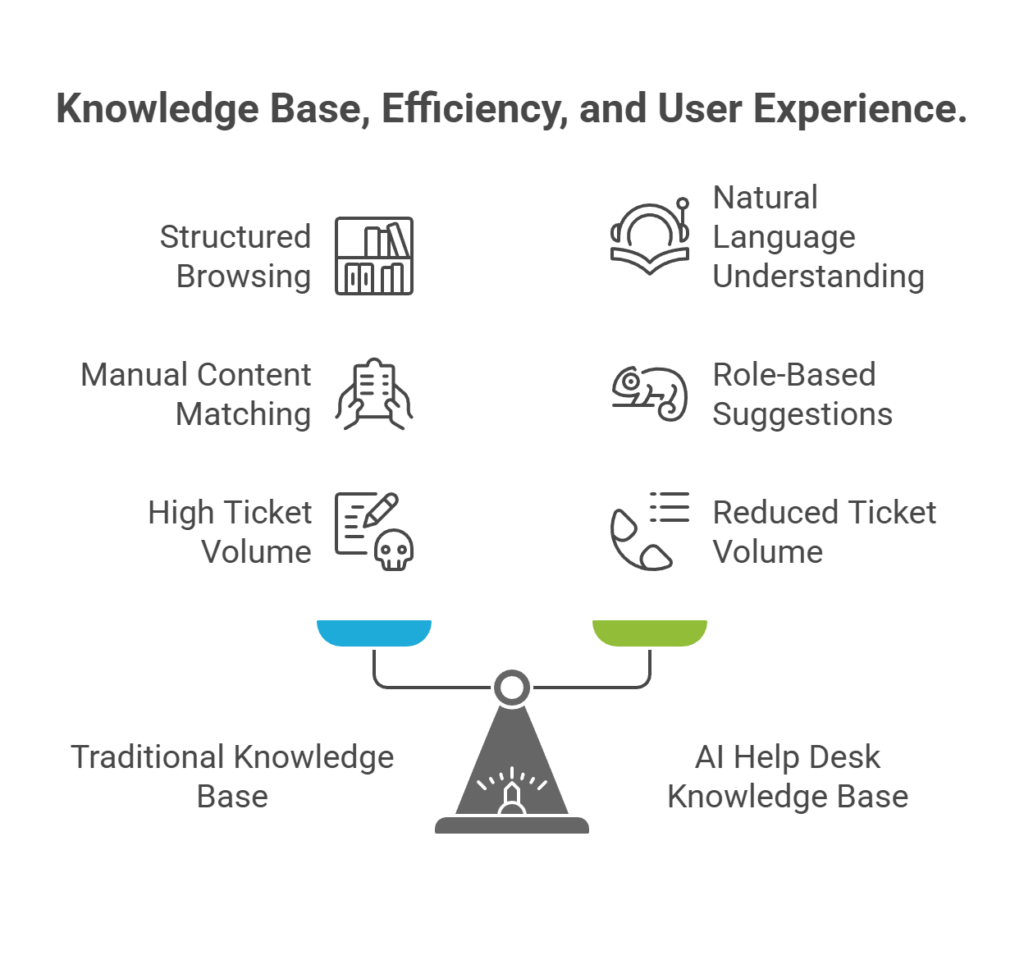
A traditional knowledge base behaves like a structured Online Browsing Platform. Users rely on menus, categories, and keyword search. The search engine often returns long lists. Many people skim several pages or escalate to a ticket. Content owners must guess which phrases customers will type, then match article titles and headings to those phrases.
An AI help desk knowledge base takes the same content and wraps a model around it. That model understands natural language, typos, and incomplete thoughts.
A user can type “Canvas LMS quiz error in New Quizzes” and receive the exact help center article, known bugs, and status page updates linked to that error message. The AI layer can also adjust suggestions based on role. A School Nurse sees different guidance than an Educational Interpreter or an administrator.
For support teams, the difference shows up in ticket volume and service delivery speed. Instead of answering repeated questions about Adobe Creative Cloud access, Office 365 activation, or student printers, agents let AI answer simple issues and focus on complex cases. The knowledge base becomes the first line of support across every channel.
How to Create a Help Desk Knowledge Base With AI
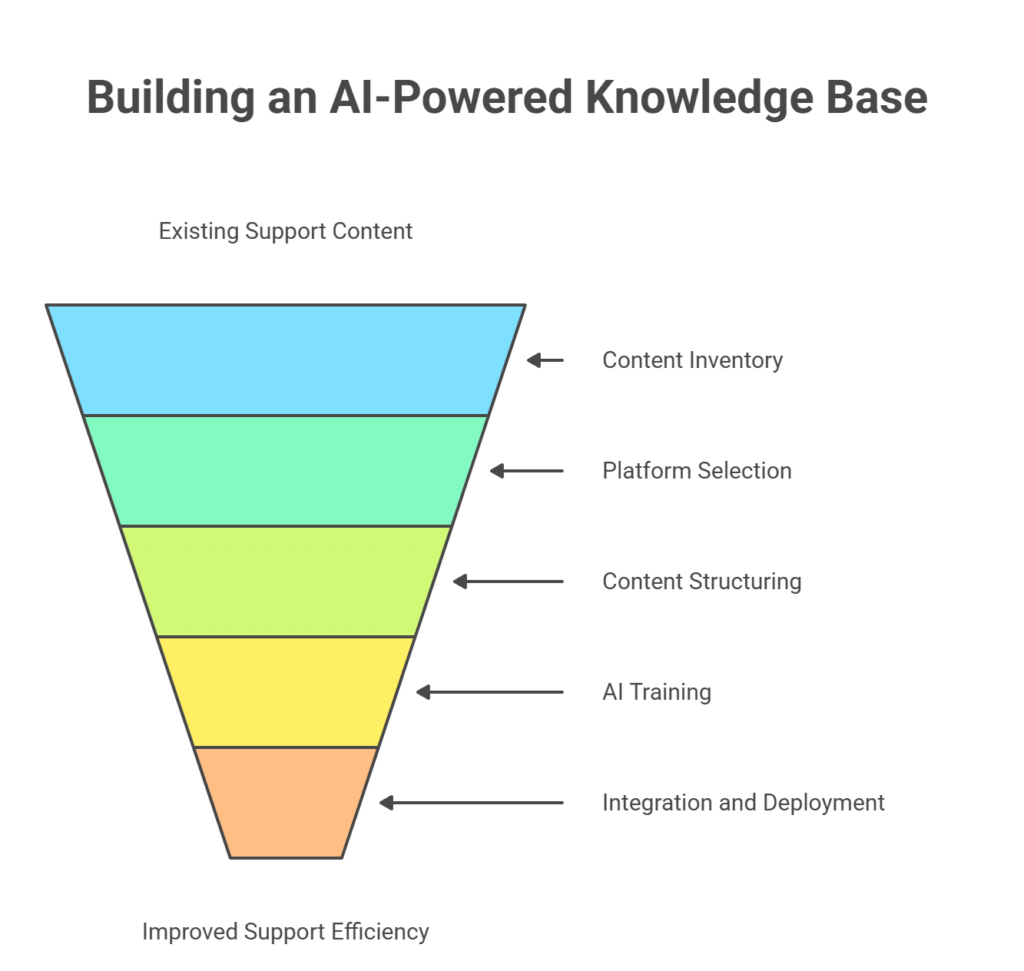
Building an AI powered knowledge base does not require a full rebuild of support operations. You start from content you already own, then add structure, tools, and training.
The process below matches how fram^ helps teams move from static portals to AI ready knowledge management without losing quality or control.
Gather All Existing Support Content
A strong AI knowledge base starts with a complete content inventory. Many organizations already have material scattered across tools.
Collect items from places such as:
Current knowledge base articles inside platforms like Zendesk or Intercom
Help desk ticket histories from SolarWinds Service Desk or Support Center Computing Help Desk
Onboarding guides for Canvas LMS, Office 365, or Lifeline email
System documentation for New Quizzes, service account lifecycle, and Student Printers
Manuals and Developer Documentation for internal tools and products
Customer Blog content and public support announcements
Bring these into a single repository. Include status page posts about unplanned outages, IT alerts, and past incident reports. Ticket transcripts reveal real wording, which helps AI match natural language to technical articles.
During this phase, do not worry about perfection. Aim for coverage. You can refine content later.
Choose Between Custom AI and Off The Shelf Platforms
Once content is gathered, the next decision is platform. Many teams start from off the shelf AI features inside tools like Tidio, Zendesk, Intercom, or standard help desk suites. Others prefer a custom AI stack.
Off the shelf tools provide quick wins. They connect to existing Ticket Forms, chat widgets, and support centers. They usually include virtual agents that answer basic questions, deflect ticket creation, and surface popular Knowledge Base articles.
Custom AI suits teams with strict security and compliance needs. Healthtech, fintech, and postsecondary institutions that handle student records or financial data often prefer a private model and strict access controls. A custom build can use internal search engines, private ticketing systems, and internal identity providers without sending data to external vendors.
fram^ can work across both models. It can extend AI features in existing help desk tools or help teams design an independent AI knowledge base that plugs into current systems through APIs.
Organize, Structure, and Tag Content
AI tools thrive on structure. Raw text from tickets and help center articles needs consistent fields and tags.
Map content to entities such as:
Products and modules
User roles, for example Student, Faculty, School Nurse, IT staff
Topics like incident management, account access, billing, or Canvas LMS features
Systems such as Adobe Creative Cloud, Office 365, Mathewson IGT Knowledge Center, or Support Center
Add metadata that marks each article as internal, external, or both. Link related items, such as “page not found” HTTP status code guides, website design notes, and IT alerts about outages.
Where possible, connect articles to real ticket IDs or issue resolution notes. This helps the AI rank proven fixes higher than untested content.
Clean up outdated items during this step. Merge duplicates. Close gaps that show up in ticket histories, for example missing guides about educational interpreter access or teacher loan forgiveness questions.
Train and Test Your AI Systems
With structured content in place, you can train the AI layer. This stage includes both technical configuration and hands on testing.
The system learns from:
Historical tickets and their resolutions
Click paths inside the knowledge base
User feedback on “was this article helpful” prompts
Search logs that track failed queries and poor search results
Create test sets that mirror real users. Include students, staff, support agents, and managers. Ask each group to perform their usual tasks through the AI interface. For instance, a student might ask about Lifeline email settings, while a support expert tests service account lifecycle steps or IT alerts on New Quizzes.
Track how often the AI returns the correct article on the first try. Measure time to first answer, deflection rate, and how many tickets still reach a human help desk agent. Adjust prompts, ranking rules, and content based on results.
Integrate and Deploy Across Support Channels
An AI help desk knowledge base works best when it sits behind every support entry point. People should receive consistent answers through chatbots, web forms, portals, and email.
Practical integration points include:
Chatbots on the main website and inside Canvas LMS
Employee Self Service Portals used by staff and faculty
Forms inside ticketing systems and incident management tools
Status pages that expose IT alerts and unplanned outages
APIs let the AI answer questions from many places while staying linked to one central knowledge base. For example, a Ball State support site can feed the same AI engine from its Support Center, Mathewson IGT Knowledge Center, and Student Printers documentation.
Branding options matter here. The AI interface should match existing website design, fonts, and visual elements. That way the AI feels like part of the existing help desk, not a bolt on tool.
Monitor, Iterate, and Improve
Once live, the AI knowledge base becomes a continuous project. New products, new error messages, and new integrations appear over time.
Set up dashboards that track:
Search terms with no good answers
Articles with poor ratings or high bounce rates
Tickets that AI tried to handle but still escalated
Topics with heavy load, for example Office 365 license issues or Adobe Creative Cloud access
Use this data to plan content editing sessions, listening sessions with support teams, and workshops with product managers. Add new help center articles, refine wording, and update tags. Treat AI training as a regular part of knowledge management, not a one time step.
fram^ can support this lifecycle with ongoing tuning, content workshops, and Contact List Triggers that alert teams when support patterns change.
How AI Knowledge Bases Reduce Customer Support Response Time
Shorter response time is one of the clearest gains from an AI powered knowledge base. The effect shows up both for self service users and for agents working inside a ticketing system.
Self service users receive instant answers from virtual agents that draw from trusted content. They do not need to wait in chat queues or refresh status pages. If the AI detects an unplanned outage or known issue, it can show a clear banner and link to IT alerts before the user opens a ticket.
Agents benefit from Smart Suggestions inside their consoles. While they read a new ticket, the AI suggests likely articles, known error messages, and past resolutions. This can turn a five minute hunting process into a one minute response.
A Before and After Case Study
Compass, a large real-estate technology platform, adopted Zendesk’s AI-powered knowledge base to reduce repetitive support work across its nationwide customer service operation.
Before AI assistance, support agents relied on manual search across documentation, archived tickets, and internal notes. This increased handling time and slowed down first-response performance during peak load.
After deploying the AI layer inside its knowledge base and agent workspace, Compass connected historical support tickets, help center articles, and user guides into one retrieval system.
The AI then generated response suggestions, surfaced relevant articles automatically, and reduced time spent switching between tools. Users also received faster self-service answers to common questions without waiting for a human reply.
Within the rollout period:
Compass reached a 65 percent one-touch resolution rate, meaning most tickets were solved in the first interaction
Ticket analysis showed many issues resolved directly through AI-surfaced knowledge instead of manual search
These results show why AI knowledge bases reduce response time. Agents spend less time digging through old tickets or rewriting answers. Users receive high-quality guidance faster. The system pushes verified fixes to the front so both sides reach a correct resolution with fewer steps.
Best Examples of AI Knowledge Bases by Industry
AI knowledge bases appear across many sectors. The core pattern stays the same. Organizations connect their support content to an AI layer that understands intent and context, then surface answers through chatbots, portals, and internal tools.
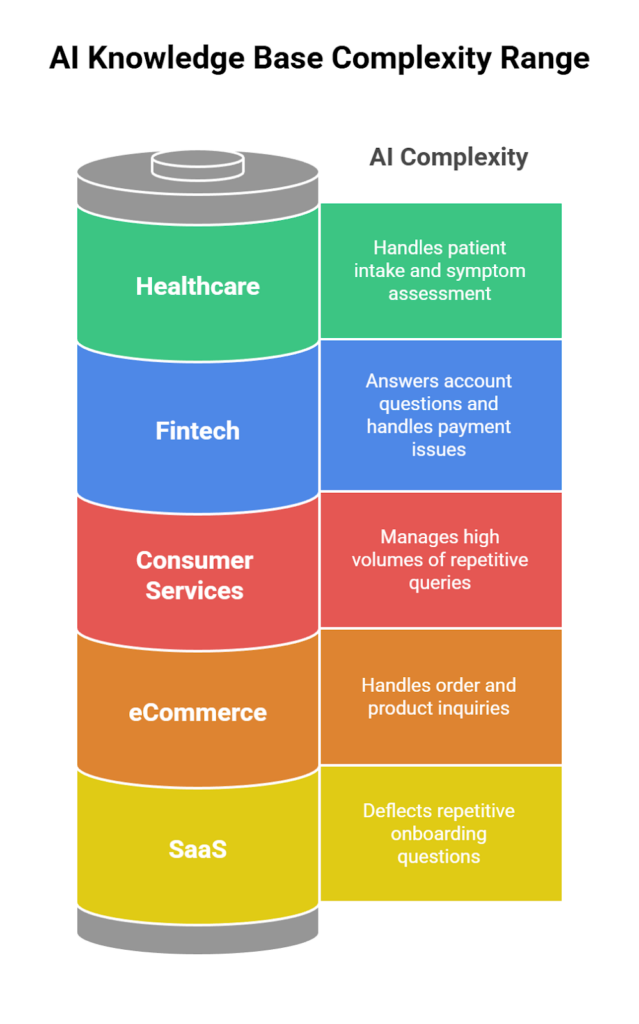
fram^ focuses on the needs of AI in SaaS, healthcare, fintech, eCommerce, and consumer services. The examples below show how real teams already use AI over their knowledge content and support data.
SaaS
SaaS companies work with fast product cycles, detailed documentation, and recurring support questions. AI knowledge bases help them reuse that content at scale.
RevPartners, a RevOps SaaS consultancy, uses HubSpot’s AI features to deflect repetitive onboarding questions. Their “Jarvis” customer agent draws on HubSpot’s knowledge base content and cuts routine support work by answering common setup and configuration queries before they reach humans.
For fram^, these examples show a clear pattern. SaaS teams want faster self service, less manual triage, and smarter search over Developer Documentation and product guides. An AI help desk knowledge base meets all three goals with one content layer.
Healthcare
Healthcare organizations carry strict privacy rules and heavy administrative work. Many now use AI virtual assistants trained on clinical and administrative knowledge bases to ease pressure on staff.
Cedars-Sinai in Los Angeles runs an AI powered virtual care platform called CS Connect. The system handles patient intake and symptom assessment through a chatbot, then feeds structured information to clinicians. It draws on medical content and triage pathways, and has already served more than 42,000 patients since launch.
Hospitals also deploy focused AI agents for specific domains. SSG Hospital in Gujarat launched an oncology chatbot that answers questions about surgery, chemotherapy, radiotherapy, and follow-up care in three languages. The bot acts as an access point to cancer care knowledge and helps patients and families understand treatment steps.
In this sector, an AI help desk knowledge base often runs on a private stack, links into electronic record systems, and respects clear role boundaries. fram^ can mirror that pattern and keep all training traffic inside approved environments.
Fintech
Fintech teams handle sensitive financial data, strict compliance demands, and complex user flows around payments, identity checks, and lending. AI knowledge bases help them scale support without losing context.
Industry reports describe how fintech companies now roll out conversational AI that reads from policy documents, product FAQs, and transaction guides. These assistants detect intent, answer account questions, and handle common card or payment issues with high coverage.
Banks sit inside this wider pattern. Research on banking chatbots highlights tools that provide 24/7 support for balance queries, card controls, and basic servicing. These bots rely on curated knowledge bases plus links into core systems.
For fram^ clients in fintech, an AI help desk knowledge base would connect internal policy libraries, public help centers, and CRM data. The AI layer then answers routine questions and flags complex or high-risk cases for human agents.
eCommerce
eCommerce businesses face huge volumes of simple questions about orders, shipping, returns, and product details. AI chatbots tied to knowledge bases and order systems now handle much of this work.
Shopify’s ecosystem shows the same direction. Guides on AI customer service for Shopify merchants describe bots that read from product catalogs and help centers, then respond with personalized product suggestions and real-time order information.
fram^ can plug into this pattern by linking product feeds, help center content, and ticket histories. The AI knowledge base then supports both self service widgets and internal agent workspaces.
Consumer Services
Consumer services cover telecoms, retail, utilities, and education. These sectors use AI assistants on top of knowledge bases to handle high volumes of repetitive queries.
Vodafone’s TOBi virtual assistant runs across more than fifteen markets and handles around one million conversations per day. Public case studies explain how TOBi answers billing questions, plan changes, and troubleshooting requests, drawing from telecom knowledge content and account data.
Vodafone has begun rolling out SuperTOBi, a generative AI version that can deal with more complex questions and support several languages, again based on a structured content and policy base.
Consumer food service shows the same direction. Pizza My Heart uses an AI chatbot called Jimmy the Surfer for orders. The bot ties into menus and store data and lets customers place and adjust orders over text.
For fram^, these examples show how an AI help desk knowledge base can support both customer-facing channels and internal staff tools. The same content layer feeds web chat, mobile apps, in-store tools, and call centers.
AI Help Desk Knowledge Base FAQ
This section addresses common questions that support leaders and product owners raise when they evaluate AI powered knowledge bases.
Will the AI Improve Over Time?
Yes. An AI knowledge base learns from every interaction. It tracks which suggestions help agents resolve tickets, which articles receive positive user feedback, and which search terms fail.
Over time, the system ranks strong content higher, closes gaps through new articles, and refines how it reads intent. With clear governance and content ownership, the knowledge base quality rises month after month.
Does It Work in Multiple Languages?
Modern AI models support many languages. An AI help desk knowledge base can read questions in one language and map them to articles in another, as long as training and configuration match that goal.
Global organizations use this to serve campuses and customers across regions. For example, one portal can answer English and local language questions about Canvas LMS, student services, and IT tools, drawing from a shared content set.
Is It Easy to Control or Approve Content Changes?
Control sits at the center of a safe AI deployment. A well designed system keeps content workflows inside existing knowledge management tools.
Editors own help center articles, troubleshooting guides, and IT alerts. AI can suggest new topics based on ticket patterns, but humans approve final wording. Every change passes through review before it reaches chatbots or portals.
fram^ designs processes that match each organization. Some prefer central content teams. Others use distributed ownership across product managers and support leads.
Can AI Knowledge Bases Integrate With Existing Help Desks or CRMs?
Yes. Integration is one of the main strengths of an AI knowledge base. Through APIs and connectors, the AI layer reads ticket histories, contact records, and product data from existing systems.
This includes:
Help desks like Zendesk or SolarWinds Service Desk
CRMs that track customer segments and contract details
Incident management systems that record past outages
Integration allows the AI to personalize answers and suggest relevant content based on account type, role, or product usage.
Can We Embed It Inside Our Chatbots or Website?
An AI knowledge base can power both new and existing chatbots. You can embed AI backed widgets on a website, inside a Support Center portal, or in Canvas LMS.
The same engine can support several experiences:
Public customer chat on a marketing site
Authenticated chat inside a SaaS product
Internal staff chat on an intranet or Employee Self Service Portal
Branding and behavior align with your design system. The AI sits behind the scenes and feeds answers.
How Do We Keep Customer Support Responses Accurate?
Accuracy rests on three pillars. First, content quality. The knowledge base must contain clear, current, and well structured articles. Second, training data. The AI needs ticket histories and real examples of good responses. Third, feedback loops. Users and agents should mark helpful and unhelpful answers.
Regular review cycles keep content aligned with products and policies. AI flags patterns where answers fail. Support teams then refine articles or add new ones. This cycle keeps both self service and agent responses reliable.
Can fram^ Provide Onboarding, Setup, and Ongoing Support?
Yes. fram^ can support the full lifecycle of an AI help desk knowledge base. That includes content audits, platform selection, data mapping, training setup, and integrations.
After launch, fram^ teams can run listening sessions, monitor metrics, and adjust models. They can help design Contact List Workflows that notify owners when certain topics spike, such as Ball State students facing Lifeline email issues or staff needing new Adobe Creative Cloud instructions.
Connect With fram^ and Get Your Help Desk Knowledge Base Started
AI help desk knowledge bases turn static content into an active support partner. They cut response times, free agents for complex work, and give customers fast, consistent answers. They sit behind chatbots, portals, and ticketing systems, and they respect the content governance you already use.
fram^ helps support leaders move from traditional knowledge bases to AI powered knowledge management with low risk and clear control.
The process starts from your existing content, systems, and support goals. From there, fram^ designs an AI roadmap that fits your sector, whether you run SaaS, healthcare, fintech, eCommerce, or consumer services.
If you want faster ticket resolution, better user experience, and a knowledge base that learns from every interaction, connect with fram^. Book a free, no pressure consultation and see how an AI help desk knowledge base can support your team and your customers.
Automated ticket triage is the process of using software to sort, tag, prioritize, and route incoming support tickets with minimal human effort. It turns the first mile of support into a repeatable system. The goal stays simple: get the right ticket to the right team fast, with the right context. Most support teams feel the […]
AI integration works best when product teams start with one measurable workflow, choose the simplest technical pattern, and pilot the feature before full rollout. Artificial intelligence improves software in specific, measurable ways: sharper search, generative content, real-time recommendations, and faster support. But none of those happen by accident. Every gain comes from applying machine learning […]
Every AI coding tool ad ends at the same place: a working product in 48 hours. What they skip is week eight, when real users arrive, payment flows fail silently, and an enterprise prospect asks for your SOC2 documentation. If you’re reading this, you may be somewhere in that gap. Maybe you tried Lovable, Cursor, […]