Every SaaS team now feels the pressure to “add AI,” but few have a clear plan for where it will actually move the needle, and perhaps most importantly, how to integrate it safely. Instead of chasing shiny features, you need a focused set of use cases, a realistic implementation path, and guardrails that protect users and data.
That’s why, in this guide, we’ll cover proven AI use cases for SaaS, the key decisions to make as you integrate AI into your product, and best practices to avoid the most common pitfalls.
Table of Contents
Key takeaways for SaaS teams
AI in Software as a Service (SaaS) works best when it is built into the product experience and tied to measurable outcomes like activation, retention, support efficiency, and expansion.
SaaS AI differs from traditional enterprise AI because it has to scale across many customers in a shared environment, with stronger demands on usability, security, governance, and time-to-value.
The strongest starting point is a focused use case with clear business value, not a broad push to “add AI” everywhere.
For most SaaS companies, the right delivery model is a strategic choice between buying, building, or combining both in a hybrid approach.
Successful AI rollout depends on more than model quality. Data readiness, workflow integration, feedback loops, and monitoring all shape whether a feature succeeds in production.
Compliance, privacy, and output quality need to be addressed early, especially when AI touches sensitive data, customer workflows, or decision-making.
SaaS teams that see the best results treat AI as part of the product and operating model, not as a standalone feature.
What AI in SaaS Means (and How It Differs from Traditional Enterprise AI)
AI in SaaS means building AI-powered capabilities directly into a cloud product so customers can use them as part of their everyday workflow. Smarter search, predictive recommendations, automated support, content generation, anomaly detection, workflow automation—these features live inside the product itself, available to every user on the platform.
The delivery model is what sets AI in SaaS apart from traditional enterprise AI. Enterprise AI is typically built for internal use inside one company, often as a custom project tied to a specific team, dataset, or business process. AI in SaaS has to work across many customers within a shared product environment, under far greater pressure on scalability, usability, security, and time-to-value.
That changes the engineering challenge. SaaS teams ask a different question: “Can we turn AI into a repeatable product capability that delivers value across a multi-tenant platform?” AI in SaaS needs to be easier to deploy, govern, and adopt by end users than traditional enterprise systems.
Success metrics are different, too. Model accuracy, of course, always matters, but SaaS companies also measure product adoption, customer retention, support deflection, expansion revenue, and how quickly users see value from the feature.
Traditional Enterprise AI
AI in SaaS
Built for
One company’s internal operations
A product delivered across many customers
Architecture
Highly customized to specific workflows
Repeatable, scalable, with strong tenant separation
Users
Specialist teams with technical expertise
Everyday end users who expect intuitive interfaces
Success measured by
Technical performance (accuracy, speed)
Product and business outcomes (adoption, retention, revenue)
For SaaS companies, AI becomes a strategic lever because it shapes the product experience, the value proposition, and the growth model—all at once.
Why AI Is So Important for SaaS Companies
AI is quickly becoming part of the SaaS baseline. In 2025, 1 in 5 SaaS startups were AI-native, with products and business models built around AI from day one.
That shift is changing customer expectations. Buyers increasingly evaluate SaaS products based on how well AI is integrated into the experience, alongside more traditional factors like usability, pricing, and core functionality.
For SaaS companies, this raises the bar across the market. AI is no longer just an emerging capability to explore. It is becoming part of how products are judged, compared, and adopted.
This means the real advantage no longer comes from simply adding AI features. It comes from integrating AI in ways that are useful, reliable, and aligned with customer needs.
Benefits of AI in SaaS Tied to Real Business Metrics
For SaaS companies, the value of artificial intelligence (AI) is not just that it makes products feel more advanced. It can improve the metrics that matter most to growth, retention, and efficiency.
AI can improve activation by helping new users get value faster through smarter onboarding, guided setup, and more relevant recommendations. It can reduce support costs by automating common requests, improving self-service, and helping support teams resolve issues faster.
It can also lower churn by identifying risky behaviour early, surfacing proactive interventions, and making the product more useful day to day. On the growth side, AI can support expansion by personalizing upsells, uncovering cross-sell opportunities, and increasing product adoption across teams. And by removing friction in setup, support, and daily usage, it can shorten time-to-value, which is often one of the biggest drivers of long-term retention.
The most effective AI use cases in SaaS are the ones tied to measurable business outcomes.
Build, buy, or hybrid: choosing the right AI approach
Once you identify the right AI opportunities, the next decision is how to bring them into your SaaS product. Companies typically choose between building custom AI capabilities, buying existing tools or APIs, or combining both in a hybrid model.
Buying is often the fastest route. It works well for common capabilities like chat, summarization, search, or support automation, especially when speed and lower upfront cost matter most.
Building makes more sense when AI is central to your product experience or competitive differentiation. It gives you more control over the user experience, data flows, performance, and intellectual property.
A hybrid approach is often the most practical option. SaaS teams use proven third-party models or infrastructure while building proprietary workflows, interfaces, and product logic on top.
The right choice depends on how central AI is to your product, how much proprietary data you have, how quickly you need to launch, and where you need differentiation most.
Approach
Best for
Buy
Speed, proven capabilities, lower complexity
Build
AI as core product advantage, maximum control
Hybrid
Fast launch with room for differentiation
Top AI Use Cases for SaaS
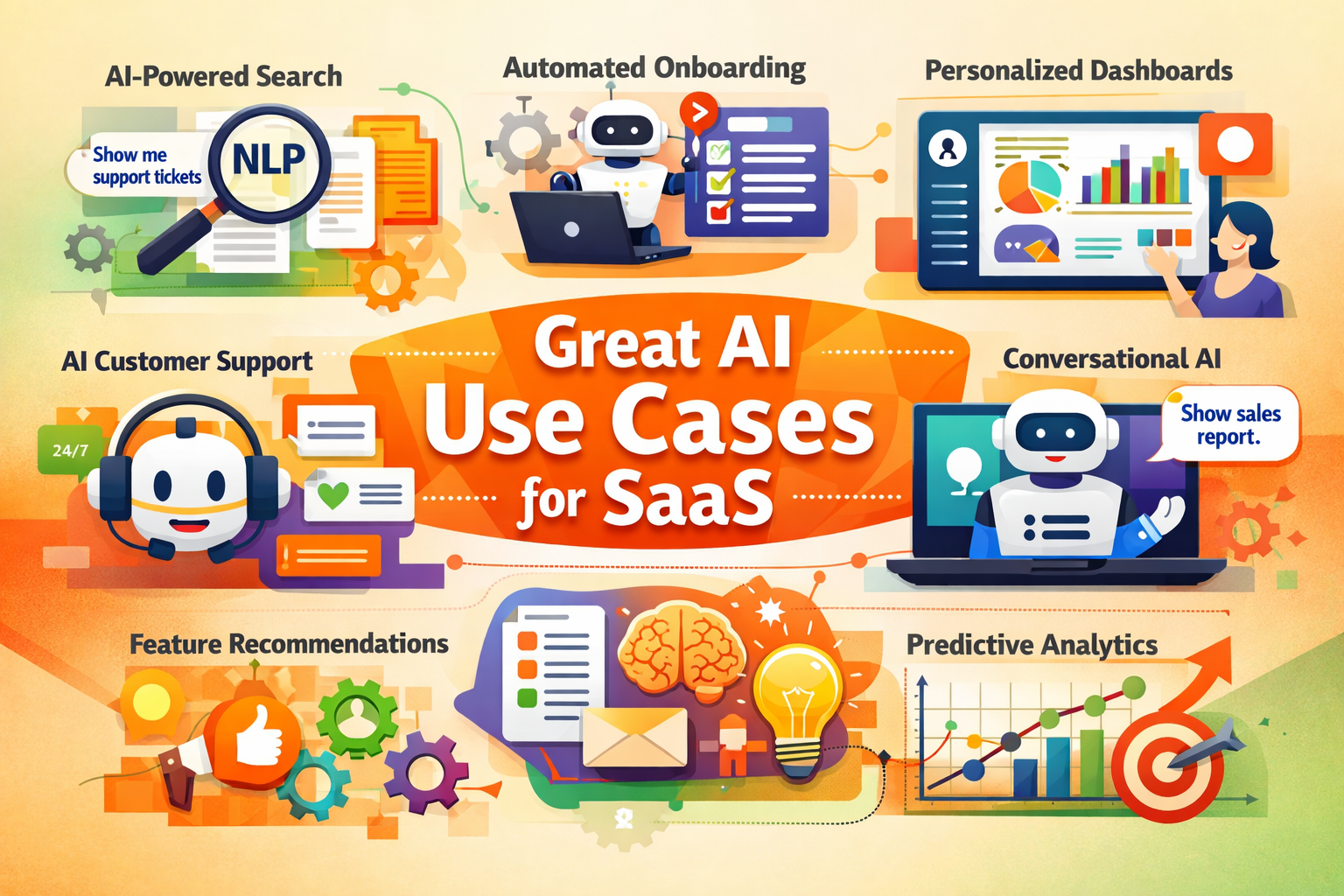
AI can enhance almost every aspect of a SaaS product. Some of the crucial use cases of AI for SaaS are:
AI-Powered Semantic Search
Natural Language Processing (NLP) lets users query a SaaS app in plain language. It does not simply match the keywords in the query but also analyzes the contextual meaning and intent behind the search query and returns relevant results.
For example, some platforms now allow queries like “show me all support tickets about payment failures” and return results from docs and tickets, rather than telling you where to find the tickets and how to filter them.
Companies are building “natural language search” for their product data to let users find answers in their knowledge bases and dashboards.
Automated and Adaptive User Onboarding
AI can observe a new user’s role and behaviour to customize their first-run experience. Machine learning models auto-select the right tutorials or UI tips for each user. Some products also recommend setup templates.
For example, Notion’s AI asks for context like how you’d describe your workspace before suggesting starter templates to match.
AI chatbots and in-app assistants can also guide new users by answering questions or directing them through steps without manual support.
Personalized Dashboards
Static dashboards waste valuable screen real estate on irrelevant metrics. AI systems analyze individual usage patterns to surface the most relevant information for each user.
For example, an AI dashboard might rearrange widgets and highlight relevant modules that seem less useful for most people but are helpful to specific users. This enhances the user experiences significantly.
Conversational AI in Workflows
Conversational AI agents are a big AI trend in SaaS. These interfaces allow users to accomplish complex tasks through natural language. For example, users can simply ask, “Show me our quarterly sales pipeline by region with forecast accuracy,” instead of navigating multiple menus to generate a report. This capability reduces training requirements and makes sophisticated functionality accessible to occasional users.
Generative AI for Summaries/Instructions/Reports
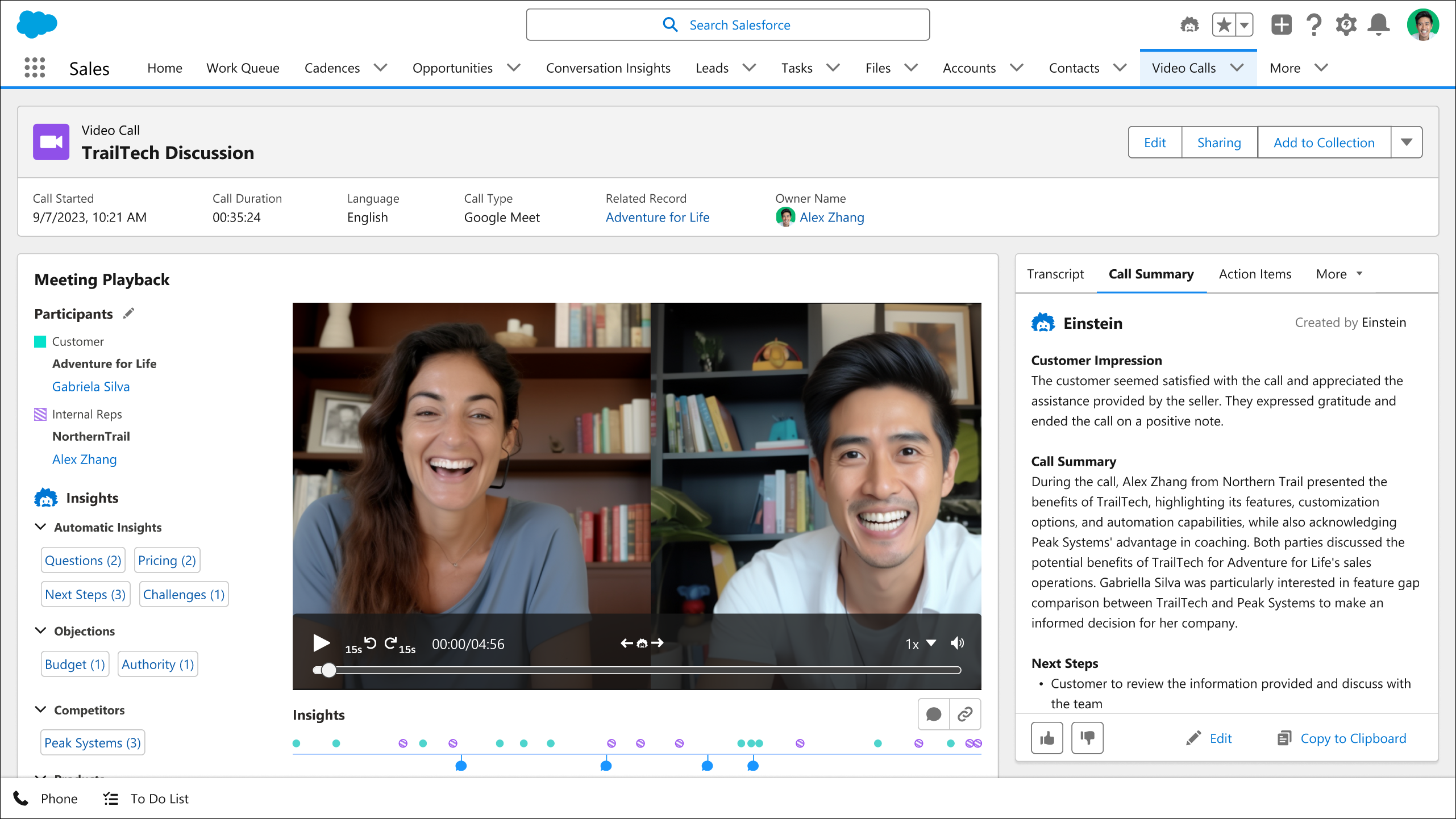
Large language models can write as well as they can search. SaaS apps are using LLMs (GPT, Claude, etc.) to auto-generate content. A classic case is summarizing complex information. For example,Salesforce’s Einstein now offers “Conversation Insights”, which are AI-generated summaries of customer call recordings, so sales reps get concise recaps.
Other tools turn long chat logs or emails into bullet-point summaries. Even SaaS documentation can be auto-generated. For example,Alteryx’s Workflow Summary Tool (powered by GenAI) summarizes analytic workflows for new data analysts. Similarly, AI can write up reports, instructions, or release notes from data.
Customer Support with AI Help Desk & Ticket Triage
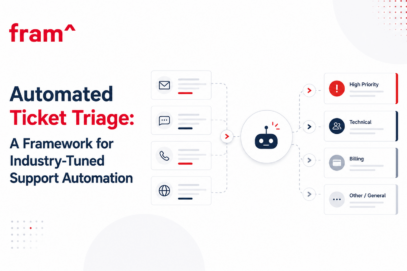
An AI classifier reads the text of new tickets and assigns topics or urgency scores, so that high-impact issues reach agents immediately. Meanwhile, a generative chatbot can pull answers from the company’s knowledge base to resolve simple queries on its own.
One report notes that AI chatbots are able to automate about80% of repetitive support tasks by answering FAQ and guiding users through features. This both speeds up response times and frees human agents to handle complex problems.
Many SaaS firms now also integrate their knowledge base into chat interfaces, so users can type questions and receive answers right away without waiting on a rep. These AI helpdesk tools reduce customer service costs while improving customer satisfaction.
Feature Discovery Engines
AI discovery engines analyze user behaviour to surface relevant but underused features. They observe patterns across users and proactively recommend shortcuts or advanced capabilities. This helps increase feature adoption and overall product value. For example, Slack’s “What’s New” feed shows feature tips contextual to your usage.
Predictive Product Analytics (Churn and Retention)
Machine learning models predict churn through their analysis of usage data, engagement trends, support interactions, and other data. Predictive analytics enable early retention alerts and proactive outreach, along with more accurate forecasting of key metrics (renewals, revenue, and lifetime value).
Behaviour-Based UI Adaptations
AI enables personalized interfaces that adjust layouts or navigation based on how users interact with the app. These real-time UI adaptations improve usability and engagement without relying on constant manual A/B testing.
App Modernization
AI in SaaS also assists development teams by automating code refactoring, generating tests, identifying vulnerabilities, and optimizing deployments. This accelerates app modernization efforts with improved code quality and reduced time-to-release.
Fram^’s SaaS AI Rollout Model
Many SaaS teams adopt AI in the wrong order. They start with a tool, a model, or a feature idea, then struggle with weak data, unclear ownership, or features that never create meaningful product value.
At Fram, we see successful AI adoption in SaaS follow a more practical path. The teams that get results usually begin with a clear business problem, validate whether their data and systems can support it, choose the right delivery model, test the idea in a narrow real-world setting, and then scale it with governance in place.
That is the logic behind Fram’s SaaS AI Rollout Model:
Focus on the business problem where AI can create measurable value
Ready your data, systems, and controls for production use
Align the right build, buy, or hybrid approach
Launch a narrow pilot with clear success metrics and feedback loops
Scale with monitoring, governance, and continuous improvement
This model helps SaaS teams move from AI experimentation to production AI that supports your product, your customer’s experience, and your business.
You can use this model as a simple way to structure implementation. In practice, these stages translate into a sequence of decisions around use-case selection, data readiness, delivery model, pilot scope, and production rollout.
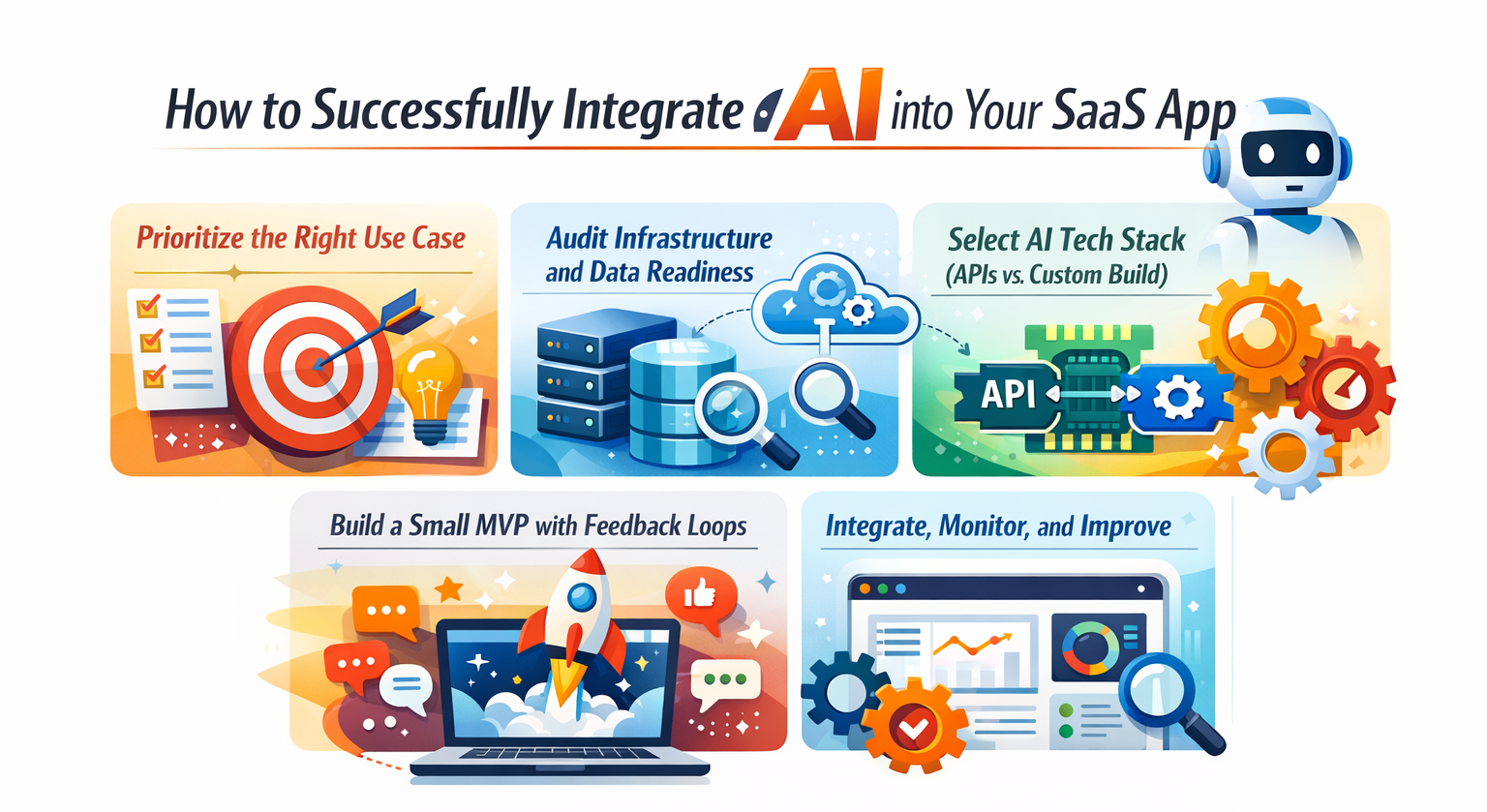
How to Successfully Integrate AI into Your SaaS App
AI capabilities for SaaS companies are phenomenal, so the real question is how to integrate AI tools into SaaS apps. Below, we have broken down the crucial steps to integrate AI into your SaaS app:
Step 1. Focus on the right use case
The first crucial step is to identify the problem areas or friction points in your product where AI could add value in the simplest way possible. It can be complex onboarding, long support queues, etc. You can rank use cases by impact vs. complexity. The recommended advice is to choose a feature that provides real value but doesn’t compromise core flows if it doesn’t work.
Step 2. Ready your infrastructure and data
Now that you know the use case to transform, don’t start with the AI integration right away. You must also conduct a thorough assessment:
Infrastructure Assessment: Determine if your current cloud computing infrastructure can support AI workloads. Consider latency requirements, scalability needs, integration points with existing systems, and other factors.
Data Readiness: Evaluate the quality, structure, labelling, and accessibility of your data. AI initiatives fail due to “garbage in, garbage out” problems. Make sure you have clean and well-structured data so that the AI sees quality inputs.
Analytics Foundation: Ensure you have robust analytics instrumentation to measure AI initiative performance and create feedback loops for model improvement.
Step 3. Align the right execution model
The build-versus-buy decision is critical in AI integration. There are three options when it comes to selecting an AI tech stack:
API-First Approach: You can use specialized AI services from Google Firebase, Microsoft’s Azure AI Foundry, Amazon Bedrock Agents, or IBM WatsonX. This API approach provides access to leading AI models, which leads to faster time-to-market and reduced development complexity. The only downside is that it may limit customization and create dependency.
Custom-Built Models: Develop proprietary models when you have unique data or specific requirements not addressed by APIs. They are also useful when AI capabilities represent core competitive differentiation. This approach offers maximum control and differentiation but requires significant expertise and resources.
Hybrid Approach: Use foundation models via APIs for general capabilities and build custom models for domain-specific applications.
Among all these, the API-first approach provides the best capability and practicality for most SaaS companies.
Step 4. Launch a narrow MVP with feedback loops
Big-bang rollout is exciting, but SaaS companies should prefer to start with a Minimum Viable Product (MVP).
Develop one clear AI feature and get it in front of users.
Gather feedback and measure the impact against your chosen metrics.
Keep a human in the loop during early releases to validate AI outputs and prevent trust issues.
Iterate quickly on models or workflows based on real user behaviour.
Gradually expand the scope based on validated learning.
This iterative approach reduces risk and demonstrates value early to secure additional resources for expansion.
We have a full comparison of AI MVPs vs traditional that dives into this in great detail.
Step 5. Scale with monitoring and improvement
Successful AI integration requires more than technical implementation:
Seamless UX Integration: AI features should feel natural extensions of existing workflows rather than bolt-on functionality. Consider using established design systems like Material UI for consistency.
Performance Monitoring: Implement monitoring tools like IBM Instana to track model performance, latency, accuracy, and other factors over time. You can set up alerts for degradation.
Continuous Training: Establish processes for regular updates to models with new data to prevent degradation.
User Education: Communicate new AI capabilities to users through contextual guidance.
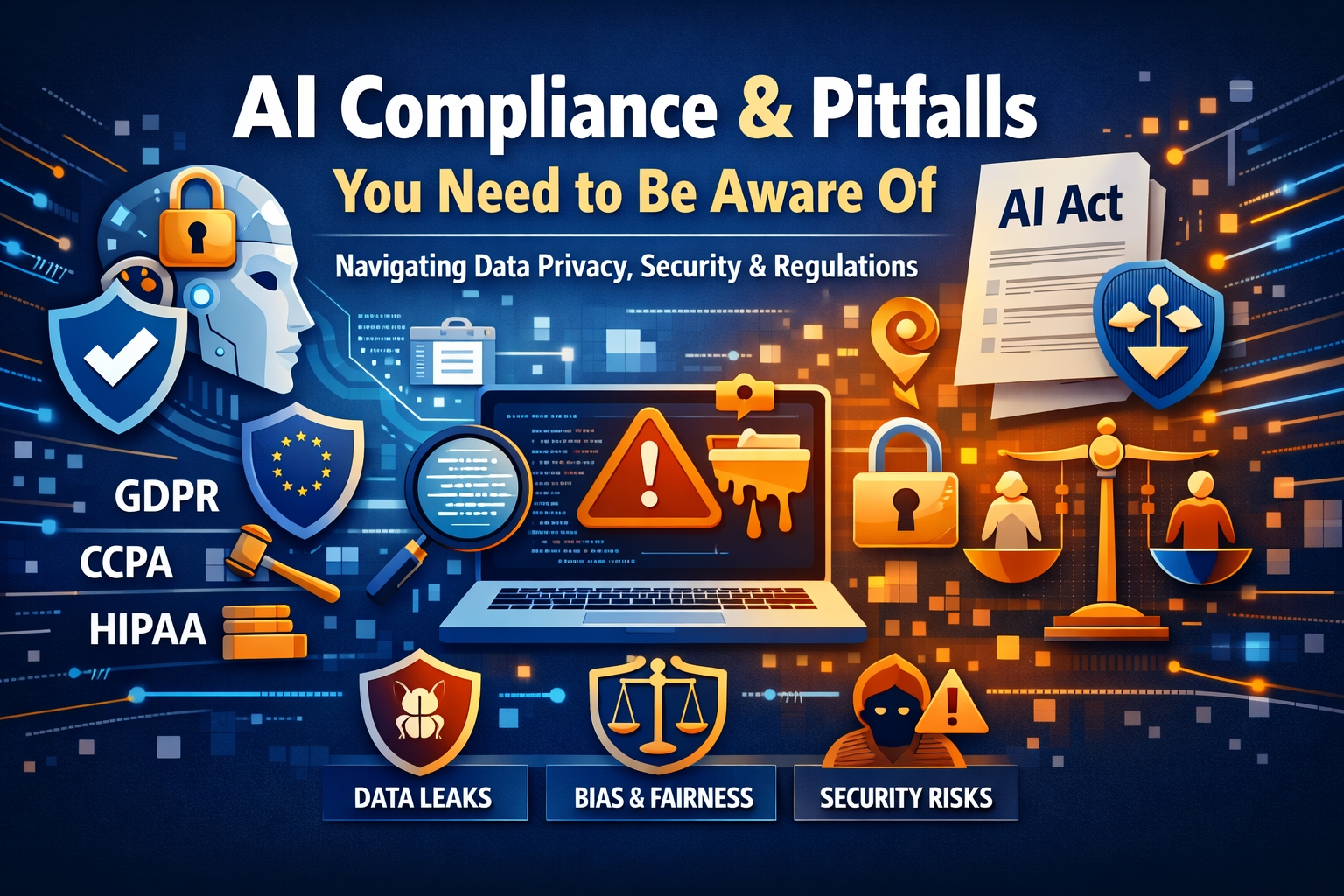
AI Compliance and Pitfalls You Need to Be Aware Of
Embedding AI into a SaaS product also raises important compliance and security concerns. Some of the crucial considerations include:
Data Privacy and Regulations
Any SaaS provider handling customer data must comply with laws such as the GDPR (EU) and the CCPA (California). When using AI, be extra cautious with personal data. For example, the EU’s upcomingAI Act will impose strict rules on AI systems, such as bias testing, transparency, etc.
Under GDPR, users must consent to how their data is used, and AI models may inadvertently store or expose user data. Therefore, use enterprise AI services that do not retain your prompts by default.
Encrypt and anonymize sensitive data before feeding it to a machine learning model. SaaS vendors often need SOC2/ISO27001 certifications, encrypted databases, data minimization policies, and more to meet client requirements.
Industry-Specific Rules
Some industries have additional rules beyond general privacy laws.
Healthcare SaaS must follow HIPAA
Finance SaaS might face FINRA or PCI-DSS requirements.
Also, data residency can matter if your SaaS has European users. Check if special consent or auditing is needed (COPPA for child data, FERPA in education, etc.) before using AI on sensitive datasets.
Security Threats & Data Leakage
AI systems introduce new attack surfaces. Poorly secured LLMs can be tricked by prompt-injection attacks, where an attacker inserts malicious instructions into inputs and causes data exfiltration or hallucinated outputs. In fact, there have been incidents (e.g.ChatGPT leaking other users’ session info) where AI “accidentally” revealed private data, such as ChatGPT leaking other users’ session info.
Never feed credentials or PII directly into AI prompts, and use strict input filtering. The SaaS should treat AI APIs like any other external service. You must enforce strong API key management and network isolation. Also, you must prepare for “shadow AI”, i.e., employees using unauthorized AI tools on company data (which can violate policies). Enforce security measures on prompt histories and limit what data the AI can access.
Model and Output Governance
Many jurisdictions expect transparency and bias control in AI. Ensure your AI feature’s decisions can be explained if audited. Have processes to review and correct biased or harmful outputs. Include disclaimers or opt-outs where appropriate (such as “AI-generated insight, for informational purposes only”).
Privacy laws demand encryption and anonymization, while AI-specific frameworks demand bias testing and explainability. When your SaaS fails to address these, it can lead to legal and reputational damage. Non-compliance fines are hefty, and customers may abandon services if they distrust your AI.
If you’re defining your broader AI strategy and governance, you’ll want to download our Generative AI in Practice whitepaper. It provides SaaS leaders a clear, executive-friendly playbook for planning, governing, and scaling AI. Everything from use-case selection and implementation tiers to governance, risk management, and real-world examples.
Quality and Accuracy Risks
AI outputs aren’t infallible. Hallucinations (fabricated or incorrect responses) are a serious pitfall. Build guardrails to catch them, as these inaccuracies can erode user trust and lead to damaging business decisions. Therefore, proactive quality checks and validation against trusted data sources are non-negotiable components of any AI feature.
AI in SaaS Examples
There are now countless examples of SaaS companies using AI in their workflows. Let’s take a look at a few of them:
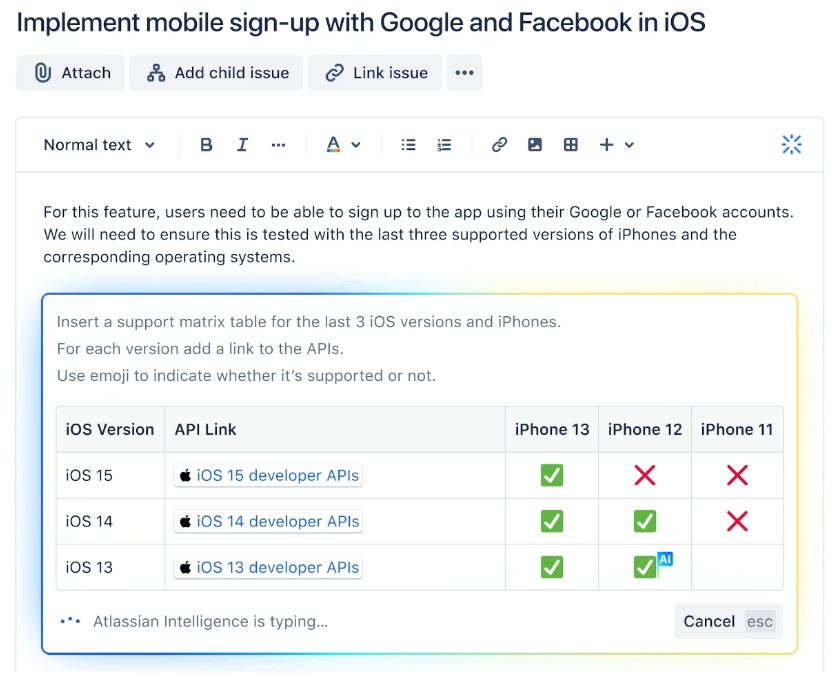
Atlassian Intelligence
Atlassian rolled out generative AI across its tools in late 2023. Users can now instantly create user stories, change content tone, and auto-summarize issues using Atlassian’s AI assistant. Early customers reported strong gains, as one team at Domino’s Pizza said AI turned a 5-page report into a5-sentence recap.
Salesforce Einstein
Salesforce’s Einstein AI has long been an example in SaaS. It uses AI for analytics (predictive lead scoring / churn alerts) and for productivity (conversation insights). For example, Einstein Conversation Insights can auto-generate bullet-point summaries of sales calls, which helps managers pick up on client feedback faster. Salesforce also offers AI to write customer emails or recommend content, which shows how generative AI can accelerate CRM workflows.
Notion AI
The productivity platform Notion added AI tools that suggest templates and write content. It uses AI to recommend templates to new users according to how they have described their workspace. This is a great example of onboarding-by-AI, as users get a personalized setup with just a text prompt.
AI in SaaS FAQs
Is AI integration prohibitively expensive?
No. Cloud-based AI APIs and managed AI services have lowered costs now. Many impactful AI features can be implemented for under $10,000 in direct costs using services like OpenAI, Anthropic, or cloud provider AI services. The greater investment is in data preparation/integration and ongoing refinement, rather than the AI technology itself.
Is AI integration more applicable for enterprise SaaS than scaleups?
No. Enterprises do have more data, but modern AI APIs make AI accessible to startups and scaleups. AI is becoming a baseline expectation across SaaS products of all sizes.
What if our data isn’t clean or ready?
Most companies overestimate their data readiness. Begin with a focused AI use case that requires limited and cleanable data. Use the AI initiative as a catalyst to improve data governance incrementally. Many API-based AI services work well with modest data quality, especially for natural language applications.
How to ensure we avoid any AI compliance violations?
Limit AI access to sensitive data, anonymize PII, use compliant AI vendors, disclose AI usage to users, and follow regional regulations, such as GDPR, HIPAA, or SOC 2.
Should my SaaS use API or build custom AI systems?
For 80% of SaaS companies, APIs provide the best balance of capability and cost. Build custom when AI is your core differentiation, you have unique proprietary data that provides a sustainable advantage, API costs would be prohibitive at scale, or regulatory requirements demand specific controls not available through APIs. Most companies should start with APIs and only build custom when specific needs justify the investment.
How to ensure guardrails limit hallucinations or user distrust?
Prevent hallucinations and build trust through multi-layered guardrails. Use technical controls such as confidence thresholds and knowledge-base verification. Design a transparent UX that labels AI content and allows easy corrections. Maintain human oversight for critical outputs. Keep monitoring performance and user feedback to refine the system and maintain reliability.
Getting ready to integrate AI into your SaaS
AI is no longer a differentiator in SaaS. But the gap between having AI features and operating AI reliably in production is still wide. The difference comes down to execution: how well AI is integrated into your product architecture, data flows, workflows, and governance model.
Successful SaaS teams don’t start with flashy demos. They start with clear use cases, clean data, measurable outcomes, and systems that can scale with customers and regulations. Whether it’s AI-powered search, support automation, decision assistance, or internal tooling, the winners treat AI as part of the product, not an add-on.
This is where having the right implementation partner matters.
For additional tips – check out our video on important questions to ask your potential AI implementation partner.
How Fram Helps SaaS Teams Implement AI
Fram^ has been helping companies design, build, and scale SaaS products for over a decade. And now we can also include AI systems that are production-ready from day one. Our focus is not just on what AI can do, but on how it fits into your SaaS business, technically, operationally, and commercially.
We help SaaS teams with:
Defining high-impact AI use cases tied to product and revenue goals
Designing AI architectures that integrate cleanly with existing SaaS stacks
Implementing systems like SMB and enterprise RAG, agents, and AI workflows with security and governance in mind
Improving data readiness, document hygiene, and evaluation frameworks
Scaling AI features without sacrificing performance, cost control, or trust
Plan Before You Build
If you’re thinking about adding or expanding AI capabilities in your SaaS product, a clear roadmap makes all the difference. We recommend starting with a structured approach that covers use-case selection, architecture decisions, governance, and rollout phases.
For a deeper dive, read our article on AI Implementation Roadmap, where we break down how teams can move from experimentation to production with confidence.
Automated ticket triage is the process of using software to sort, tag, prioritize, and route incoming support tickets with minimal human effort. It turns the first mile of support into a repeatable system. The goal stays simple: get the right ticket to the right team fast, with the right context. Most support teams feel the […]
AI integration works best when product teams start with one measurable workflow, choose the simplest technical pattern, and pilot the feature before full rollout. Artificial intelligence improves software in specific, measurable ways: sharper search, generative content, real-time recommendations, and faster support. But none of those happen by accident. Every gain comes from applying machine learning […]
Every AI coding tool ad ends at the same place: a working product in 48 hours. What they skip is week eight, when real users arrive, payment flows fail silently, and an enterprise prospect asks for your SOC2 documentation. If you’re reading this, you may be somewhere in that gap. Maybe you tried Lovable, Cursor, […]