A business and product guide to what actually needs to change
The question isn’t whether your app supports one new device. It’s whether your product is ready to adapt when the context changes.
Assessing iPhone Duo app readiness starts with a simple question: can your existing product adapt when the context changes? Apple’s iPhone Duo introduces a change the iOS ecosystem has rarely had to manage: a screen that changes shape while the user is using it.
An app can move from a compact outer display to a much larger inner screen, operate beside another app, and transition between different device positions within the same session.
For businesses with an existing iOS app, the immediate reaction may be: Do we need to redesign our app?
For most businesses, not necessarily.
The more useful question is: How exposed is the current product to this new form factor, and how much investment is commercially justified?
That distinction matters. An app may technically run on iPhone Duo without delivering an experience that works particularly well. On the other hand, rebuilding an entire product simply because a new device exists could mean investing heavily before there is a meaningful user or business case.
The right response starts somewhere in between: understand the exposure, protect the journeys that matter, and then decide where adaptation can create real product value.
What Actually Changes for Your App?
For years, most iPhone apps have been designed around a dependable assumption: the interface lives inside one relatively stable rectangle.
iPhone Duo changes that assumption.
The same product may now need to work across a compact outer display, an expansive inner display, partially folded positions, and a reduced window when another app is running beside it.
The app needs to respond to the space available, rather than assume what the device looks like.
More space does not mean stretching the current interface
When the device opens, simply making the existing mobile interface wider is rarely the best use of the additional space.
A retail app could keep the product list visible while showing product details beside it. A productivity app could display a document alongside comments. A financial app could keep transaction history visible while showing the selected transaction in detail.
The opportunity is not to put more things on screen. It is to reduce unnecessary navigation and preserve context while users complete a task.
The fold becomes part of the interface
The physical division between the two sides of the display, camera hardware and system controls create regions that interfaces need to respect.
According to Apple’s guidance for preparing apps for iPhone Duo, standard navigation containers and presentations adapt across iPhone Duo poses, while custom, manually positioned interfaces require more deliberate handling of safe areas and reserved regions.
This makes custom popups, maps, charts, cameras, floating controls and heavily customised navigation particularly important areas to test.
The app must work when space becomes smaller too
The challenge is not only what happens when the screen gets bigger.
iPhone Duo supports Split View multitasking, where two apps can share the inner display. An interface that looks polished at full width may still fail in the reduced window, particularly when forms, toolbars or primary actions depend on fixed widths.
So readiness cannot be judged by looking at the app on the largest possible screen alone. It has to work as the available space changes.
Your App May Run and Still Not Be Ready
Compatibility is not binary. An existing app may launch successfully while still exposing layout, usability or continuity problems.
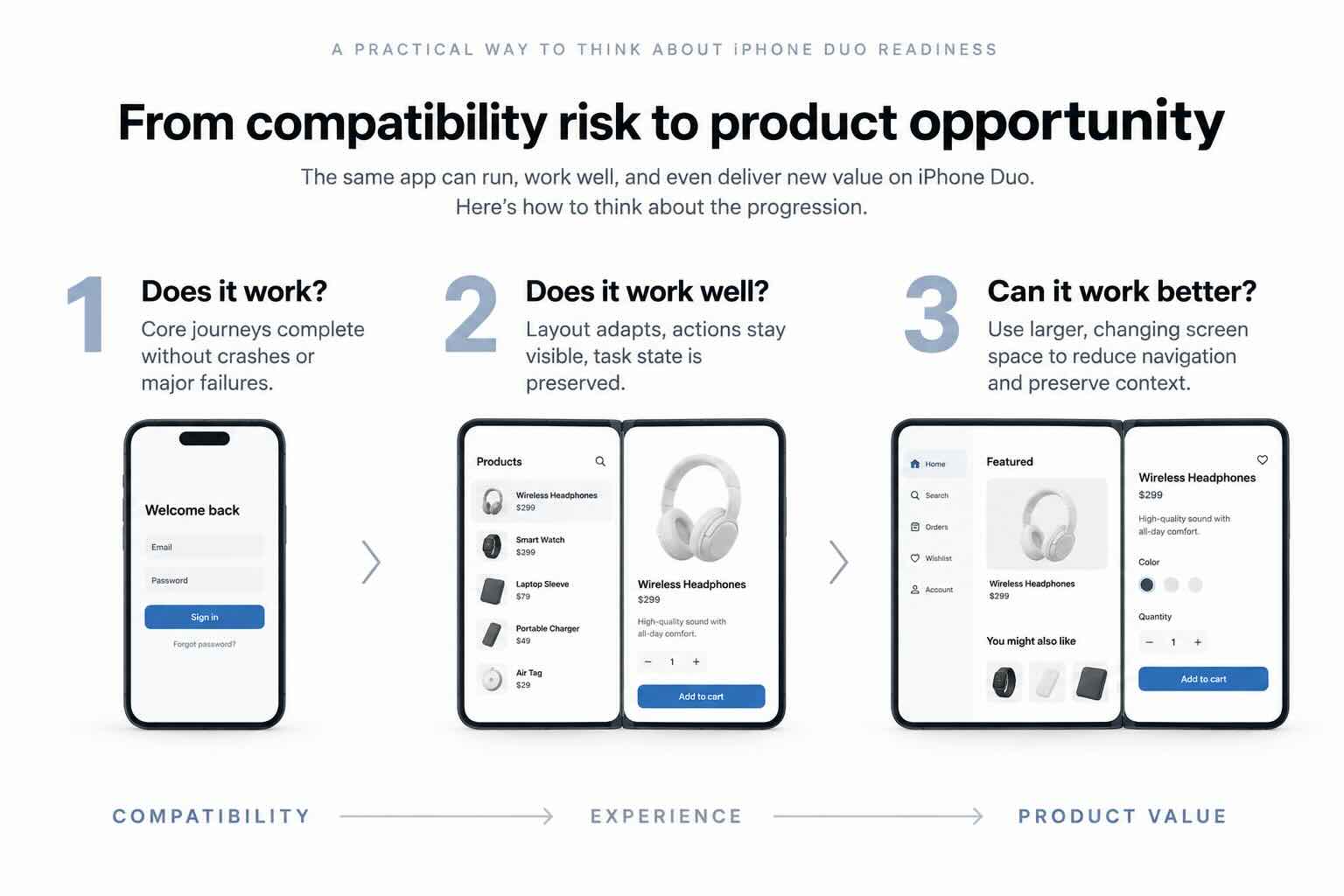
1. Does it work?
Can users launch the app and complete essential tasks without crashes or major interface failures? This is the minimum standard.
2. Does it work well?
Does the interface adapt naturally when available space changes? Are important actions still visible? Does the app preserve the user’s progress when the device opens, closes or shares the screen with another app? This is where compatibility becomes an experience question.
3. Can it work better?
Can the larger display enable users to complete important tasks more easily? Could related information remain visible instead of forcing users to move repeatedly between screens? Could a workflow that previously required several navigation steps become simpler? This is where iPhone Duo moves from compatibility risk to product opportunity.
Businesses should not jump to the third question before answering the first two.
Figure 1. From compatibility to product value.
Where Existing Apps Are Most Exposed
Not every visual imperfection deserves an immediate redesign.
A border around an otherwise functional screen is primarily a presentation issue. A hidden confirmation button during checkout is a business issue.
Common areas worth testing include:
Buttons or form fields clipped by fixed widths
Images stretched or cropped around the wrong focal point
Dialogs or floating controls appearing across the fold
Primary actions hidden by the keyboard or repositioned navigation
Text and lists becoming awkwardly sparse on the open display
Scroll position, selections, carts or form data being lost when the device changes state
The highest-priority journeys are those with a high cost of interruption: login, registration, checkout, payment, booking, financial transfers, content creation, forms and document editing.
If a screen looks slightly awkward after the user opens the device, that is undesirable. If their cart, form or transaction disappears, that is a materially different problem.
This is why iPhone Duo app readiness should be assessed through real user journeys, not a collection of static screens.
How Much Should Your Business Care Right Now?
Not every business needs to react at the same speed. The answer depends less on iPhone Duo itself and more on your product, your users and the role your digital experience plays in the business.
How important are iOS users to the business?
If iOS represents a meaningful share of customer activity, transactions or revenue, compatibility problems deserve greater attention.
How costly is an interrupted journey?
Products involving payments, bookings, transfers, data creation or other high-value actions have less tolerance for interface failures.
How exposed is the current product?
Apps relying heavily on custom interfaces, fixed layouts or assumptions about screen dimensions may require more testing and adaptation than products built around standard adaptive components.
Who is likely to use the device?
If a commercially important customer segment is likely to adopt premium Apple hardware early, there may be a stronger case for earlier optimisation.
The result should not simply be “support Duo” or “don’t support Duo.” It should tell the business how much exposure exists and what level of response is justified.
If initial customer exposure is low, ambitious Duo-specific features can reasonably wait until real usage data supports the investment. Critical failures should not.
Three Levels of Investment
Level 1: Protect the business through compatibility
Start with the basics. The app should launch reliably, avoid crashes, keep critical actions accessible, preserve task state and allow users to complete essential journeys across relevant screen conditions. For many businesses, this is the only urgent requirement. The objective is risk reduction.
Level 2: Optimise the experience
Once critical journeys are protected, teams can improve how the product responds to different spaces. This can include adaptive navigation, more appropriate layouts for the open display, correct treatment of safe areas, preserved media proportions and reliable continuity as the device opens and closes. The objective is not to create a separate iPhone Duo app. It is to make the existing product more adaptive through thoughtful product design and mobile app development.
Level 3: Differentiate through product value
Only then should the larger display become a platform for new experiences. The useful question is not what else can we put on the screen, but what can users now do more easily? That could mean comparing information without repeatedly moving between screens, keeping supporting context visible during a task, or using side-by-side workflows that previously required several navigation steps. These are product hypotheses, not guaranteed commercial benefits. They should be tested and measured accordingly.
Where Could the Larger Display Actually Create Value?
E-commerce and retail
For retailers, the immediate risk sits around product discovery and checkout. Product grids, imagery, filters, carts and payment flows need to remain reliable first. Once those journeys are stable, the open display could make comparison easier by keeping a product list visible beside product details, or allowing imagery and variant selection to remain visible together. The goal should be fewer unnecessary transitions, not more promotional clutter.
Financial services
A clipped control is inconvenient in many apps. In a financial transaction, it can stop the journey entirely. Forms, keyboards, authentication messages and transaction controls therefore need to remain clear and accessible while state is preserved. A two-pane experience could place transaction history beside transaction details or supporting analysis, but clarity, security and continuity should always take priority over novelty.
Content, social and media
More screen does not necessarily mean more room for the content itself. A larger, more square display may not suit every media format, so stretching or cropping content simply to fill the space can work against the experience. Surrounding areas can instead hold useful context such as comments, playlists, transcripts or creation controls.
Productivity and collaboration
Productivity products may have one of the clearest opportunities to benefit from the open display. Documents and comments, messages and details, meetings and notes, or lists and selected items can remain visible together. But a larger screen does not automatically turn an existing iPhone app into a tablet-class product. The workflow still requires deliberate product and engineering decisions.
What Should Your Business Do Now?
1. Audit
Test how the current app behaves across the outer display, open inner display, relevant folded positions and two-app mode. Do not stop at the homepage. Follow complete customer journeys, particularly those involving transactions, forms, data creation and state changes.
2. Prioritise
Rank issues by business consequence. Login, checkout, payments, transfers, bookings and data creation deserve attention before lower-impact visual imperfections. Then identify technically exposed areas such as custom popups, charts, maps, cameras, floating controls and heavily customised navigation.
3. Test
Test layout behaviour, larger text settings, keyboard interactions, popups, navigation, app switching and state restoration. Simulation can identify many layout problems quickly. Physical hardware remains valuable for validating grip, touch targets, camera use and interactions around the fold.
4. Decide
Separate findings into three buckets: what must change for compatibility, what should change to improve the experience, and what could change to create new product value. Only then should the business estimate the size of the investment. Effort can vary significantly depending on architecture, custom components, frameworks, test coverage and redesign ambition. A credible estimate should therefore follow the audit rather than begin with a generic price for making an app “Duo-ready.” Fram’s digital consultancy approach follows the same principle: understand the product and business needs before defining the solution.
Measure the Outcome, Not Just the Release
Shipping an update is not evidence that the investment worked. Before release, establish a baseline for the journeys being changed. After release, monitor relevant indicators such as:
Crash rate and reported interface defects
Completion rate for critical journeys
Conversion where commercially relevant
Time required to complete key tasks
Number of unnecessary screen transitions
Adoption of new adaptive workflows
Support tickets and customer feedback
Device-level ratings and retention signals
This is particularly important for more ambitious Duo-specific experiences. A two-pane checkout or side-by-side productivity workflow may appear better in a design review. Whether it actually makes the user’s task easier is something the product needs to prove.
A Sensible Investment Timeline
Time horizon
Priority
What can wait
Next quarter
Verify core journeys, fix critical defects, preserve state and test relevant window conditions.
A full visual redesign driven mainly by novelty.
6 to 12 months
Measure adoption and device-level behaviour, then test one or two adaptive workflows where the larger display could materially improve an important task.
A broad portfolio of device-specific features without validated demand.
Longer term
Make adaptive layout a product standard across different window sizes, multitasking modes and future devices.
A separate product branch unless there is a clear operational need.
The short-term objective is iPhone Duo readiness. The longer-term value is something much bigger: a product that can adapt as devices and usage contexts continue to change.
Don’t Market the Specification. Market What Users Can Do Better.
If your team does invest in an improved iPhone Duo experience, “Now supports iPhone Duo” is not much of a customer proposition.
Instead, communicate the benefit. Can customers compare products without constantly moving backwards and forwards? Can users take notes without leaving a meeting? Can they review information while keeping the source visible? Can an important task now be completed with fewer steps?
Technology is relevant when it changes what users can accomplish. The same principle should guide both product development and how the update is communicated.
Frequently Asked Questions
Will our current app stop working on iPhone Duo?
Not necessarily. Existing apps may continue to run through compatibility support. Testing is still required because launching successfully does not guarantee that critical journeys work correctly.
Does the entire app need an immediate redesign?
No. Start with an audit and correct defects that threaten core tasks. A deeper redesign makes sense when the larger display enables a valuable use case or when the existing interface relies heavily on fixed assumptions.
How long will the work take and what will it cost?
There is no useful standard figure. Cost and effort depend on the architecture, number of custom screens and components, framework support, testing requirements and the ambition of the redesign. A focused readiness assessment should come before a formal estimate.
Should we build features available only on iPhone Duo?
Only when they solve a validated user need and their value can be measured. Where possible, prefer adaptive features that work across multiple screen sizes and contexts. Device-specific behaviour makes sense when the form factor enables something other devices cannot reasonably provide.
If adoption is initially low, should we wait?
Differentiated features can wait. Critical failures should not. Secure compatibility first, then use device and behavioural data to determine whether deeper optimisation is justified.
The Bigger Question Isn’t Really About iPhone Duo
iPhone Duo may be the immediate trigger, but the product question is bigger than one device.
Foldables, multitasking and changing window sizes challenge one of the assumptions mobile products have relied on for years: that an interface can be designed around a predictable screen.
The durable investment is not a separate product version for every new form factor. It is an adaptive product architecture that understands the space available and responds appropriately as the user’s context changes.
The first question should not be “How much will it cost to redesign our app for iPhone Duo?” It should be “Where is our product exposed, and where could adaptation create meaningful value for our users?”
Answer that first. Then decide what deserves investment.
Find Out Where Your App Stands
Not sure how your current iOS app will perform on iPhone Duo? Fram can help you move from uncertainty to a clear product decision.
Our iPhone Duo App Readiness Assessment looks beyond basic compatibility. We review your critical user journeys, interface architecture and adaptive behaviour to identify where the experience may break, where optimisation is worthwhile, and where the new form factor could create meaningful product value.
From there, Fram can support the next step based on what your product actually needs, whether that means targeted compatibility fixes, UX and interface optimisation, technical implementation, or exploring new adaptive experiences that make better use of the larger display.
The goal isn’t to redesign for the sake of a new device. It’s to help you make the right level of investment, in the right areas, at the right time.
Whether your app needs a few targeted fixes or a more adaptive product experience, Fram can help you determine what is worth changing now, what can wait, and where further investment can create real value.
Progressive Web Apps (PWAs) and native mobile applications represent two distinct approaches to delivering mobile experiences. Both aim to provide engaging, functional apps, but they differ in development, capabilities, and user experience. Choosing between them is an important decision for any business looking to launch or upgrade a mobile solution in 2025. PWAs deliver fast, […]
In the app development world, there’s this ongoing debate—should you go all out for the perfect app or race to launch it quickly? It’s a tough call, and developers often find themselves caught between the two. In this blog, let’s unpack the pros and cons of each approach to help developers navigate this tricky decision. […]
Mobile apps have become a crucial part of our daily routines in today’s ever-changing tech scene. From communication to entertainment and productivity, apps play a crucial role in shaping our digital experiences. However, as the app ecosystem continues to expand, it’s essential to prioritize digital accessibility and inclusivity to ensure that everyone, regardless of ability, […]