PWA vs Native Apps: Which is Better For Developers and Customers?
October 6, 2025
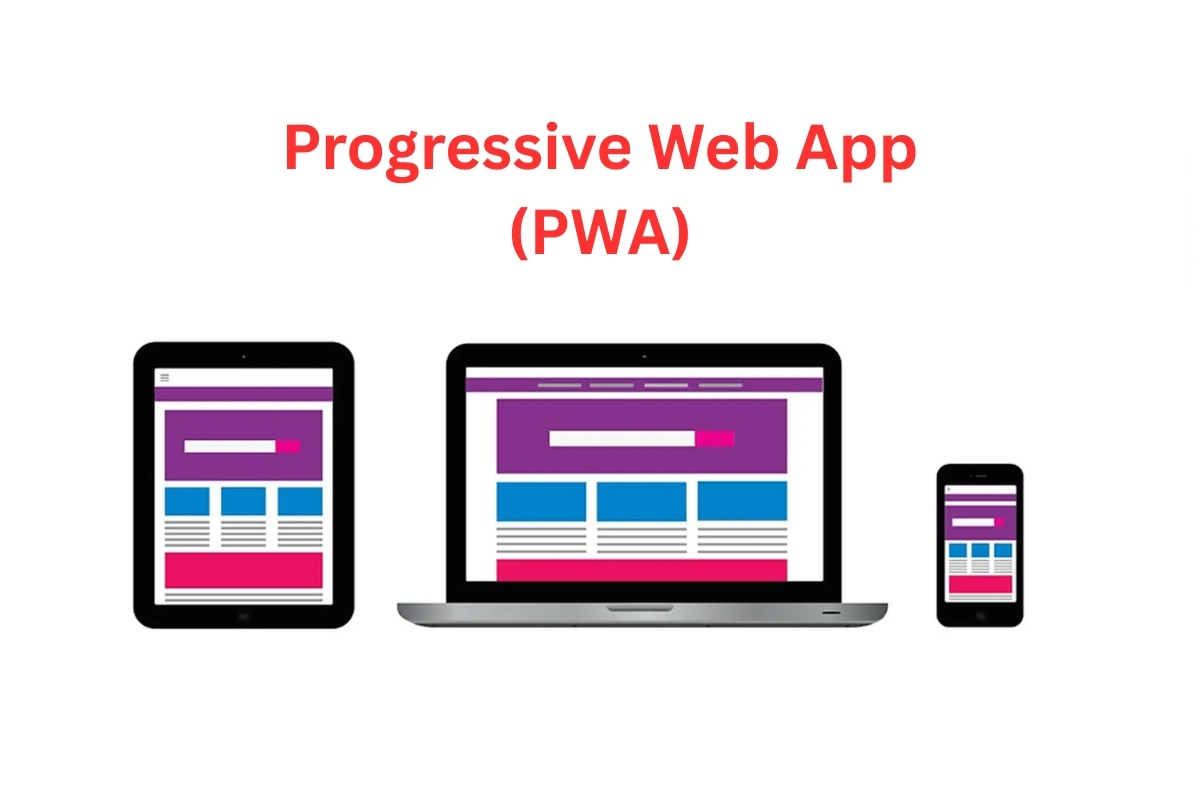
Progressive Web Apps (PWAs) and native mobile applications represent two distinct approaches to delivering mobile experiences. Both aim to provide engaging, functional apps, but they differ in development, capabilities, and user experience.
Choosing between them is an important decision for any business looking to launch or upgrade a mobile solution in 2025. PWAs deliver fast, web-based experiences on any device and are cost-effective, while native apps offer high performance and deep device integration. The best choice depends on your goals, budget, and audience.
Key Differences between Progressive Web Apps (PWA) and Native Apps
PWA
Native
Development
Web-based
Mobile
Performance
Good but browser-dependent
Excellent, platform-optimized
User Experience
Consistent look and feel across multiple platforms
Specific UI for each platform
Installation
No Installation required, can be easily added to the home screen
Needs to be installed from app stores
Storage requirements
Minimal
Needs more storage for installation
PWAs operate in browsers and are accessible via URLs, while native apps require platform-specific development and distribution through something like the Android or Apple’s iOS app stores.
The key differences include:
Development architecture: PWAs utilize web technologies like HTML, CSS, and JavaScript with service workers for offline functionality, whereas native apps are built using platform-specific languages such as Swift for iOS or Kotlin for Android.
Performance characteristics: Native apps generally deliver superior performance due to direct hardware access and platform optimization, while PWAs depend on browser efficiency and may experience some performance overhead.
Installation: Native apps require app store approval and distribution, creating potential delays but offering discoverability benefits. PWAs can be deployed instantly and shared via URLs without app store gatekeeping.
Resource requirements: PWAs consume minimal device storage since they primarily cache essential data, while native apps require full installation and consume significantly more storage space.
Progressive Web Apps (PWA) Pros and Cons
Progressive Web Apps represent a hybrid approach that bridges the gap between traditional websites and native mobile applications. PWAs leverage service workers, web app manifests, and HTTPS protocols to deliver app-like experiences directly through web browsers. These applications can function offline, send push notifications, and be installed on device home screens without requiring app store distribution.
Advantages
Costs
PWA development costs represent 50-70% savings compared to native app development. This cost advantage stems from the single codebase approach that works across multiple platforms simultaneously.
SEO Advantages
Unlike native apps, PWAs are discoverable through a search engine index since they function as enhanced websites. This organic discoverability can drive significant traffic without relying solely on app store visibility.
No Installation Required
Users can access PWAs immediately through browsers and add them to home screens without downloading from app stores. This approach reduces user acquisition barriers as every additional step in the traditional app store installation process introduces friction and increases the risk of user drop-off.
Consistent look and feel
A single PWA works seamlessly across iOS, Android, desktop, and other mobile devices with browser support.
Instant updates
PWAs update automatically whenever users access them, ensuring everyone uses the latest version without manual update processes.
Disadvantages
Limited device features
PWAs cannot access many of the native device features like Bluetooth, Face ID, Touch ID, advanced camera functions, and native social features. And on iOS, these limitations are particularly restrictive.
Battery drain
Research indicates that web-based applications consume49% more CPU resources and significantly more battery power than native equivalents due to browser processing overhead.
iOS limitation
Apple’s Safari imposes strict restrictions on PWAs, including 50MB storage limits, no push notifications on older iOS (pre-2023), limited background processing, and potential data eviction after periods of inactivity.
Performance constraints
While PWAs perform well for basic functionality, they may struggle with complex animations, intensive computations, or applications requiring high frame rates.
Aspect
Advantages
Disadvantages
Development
Single codebase for all platforms, 50-70% cost reduction
The online store run by one of the largest e-commerce companies in Japan invested on PWA, making their web app installable. They achieved striking results in just one month: visit frequency per user rose by 310% compared to other web users, visitor retention improved by 450% over the previous mobile web flow, sales per customer climbed 150%, and conversion rates doubled.
This Indonesian e-commerce platform’s PWA implementation increased its overall mobile conversion rate by 53%, achieved 200% higher conversions for installed users, and increased daily active users by 26%.
According to official Google documentation, the in-browser video editor saw 9% higher user retention with its PWA compared to standard desktop app users, and PWA installations increased at 97% each month during the first five months.
Native Apps Pros and Cons
Native applications are built specifically for individual operating systems using platform-dedicated programming languages and development frameworks. These apps are compiled directly for the target platform, providing direct access to hardware components and operating system APIs. Native apps require separate development efforts for iOS (using Swift/Objective-C) and Android (using Kotlin/Java), but deliver platform-optimized performance and user experiences.
Advantages
Highly interactive
Native apps deliver superior performance with smooth animations, immediate responsiveness, and optimized resource management. They achieve near-instantaneous user interactions because they’re compiled directly for the target platform’s hardware architecture.
Security
Native applications benefit from platform-specific security features built into iOS and Android. These include secure storage mechanisms, biometric authentication integration, multi-factor authentication, and protected communication channels.
Interact directly with native functions
Native apps can access all device capabilities, including advanced camera features, Bluetooth connectivity, NFC payments, GPS sensors, accelerometers, and platform-specific APIs like Apple’s HealthKit or Android’s ML Kit.
Monetization
Native apps support diverse revenue models, including in-app purchases, subscription services, premium app sales, and sophisticated advertising integrations through platform-specific ad networks.
Disadvantages
Higher development cost
Native app development typically has a higher price range depending on the specific needs. One big reason for this is the need for separate development teams for iOS and Android.
Extended development time
Native development requires more time than PWAs. The complexity of building platform-specific versions and testing across multiple devices extends project timelines.
Ongoing support requirements
Native apps demand continuous maintenance and updates for new OS versions with platform-specific bug fixes. And annual maintenance typically costs 15-20% of the original development investment.
App store dependencies
Native apps must navigate app store approval processes, which can be unpredictable and time-consuming. Apps face potential rejection and must comply with constantly evolving store policies.
Great Native App Examples
AllEasy Pay
fram^ developed a native app for both iOS and Android that delivered an all-in-one mobile app that lets users pay bills, purchase prepaid mobile load and RFID, transfer funds wallet-to-wallet, and make QR code payments. The native app also provides enhanced security – an essential requirement for financial services. And was just one of the successful projects we worked on for All Value Group.
fram^ built native mobile apps to streamline sales pipelines, multi-tenant management, and client onboarding. The solution improved user experience and empowered teams with responsive, platform-native features, leading to swift deployment and scalability.
With our native app, Grace.Health and its users enjoy security, real-time data sync, and streamlined communication. This reduces manual admin and improves engagement, proving native’s advantage in speed, reliability, and custom medical functionality.
How Does PWA vs Native App Development Compare?
Development Costs
PWA development proves to be significantly more economical. The single codebase approach eliminates duplicate development efforts across platforms.
Native app development requires substantially higher investment. As mentioned, the need for separate iOS and Android teams drives these higher costs, and the requirement for ongoing maintenance also contributes to the high cost.
Distribution
PWAs bypass traditional app store gatekeeping. They can be deployed instantly via web servers and shared through URLs. Users discover PWAs through search engines, social media, or direct links.
Native apps depend on app store ecosystems. Distribution requires approval from Apple’s App Store and Google Play Store. While this creates potential delays and compliance requirements, it also provides access to established user bases and integrated payment systems.
Security
PWAs require additional security measures. Developers must implement HTTPS encryption, secure authentication token management, and protect against web-based vulnerabilities. The browser environment provides some security, but additional precautions are necessary.
Native apps benefit from platform-level security. iOS and Android provide built-in security features, including app sandboxing, encrypted storage, and secure communication channels. Platform-specific security APIs offer robust protection mechanisms.
Monetization
PWA monetization relies on web-based strategies. These include subscription services, web advertising, direct payments through services like PayPal or Stripe, and freemium models with premium content.
Native apps support diverse monetization options. In-app purchases, platform-specific subscription services, native advertising networks, premium app sales, and sophisticated analytics for optimization provide multiple revenue streams.
Discoverability
PWAs excel in organic discovery via web searchability. For example, search engine optimization drives traffic, social media sharing increases reach, and direct URL sharing facilitates user acquisition without app store dependencies.
Native apps leverage app store visibility: Featured placements, category rankings, and recommendation algorithms can drive downloads, but competition is intense and store optimization requires ongoing effort.
PWA vs Native App: Which Is Better For Your Users?
Functionality Comparison
PWA functionality
PWAs are well-suited for web applications that need essential mobile app features like push notifications and easy access from the home screen. Ideal scenarios include:
Food & beverage ordering apps
Hotel and travel booking apps
Loyalty program apps
Dating apps
These use cases benefit from PWAs’ fast loading, offline capabilities, and lightweight installations without needing full native app complexity.
Native App functionality
Native apps are necessary when web technology falls short, especially for:
Gaming apps requiring advanced graphics
Heavy augmented or virtual reality applications
Apps needing Bluetooth, NFC, or other deep device integrations
Highly secure apps (e.g., banking) that require features like blocking screenshots and recording
Native apps deliver full device access and robust security, which are needed for rich, complex user experiences beyond the capabilities of PWAs.
Performance Characteristics
Native apps generally deliver higher performance and smoother animations, especially for complex interactions. PWAs perform reliably for most everyday use cases and continue to improve as browsers evolve.
Offline use
Both can cache data for offline use. Native apps can store larger amounts and sync in the background more seamlessly, while PWAs’ offline capability depends on the service worker setup and may be more limited on iOS.
Which Is Better For Your Needs: PWA or a Native App?
When deciding between a Progressive Web App (PWA) and a native app, consider the following key factors aligned with your business needs:
Budget and timeline: How much can you invest, and how fast do you want to launch? PWAs are ideal for limited budgets and quick market entry (6-10 weeks). For investments over $150,000 and longer timelines (12-20 weeks), native apps offer optimized quality.
Feature requirements: Do your users need only basic app functions like push notifications and offline access? PWAs are suitable. If your app requires advanced device capabilities such as biometric security, Bluetooth, or AR, native apps are better.
Target audience: Are you aiming for a wide, cross-platform reach or a platform-specific user base? PWAs suit broad audiences, while native apps deliver tailored experiences to specific platforms.
Monetization strategy: Web-based revenue models like subscriptions and ads work well with PWAs. If in-app purchases or app store marketing are critical, native apps are preferable.
Business goals: Are you focusing on rapid user acquisition and SEO benefits, or on premium user experience and deep integration? PWAs excel for growth and visibility; native apps deliver high-quality, feature-rich experiences.
Decision Factor
When to Choose PWA
When to Choose a Native App
Budget
Limited
Willing to invest for higher cost and time
Timeline
Need to launch quickly
Can allow 12-20 weeks or more for development
Core Features
Basic functionality enough
Advanced hardware integration & platform features needed
Audience Reach
Broad, cross-platform
Platform-specific, high engagement
Monetization Model
Web-based ads, subscriptions
In-app purchases, app store dependency
Business Priority
Speed to market, SEO, accessibility
Best UX, security, rich features
FAQ: Progressive Web Apps vs Native Apps
When should you not use PWA?
Don’t use PWAs if your app needs deep device access (Bluetooth, biometric security, complex camera use, or native sharing). Apps focused on iOS push notifications, extensive offline use, or graphic/CPU-heavy tasks like gaming should be native.
Which is better for eCommerce?
PWAs work best for most eCommerce sites due to their broader reach, SEO opportunities, and lower costs. Choose native only if your shop needs advanced payment tech, heavy offline browsing, or AR/VR.
Should I make my website a PWA?
Convert content-rich, frequently visited, or mobile-heavy websites to PWAs for better speed, offline use, and mobile UX. PWAs suit most modern business sites.
What’s the difference between a PWA and a web wrapper?
A PWA is built with modern web standards for offline use, push notifications, and native-like features. A web wrapper is just a browser-view packaged as an app with no enhancements.
Want fram^ to Help You Develop a PWA or Native App?
The choice between Progressive Web Apps and native applications ultimately depends on your specific business requirements, target audience, and development resources.
Many successful companies adopt a hybrid approach, starting with PWAs to validate market demand and developing native apps as their user base grows and requirements become more sophisticated. This staged strategy allows businesses to minimize initial risk while preserving the option to leverage native capabilities when justified by user adoption and revenue potential.
Atfram^, we analyse your requirements and propose the best approach for our clients. Besides PWAs and Native apps, we also leverage React Native for hybrid development because it balances cost efficiency and robust functionality. Contact us today to bring your digital vision to life!
A business and product guide to what actually needs to change The question isn’t whether your app supports one new device. It’s whether your product is ready to adapt when the context changes. Assessing iPhone Duo app readiness starts with a simple question: can your existing product adapt when the context changes? Apple’s iPhone Duo […]
In the app development world, there’s this ongoing debate—should you go all out for the perfect app or race to launch it quickly? It’s a tough call, and developers often find themselves caught between the two. In this blog, let’s unpack the pros and cons of each approach to help developers navigate this tricky decision. […]
Mobile apps have become a crucial part of our daily routines in today’s ever-changing tech scene. From communication to entertainment and productivity, apps play a crucial role in shaping our digital experiences. However, as the app ecosystem continues to expand, it’s essential to prioritize digital accessibility and inclusivity to ensure that everyone, regardless of ability, […]