Your Cloud Migration Checklist for Steps, Strategies, and Cost-Saving Tips
October 14, 2025
Global spending on cloud migration services is projected to climb from about $232 billion USD in 2024 to more than $800 billion USD by 2029, a growth rate of around 28 percent annually. Surveys also show that over 90 percent of companies already run at least some workloads in the cloud, and many plan to move half or more of their applications within the next twelve months.
These numbers highlight two facts. The shift to public and hybrid cloud is well underway, and organizations that delay migration risk higher costs and slower delivery than their peers. But speed alone is not enough. A rushed move can create new security gaps, runaway bills, and vendor lock-in.
This article will outline the cloud migration steps and strategies you can take to avoid such headaches.
You do not need one method for every workload. Pick the right method per system. Tie each choice to a concrete goal, such as time to value, risk tolerance, and required change to the codebase.
Which strategy fits your stack? Pick the one that aligns with your business goals, time frame, and risk tolerance.
Rehosting
Rehosting, often called lift and shift, moves applications and data from on-premises servers to cloud compute with little or no code change. It is fast and works well for large portfolios that need quick moves out of a data center.
The wins come from quicker disaster recovery options, faster provisioning, and simple cost-saving measures like right-sizing and off-hours scheduling.
Risks include carrying over legacy limits, such as chatty databases or brittle file paths. Use rehosting for stable systems that already meet needs and for short timelines.
Refactoring
Refactoring restructures code to remove technical debt and to fit cloud computing patterns. Common tasks include breaking out shared services, upgrading libraries, or extracting modules for container use. Refactoring is slower than lift and shift, but it improves reliability and performance.
It sets up a clean CI/CD pipeline and grants better scaling on the public cloud. Use it for applications with long life and clear pain in maintenance or speed.
Replatforming
Replatforming swaps some components for managed cloud services without deep code rewrites.
Move databases to managed services, switch to managed file storage, or adopt a managed message bus. The team keeps core code but avoids the pain of patching and backups.
This path often brings faster wins in High Availability and disaster recovery. Plan for performance testing, as managed tiers can change latency and throughput.
Repurchasing
Repurchasing moves from a custom system to a SaaS platform. Examples include shifting CRM, email systems, or IT service desk tools.
You trade custom control for faster updates and lower run cost for that function. Review data migration needs, API limits, and single sign-on options. Confirm the vendor’s compliance posture before you move regulated data.
Replacing
Replacing means building a new, cloud-native system that supersedes the old one. Teams pick this route for legacy systems that block change or fail to meet basic needs. You may pair this with a cloud-native data platform for analytics, streaming, or machine learning.
This path calls for strong product management, careful data migration planning, and staged releases. Start with the smallest set of features that meet clear business goals and add more after you prove value.
Essential Cloud Migration Steps
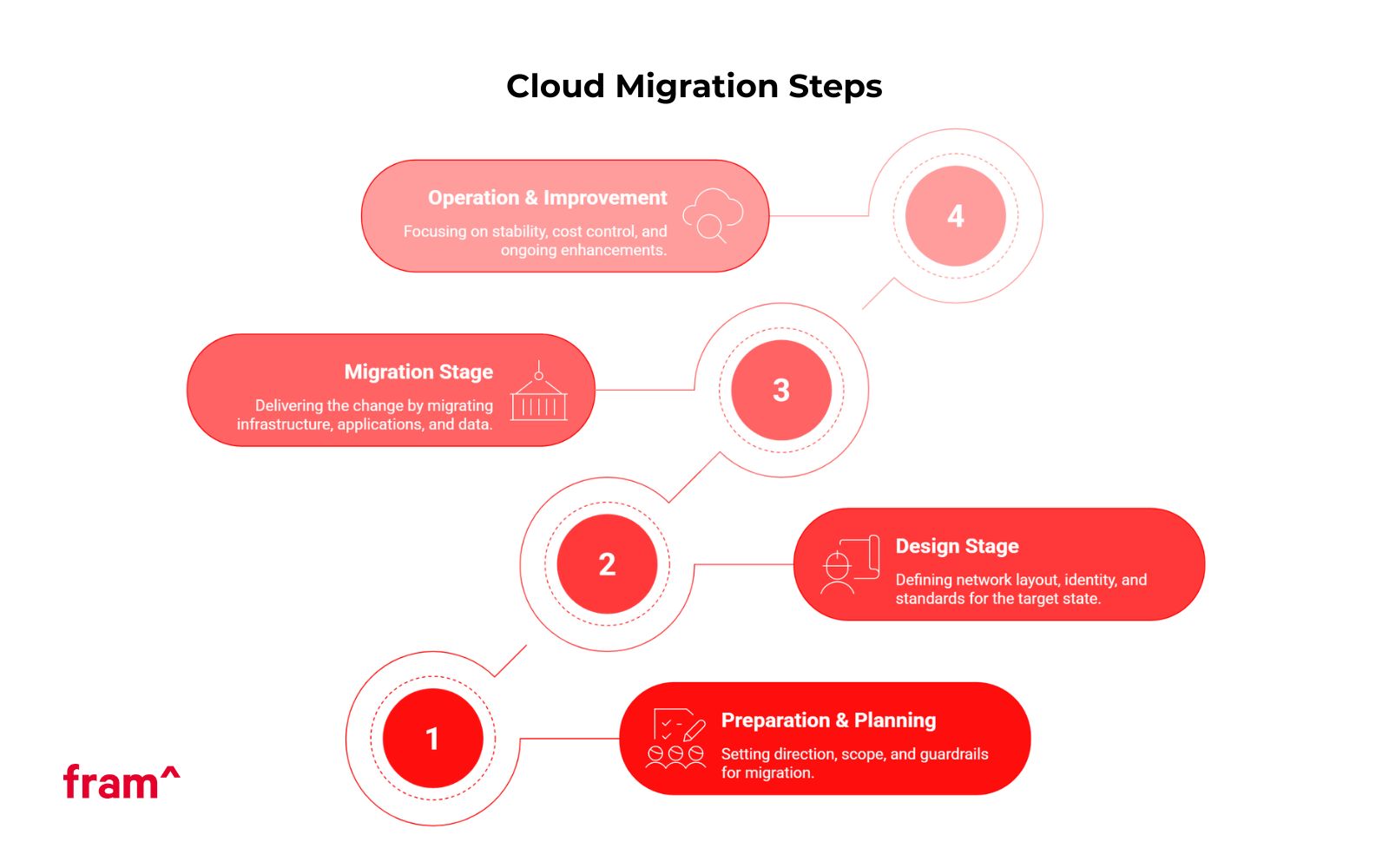
A steady migration process follows four stages. Each stage has clear outputs that feed the next stage. Keep stakeholders aligned with simple status reports that tie progress to business goals.
1: Preparation and Planning Stage
The planning stage sets direction, scope, and guardrails. It is where you build your cloud migration plan, agree on success metrics, and select the first wave of systems.
List all legacy system weaknesses
Create a full inventory of applications, databases, file storage, batch jobs, and email systems. Map dependencies across network, identity, and data flows.
Note end-of-life software, hard-coded paths, cron jobs, and manual runbooks. Capture non-functional needs such as high availability targets, recovery time objectives, and recovery point objectives. Record data classification and current security measures.
Internal and competitor analysis of the current system landscape
Score each workload on business value, change rate, and risk. Review internal incidents and performance gaps. Compare your release speed, uptime, and cost per user against peers where public data exists. Use this to pick the first migration cohort. Quick wins build trust and free budget.
Forecast cloud infrastructure trends
Plan for the next 24 to 36 months. Expect more managed databases, more serverless options, and stronger defaults for identity and encryption.
Track price trends for storage and compute tiers across Amazon Web Services, Microsoft Azure, and Google Cloud. Bake this view into your migration strategy so your plan does not age out mid-program.
2: Design Stage
Design turns goals into a working target state. You will define network layout, identity, guardrails, landing zones, and the standards the team will follow.
Choose your migration partner
Pick a partner with clear playbooks and references in your industry. Ask for sample cutover plans, rollback steps, and cost tracking templates. Agree on roles and an RACI. Keep ownership of your cloud accounts and keys. A partner should transfer knowledge to your team, not hold it.
Select the appropriate cloud vendor and deployment model
Decide on public cloud, private Cloud, or hybrid cloud per system. Public cloud speeds delivery and brings broad services. Private Cloud fits tight latency or data residency needs. Hybrid cloud often serves as a bridge from the data center to cloud-based infrastructure.
Compare core features across AWS, Azure, and Google Cloud. Look at network reach, managed services, price models, and local regions. Avoid vendor lock-in where you can by using common patterns for containers, databases, and IaC.
Nail down the details of the migration project
Define the landing zone with network segments, identity integration, logging, and baseline policies. Write the test plan for test migrations and user acceptance testing. Decide on the cutover model per workload. Options include big-bang, blue-green, and canary.
Set clear gates for data security, disaster recovery, and high availability. Plan the CI/CD pipeline with build, scan, deploy, and rollback steps. Create the communication plan for business users and support teams.
3: Migration Stage
The migration stage delivers the change. Work in waves. Start with lower-risk systems to test the path, then move to core applications. Track cost, risk, and user impact daily.
Infrastructure migration
Stand up the base cloud infrastructure. Build VPC or VNet networks, routing, and firewall rules. Connect to the data center with VPN or direct links. Integrate identity with your IdP. Set up secrets management, logging, and metrics from day one.
Move shared services like DNS, time, and NTP. Migrate file storage and lift general services such as print, email routing, and artifact stores if they sit on shared infrastructure.
Application migration
Pick the migration method per app. For lift and shift, create images or templates and move hosts to cloud compute. This is for refactoring or replatforming, containerizing services, splitting background jobs, or adopting managed runtimes.
Add health checks and readiness probes. Wire the CI/CD pipeline to build, test, and deploy to dev, stage, and prod. Run performance tests to set instance sizes and autoscaling rules. Keep a rollback plan that you can trigger in minutes.
Data migration
Data migration needs careful steps. Start with schema mapping and data cleansing. Run change data capture or snapshot-and-catch-up. Validate row counts and checksums. Test failover and failback before you move real users.
Plan user batches and clear time windows for email systems and file storage. For analytics, stand up the cloud-native data platform in parallel, load historical data, and switch ingest after you cut over source systems. Record each cutover step in a runbook and capture actual timings for the next wave.
4: Operation and Improvement Stage
After cutover, focus on stability, cost control, and steady gains. Treat this stage as ongoing work, not a one-time handoff.
Push live
Open traffic in phases. Watch logs, metrics, and user tickets. Keep a command channel with clear owners. Run a go/no-go at each gate. When the load is stable, retire old servers in the data center. Update DR runbooks and contact lists.
Monitor, iterate, and refine
Turn on application, system, and user experience dashboards. Track error rates, percent of failed deployments, and mean time to recovery. Apply cost-saving measures such as right-sizing, autoscaling, and storage tiering.
Use savings plans or reserved capacity where workloads are steady. Test disaster recovery quarterly. Patch managed services and rotate keys on a fixed schedule. Audit policies and review access. Feed lessons back into the CI/CD pipeline and the cloud migration plan for the next wave.
Common Cloud Migration Challenges To Avoid
Every migration program meets headwinds. Clear plans and simple rules reduce most of them. Use the list below to get ahead of the most common issues.
Lack of strategy
Teams jump into tool choices and skip business goals. The fix is a short strategy doc with scope, drivers, non-goals, and metrics. Tie each migration to a specific goal such as cost per request, page load time, or recovery target.
Cost management
Cloud billing is granular and fast. Bills can grow if you run dev environments 24×7 or keep every log at hot tiers. Set budgets and alerts. Tag all resources.
Review unit costs weekly in the first three months. Close unused snapshots and downsize over-provisioned nodes. Publish wins so teams see the link between daily habits and real cost.
Vendor lock-in
Deep use of one proprietary service can slow future moves. Use open formats and portable stacks where it makes sense.
Containers, Kubernetes, and common observability tools help. For data, pick engines with broad support and clear export paths. Sometimes lock-in is a fair trade for speed. Make that call case by case and write it down.
Data security and compliance
Cloud platforms offer strong defaults, but gaps appear in design and process. Encrypt data at rest and in transit. Use least-privilege roles and short-lived credentials.
Centralize logging and keep tamper-evident trails. For regulated data, confirm region, residency, and key ownership. Test incident response and privacy requests with dry runs.
The platform required cloud-ready infrastructure to handle rapid growth and unpredictable traffic patterns.
image credit: AllEasy Go
Context and Goals
AllEasy Go needed to move from a limited on-premises setup to a scalable cloud environment. The company wanted to launch new features quickly, process high transaction volumes during peak hours, and integrate with multiple banks and e-wallet providers without downtime.
Design and Landing Zone
fram^ selected Amazon Web Services (AWS) as the primary cloud service provider. The team designed a landing zone based on a microservices architecture with Kubernetes orchestration.
Core elements included:
Auto-scaling compute clusters for the customer, rider, and order-management apps
Managed databases for reliable storage and disaster recovery
Secure API gateways with strict role-based access and encryption
CI/CD pipelines for fast, repeatable deployments across environments
Migration Waves
fram^ ran the migration in phases:
Infrastructure migration: Core services moved to AWS while legacy services stayed live.
Application migration: Each mobile and web component was containerized and deployed in Kubernetes clusters.
Data migration: Customer, merchant, and order data shifted to managed AWS databases with integrity checks and live replication.
This staged approach allowed continuous service during the cutover and simplified rollback if needed.
Cutover and Operations
Traffic moved gradually to the new cloud environment with real-time transaction flow and system latency monitoring. fram^ right-sized compute nodes, tuned auto-scaling rules, and implemented cost-saving measures such as reserved instances for steady workloads.
Results
Within 1.5 months, AllEasy Go launched the first production release on AWS. The new platform scaled seamlessly during marketing pushes and high-traffic events.
Auto-scaling microservices maintained low response times and high availability, while the CI/CD pipeline cut release cycles from weeks to days.
This project shows how a clear migration strategy and a phased delivery plan can transform a fast-growing service into a secure, high-availability cloud platform ready for rapid expansion.
fram^ helps fast-scaling companies migrate to secure, cloud-native platforms within weeks – not months.
Get Started With Your Cloud Migration Process Today!
Start with a short discovery. List your top ten workloads by business value and pain point. Pick one or two that can move in eight to twelve weeks. Write a one-page migration plan with goals, owners, and a cutover window.
Confirm the target cloud service provider and the deployment model. Build the landing zone once and reuse it across waves. Keep score with simple metrics such as cost per user, change failure rate, time to restore, and page load time.
Your team does not need to guess. The steps in this guide are proven across public cloud platforms such as Amazon Web Services, Microsoft Azure, and Google Cloud. Apply them to application migration, data migration, and infrastructure migration with the same steady rhythm.
Use test migrations to rehearse. Use user-acceptance testing to build trust. Keep a clear rollback plan for each wave. Tight feedback loops and simple rules will carry you from the first lift and shift to a modern, cloud-based infrastructure that meets current business goals and sets the stage for future growth.
For any help or support on your migration needs, be sure to Contact fram^
Customers expect smooth digital experiences, regulators demand compliance, and business leaders want software that keeps up with growth. Modernization transforms outdated applications into flexible, secure, and scalable assets that serve current needs and prepare organizations for future demands. What Exactly is Application Modernization? Application modernization is the process of upgrading legacy applications and legacy systems […]
Mobile technology now spans devices, networks, software, sensors, cloud services, and AI. The stack powers how people work, shop, communicate, and access information on the move. Advances like 5G, edge computing, wearables, and on-device AI make mobile experiences faster, more personal, and more context-aware. Mobile is its own platform. It supports real-time assistance, camera-based interaction, […]
Software modernization transforms legacy systems to align with modern technology and business goals. More than an upgrade, modernization ensures scalable, secure systems that enhance customer experience. This guide explores the importance of legacy system modernization, its benefits, challenges, and the essential steps you should take to do it right! What is Software Modernization, and Why […]