Mobile Technology: Types, Benefits, and Trends in 2026
September 15, 2025
Mobile technology now spans devices, networks, software, sensors, cloud services, and AI. The stack powers how people work, shop, communicate, and access information on the move. Advances like 5G, edge computing, wearables, and on-device AI make mobile experiences faster, more personal, and more context-aware.
Mobile is its own platform. It supports real-time assistance, camera-based interaction, voice interfaces, offline functionality, and privacy-sensitive experiences that run partly on the device itself.
This guide covers what mobile technology is, how it evolved, which types matter most today, and where the category is heading.
Table of Contents
Key Takeaways on Modern Mobile Technologies
Mobile technology spans the full stack. Devices, wireless networks, operating systems, sensors, cloud infrastructure, and AI work together to deliver portable, connected experiences.
Mobile is its own platform. Today’s mobile products support camera-based interaction, voice input, offline functionality, real-time assistance, and privacy-sensitive features that run partly on the device.
On-device AI improves privacy, latency, and reliability. It supports useful experiences even when internet access is limited.
The right stack depends on the product. Native, cross-platform, low-code, and hybrid approaches each trade off performance, speed, flexibility, and access to device features.
Phones act as control hubs. Mobile apps connect with wearables, sensors, tags, watches, earbuds, home devices, and workplace equipment.
Near-term gains come from smarter interfaces and better connectivity. Ultra-wideband, augmented reality, wearables, and AI-driven interactions already shape product roadmaps.
Strong mobile products solve a clear user problem. Speed, trust, accessibility, battery efficiency, security, and ease of use matter more than adding new technology for its own sake.
What is Mobile Technology?
Mobile technology covers the hardware, software, mobile networks, and devices that support portable computing, all built on layers of cellular technology and wireless standards. A cell phone or tablet is only one piece. Radios move data.
Mobile operating systems run apps, cloud platforms store and process information, and access controls protect users and data. Each layer shapes cost, user experience, and time to market.
Modern cell phones pack multi-core CPUs, GPUs, AI accelerators, secure enclaves, and several radios. iOS and Android provide SDKs for UI, storage, sensors, mobile payments, and privacy controls.
App stores handle distribution, updates, and reviews. Back-end services deliver identity, push notifications, analytics, and content delivery. The chain is long, and each link needs attention.
Here’s a quick look at the mobile technology landscape:
.NET MAUI, Flutter, React Native, Kotlin Multiplatform Mobile
Cellular Technology & Networking
GSM, CDMA, 4G, 5G, Wi-Fi, Bluetooth, UWB, GPS
Common Types of Mobile Technologies
The field includes app platforms, instant messaging rails, networks, wireless technology, and devices beyond phones. The list below covers the pieces teams most often touch, from software to spectrum.
Mobile Application
An app delivers a focused task on iOS or Android. Native apps ship through the App Store and Google Play. Teams track core metrics such as daily active users, session length, crash rate, and conversion. Here, comprehensive support, mobile security, and battery use carry real weight in reviews. But important to note that there are different types of apps – check out our comparison of native apps vs progressive web apps.
We know this because we’ve successfully delivered mobile app development projects recently that include a retail loyalty wallet with in-store QR pay, a field-service app for offline jobs with photo proof, and a telehealth booking app with video visits. And each project required aclean mobile front end with a reliable back end that handles identity, data sync, and audit logs.
SMS
SMS (short message service) remains the most common fallback for alerts, one-time passwords, and service updates. Delivery works on basic networks and older cell phones. Content stays short. For links, use branded short URLs. For one-time codes, limit reuse and set short expiry windows.
Cloud Computing
Cloud services play a central role in mobile technologies by hosting APIs, databases, media, and functions. Teams use managed auth, push queues, object storage, and serverless jobs to cut boilerplate. The payoff is speed, autoscaling, and clear cost models. Regions and edge caches matter for latency and data rules.
4G
4G LTE arrived in mass markets in the early 2010s. It raised mobile broadband to tens of megabits per second in many cities. Apps gained smooth video, real-time collaboration, and large media sync. 4G network still carries a large share of traffic in many countries.
5G
5Grollouts began around 2019. The promise is higher peak rates, lower latency, and network slicing for priority traffic. Teams can plan richer live video, faster downloads, and tighter device control in smart sites. Coverage and backhaul quality still define the real gain for cities.
GSM
GSM introduced digital 2G voice and SMS in the early 1990s. Many regions still keep 2G for voice and fallback texts. It helps during outages and on simple devices. Internet of Things (IoT app) modules often rely on this layer for basic telemetry in areas with mixed coverage.
CDMA
CDMA powered several 2G and 3G cellular networks. Many operatorssunsetted CDMA by the early 2020sand moved users to more advanced cellular technology like LTE and 5G. Product teams planning for legacy device fleets should confirm local carrier timelines before committing to new CDMA hardware.
WIFI
Wi-Fi provides high throughput in homes, offices, and stores. Newer standards, such asWi-Fi 6 and Wi-Fi 6E, cut latency and raise capacity for wireless communication.
For rich media or large updates, app flows should detect Wi-Fi networks and adjust downloads, bitrates, and background sync rules.
Laptops
Let’s not forget that laptops are mobile too. Teams often ship a companion web app that mirrors features on mobile devices.
This helps with admin tasks, long form input, and dashboards. Shared accounts, shared settings, and a single back end reduce friction across screens.
Smart Devices
Wearables, tags, smart speakers, and home sensors extend mobile reach. Phones act as hubs to connect to other mobile devices over Bluetooth, UWB, or local Wi-Fi. Clear use cases include tap-to-open doors, hands-free boarding passes, fall detection alerts, and indoor location in warehouses.
Superapps and Mini-Apps
Superapps dominate mobile strategy in Southeast Asia. Platforms like Grab, Gojek, Zalo, and WeChat bundle payments, transport, messaging, food delivery, and shopping into a single app. Users stay inside the ecosystem instead of switching between standalone apps.
Teams have the option to build a standalone app or launch a mini-app within these platforms. Mini-apps reside within the superapp and utilize its payment rails, user base, and distribution channels. You build once using the platform’s SDK and reach millions of existing users without driving installs.
Standalone apps give you complete control over features, data, and monetization. You own the customer relationship and set your own rules. Mini-apps trade control for faster distribution and lower friction – users already trust the superapp and have payment methods saved.
Some teams hedge by launching both—a mini-app for quick reach and a standalone app for users who want the full feature set. And fram^ can help!
Lightweight App Entry Points
Teams increasingly reduce install friction through fast onboarding flows, deep links, QR journeys, and focused web-to-app experiences rather than relying on install-heavy funnels. The goal is to help users reach value quickly, then encourage install only when the full app experience offers a clear benefit.
Mobile, IoT, and Device Control
Apps coordinate smart home devices, industrial sensors, workplace equipment, and vehicles through a unified interface. You issue commands from your phone, and the system handles device communication, state management, and automation.
New AI integration patterns are making natural-language control more practical across connected-device experiences. Instead of navigating multiple menus, users may increasingly issue requests by voice or text while the app translates intent into device-specific actions through APIs, automations, and connected back-end systems.
For product teams, the main design question is whether it improves the experience. It works best for common actions, status checks, and multi-step routines where speaking or typing is faster than tapping through settings.
Mobile apps become dashboards that monitor device status, trigger automations, and alert users when sensors detect issues. The interface should show device health at a glance and provide quick controls for common actions. Deep configuration stays in separate settings screens so everyday use remains simple.
Membrain worked with fram^ to modernize their mobile and web tools for large-scale real estate operations.
We rebuilt core modules, optimized data sync across thousands of active units, and improved performance for offline workflows used by field teams.
The upgrades made daily reporting faster and more reliable, supporting Membrain’s growth into one of Vietnam’s largest property platforms. You can learn more in our case study here!
Common Mobile App Development Technologies
Tooling shapes team speed, release cadence, and the feel of the finished app. Good choices keep the stack simple, reduce duplicate work, and help new hires ramp fast.
What should guide the choice of a tech stack?
Start with user needs, critical device features, performance goals, team skills, and release timelines. Match the tool to the job, not the other way around.
Native vs Cross-Platform Development
Native development uses Swift and SwiftUI on iOS, and Kotlin and Jetpack Compose on Android, which remain among the most widely used mobile technologies for app development. It gives first-class access to sensors, background modes, and platform UI. The cost is two codebases.
Cross-platform tools share a single codebase across iOS and Android. This cuts effort and speeds feature parity. Access to device features comes through plug-ins or custom bridges. Most teams still write a few native modules for advanced camera, payments, or secure storage.
Approach
Pros
Cons
Native
Best performance, full access to device features, platform-consistent UI
Two codebases, higher cost & effort
Cross-Platform
One codebase for iOS & Android, faster development, easier feature parity
Limited access to advanced features, may need native modules
Core building blocks include a design system, an API layer with retries and caching, a local database for offline work, analytics with event versioning, and a CI/CD pipeline for automated builds, tests, and staged rollouts.
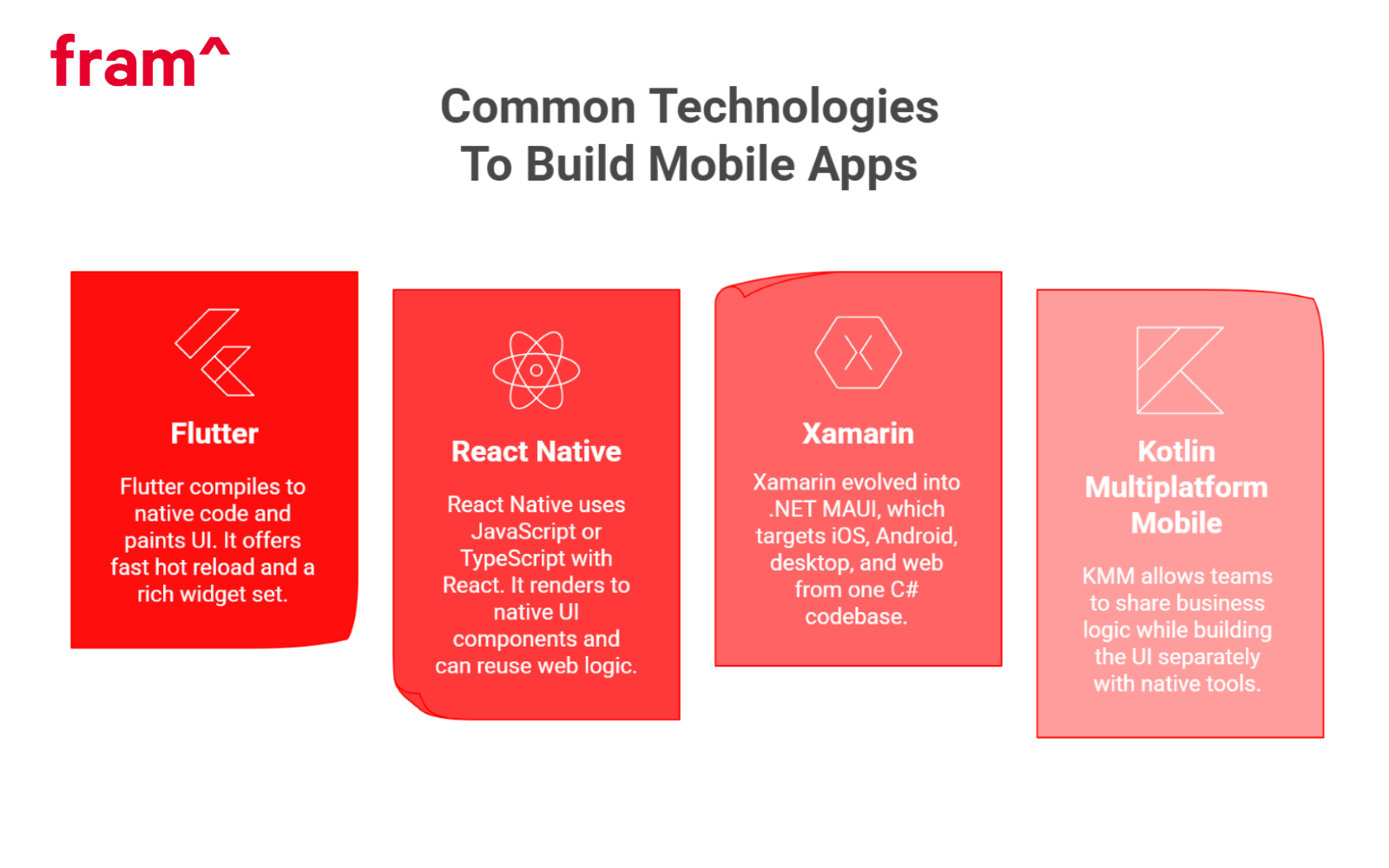
Fluttercompiles to native machine code and paints UI with its own renderer. It offers fast hot reload and a rich widget set. It works well for animation-heavy apps, internal tools, and apps that need identical UI across platforms. Teams often bridge to native code for platform-specific needs.
React Native
React Native uses JavaScript or TypeScript with React. It renders to native UI components and can reuse web logic. The plug-in ecosystem is large. For performance, teams pin versions, profile re-renders, and move heavy work to native or to a separate thread.
.NET MAUI and Xamarin Migration
.NET MAUI (the successor to Xamarin.Forms), which targets iOS, Android, desktop, and web from one C# codebase. Many teams keep existing Xamarin apps and plan a steady move to MAUI to gain support and new tooling. The shared language helps if the back end already runs on .NET.
Kotlin Multiplatform Mobile (KMM)
KMM allows teams to share business logic (networking, data, etc.) while building the UI separately with native tools like Jetpack Compose and SwiftUI. This approach offers the best of both worlds: code reuse for core logic and a true native look, feel, and performance on each platform. It’s an excellent fit for teams with existing Kotlin expertise.
Low-Code and No-Code Mobile Development
Low-code platforms let teams ship internal tools and MVPs in days instead of weeks. Tools like Retool Mobile, FlutterFlow, OutSystems, Glide, AppSheet, and Adalo handle common patterns – forms, lists, simple workflows – through visual builders and pre-built components.
These platforms work well for back-office apps, proof-of-concept demos, and internal dashboards where speed matters more than custom features. You drag components onto a canvas, connect to a database or API, and publish. The platform handles authentication, data sync, and basic UI patterns.
Limitations appear when you need deeper device integration. Camera processing, background location tracking, biometric authentication, and offline-first architectures often require custom native code. Security and compliance requirements in fintech or healthtech also push teams toward fully custom builds where you control every layer of the stack.
Plan your exit path early. Low-code works for validation and early traction. As user needs grow more complex, budget for a migration to native or cross-platform development. The investment pays off through better performance, tighter security, and features that low-code platforms cannot support.
AI in mobile app development
AI is now a practical part of mobile app development. Mobile products use AI to support smarter search, voice interaction, visual understanding, personalization, and task assistance within the app experience. On Android, Google positions AI as part of the development stack through both cloud-based models and on-device capabilities.
On-device AI changes the architecture
On-device AI runs directly on the phone instead of sending every request to the cloud. This approach works well when privacy matters, when internet access is unreliable, or when lower latency improves the user experience. Google’s Gemini Nano documentation highlights these benefits: local processing keeps data on the device.
This shift changes how teams think about mobile product architecture. The question is no longer whether an app should use AI. Teams now decide which features run on-device and which rely on cloud models. A hybrid approach often works best: on-device AI handles fast, privacy-sensitive, context-aware tasks while cloud AI handles heavier reasoning or complex generation. Google’s Android AI documentation reflects this split across on-device and cloud tooling.
Gemini Live shows what this shift looks like in practice. Google describes the Gemini Live API as enabling low-latency, real-time voice and vision interactions through continuous streams of audio, images, and text. Users speak naturally, share visual context through the camera, and receive immediate responses within the same interaction. This points to a new kind of mobile interface.
Seeing AI and accessibility
Microsoft’s Seeing AI app demonstrates another strong use case. Microsoft describes Seeing AI as a free app designed with and for the blind and low vision community that narrates the world around the user. It uses the phone’s camera and AI to read text, identify products, describe scenes, and support everyday navigation. Mobile AI improves accessibility in meaningful, real-world ways.
AI should solve a specific user problem
The strongest mobile AI use cases reduce friction, improve responsiveness, support privacy-sensitive workflows, or make the product more useful in context. That strategy outperforms adding AI features simply because they are trending.
Key Benefits of Mobile Technologies
Mobile technology solutions and tools increase reach, speed, and operational efficiency for both users and teams. When flows stay focused and simple, gains show up in sales, service quality, and staff productivity.
Cloud-Based Development
Cloud build pipelines run tests on device farms and ship to testers on each commit. Feature flags gate risky changes. Rollbacks take minutes. Logs and traces feed straight into dashboards for quick fixes.
Remote Work Software
Phones and tablets let people approve tasks, chat, and view dashboards from anywhere. Secure single sign-on and device posture checks protect accesƒs. Short, mobile-first flows reduce context switching and reduce errors.
Easy Collaboration
Shared notes, live cursors, and quick mentions cut email loops. Push notifications bring people back to the exact screen and state. Clear notification design prevents noise.
Better Productivity
Offline sync keeps forms and checklists moving in the field. QR codes and NFC scans replace manual input. Camera capture withon-device OCR turns photos into structured data and reduces retyping. If you’re interested, be sure to check out our AI vs OCR breakdown.
Easy Access for eCommerce Businesses
Apps create a direct line to customers through their mobile devices. Features like saved carts, one-tap pay, local language content, and store pick-up raise conversion and enhance customer experience. Loyalty wallets tie together points, rewards, and in-store scans. Social media makes it easier to reach new customers
Disadvantages of Mobile Technologies (with Solutions)
The gains come with trade-offs. Teams should plan for the risks below and bake in guardrails from day one.
Addictive and Habit Forming
Mobile apps compete for attention using endless feeds, persistent notifications, and reward loops designed to maximize session length. Research in the Journal of Adolescent Health shows prolonged mobile use affects sleep quality, focus, and mental health, particularly in younger users.
Attention is finite. Apps that respect boundaries build trust and reduce churn over time. Some clients like to give users granular controls over which notifications they receive and when. And consider time-spent metrics alongside engagement rates to spot patterns that signal unhealthy usage.
Security and Privacy Concerns
Lost phones, weak passcodes, and unsecured Wi-Fi networks create attack vectors. Biometric authentication using Face ID or fingerprint scanning provides stronger protection than four-digit PINs. Store API keys and tokens in platform secure enclaves – Keychain on iOS, Keystore on Android, rather than local storage or shared preferences.
So it’s important to encrypt all sensitive data at rest and in transit. Apply least-privilege principles to API design so each endpoint exposes only the data and actions a user needs. And configure network security rules to block unencrypted connections and validate SSL certificates.
Fintech and healthtech apps especially face higher risk and stricter compliance requirements. Add end-to-end encryption for message content and file transfers. Use device-bound tokens that cannot transfer between phones. Maintain fast patch cycles to address vulnerabilities within days rather than weeks. Regular security audits catch issues before attackers exploit them.
Platform Fragmentation
Screen sizes range from compact phones to foldables with tablet-sized displays. Android runs on hundreds of device models with custom vendor skins. iOS maintains tighter control but still spans multiple screen sizes and hardware generations.
Define a minimum OS version based on your user base and required features. Test on a representative device matrix that covers popular models, screen densities, and OS versions. Use feature flags tied to OS version so you can enable or disable functionality based on device capabilities and spot issues in specific configurations.
Analytics should track crashes and performance metrics segmented by device model and OS version. This helps you identify which combinations cause problems and prioritize fixes based on impact.
Battery and Data Use
Continuous GPS polling, uncompressed video streams, and frequent network requests drain battery and consume mobile data. Users notice and uninstall apps that cause problems.
Batch background work into infrequent intervals rather than running constant checks. Use platform background task APIs that respect system battery modes. Compress images and video before upload. Detect Wi-Fi connections and defer large downloads until users are on unmetered networks.
Provide settings that let users control sync frequency, video quality, and background refresh behavior. Make the defaults conservative and let power users opt into more aggressive features. Surface battery usage in your app’s settings so users understand the trade-offs.
Ongoing Cost
App stores update review guidelines multiple times per year. Apple and Google deprecate old APIs and require adoption of new ones. Device manufacturers release new screen sizes, biometric sensors, and hardware features annually.
Budget for regular dependency updates to address security patches and compatibility fixes. Plan OS adoption work as new versions launch in fall, typically September for iOS and throughout the year for Android. Third-party SDKs break when vendors change APIs or shut down services, so maintain fallback options for critical features.
Staff engineers spend roughly 15-20% of their time on maintenance work. Factor this into roadmap planning and sprint velocity calculations. Teams that defer updates accumulate technical debt that eventually forces larger, riskier migrations.
Predicting Future Trends of Mobile Technologies
Change continues at a steady clip. Predicting future trends of mobile technologies is key for product teams planning new features and long-term roadmaps. The items below already ship in major devices or active roadmaps, so teams can plan with confidence.
Where will teams see real, near-term gains? Expect gains in on-device AI, precise location, and richer mixed-reality UI. Each ties to clear hardware and OS support across new phones.
AI-driven mobile experiences
AI already shapes how mobile products work. On-device processing, multimodal interfaces, and context-aware app behavior improve real mobile experiences today. Google’s Android AI guidance and Gemini Nano documentation reflect this shift toward practical mobile AI across supported devices.
The long-term opportunity lies in how AI combines with new hardware, sensors, and interface models. Phones increasingly serve as orchestration layers for experiences that blend voice, camera input, location, and ambient context. Google’s Live API supports low-latency, real-time voice and vision interactions. And as mentioned, Microsoft’s Seeing AI demonstrates how mobile AI can create meaningful accessibility improvements.
For teams planning, trust and usability matter more than novelty:
Design clear permissions.
Use transparent data practices.
Build fallback paths for when AI underperforms.
And focus on use cases that solve a specific problem.
Ultra-Wideband Connectivity
Ultra-wideband (UWB) delivers precise ranging within a few centimeters on supported phones, tags, and accessories. The technology uses short radio pulses to measure distance and direction with accuracy that Bluetooth and Wi-Fi cannot match. UWB adoption is likely to grow as more phones, tags, vehicles, and accessories ship with built-in support.
Common uses include keyless car entry, indoor navigation in airports and warehouses, and finding lost items like AirTags. UWB works through walls and clothing, which makes it reliable for authentication flows that depend on physical proximity.
Mobile agents gain spatial awareness through UWB. Devices understand room layout, detect which direction you’re facing, and trigger actions when you approach specific objects. A phone unlocks your office door as you walk up. A smart display hands off your video call when you enter the room.
Teams typically pair UWB with Bluetooth for the initial device discovery and secure session setup, then switch to UWB for location-based actions. This hybrid approach balances power consumption with precision.
Augmented Reality Apps
AR toolkits on iOS and Android detect horizontal and vertical planes, recognize faces, and adapt to room lighting. ARKit and ARCore provide the foundation. Apps build on top with retail try-ons, training overlays for field technicians, and indoor wayfinding in large venues.
Hardware improvements drive new use cases. Better depth sensors create more accurate object occlusion. Faster processors render complex 3D models without lag. When you pair AR with on-device AI, the camera identifies products, reads signs in foreign languages, and overlays real-time guidance on physical objects.
Teams should design AR sessions for short bursts rather than extended use. Track device temperature, battery drain, and user comfort metrics. Most people tolerate AR for a few minutes before fatigue sets in. Provide clear exit points and fallback 2D views for users who prefer traditional interfaces.
The technology works best when it solves a specific problem that traditional UI cannot. Virtual furniture placement beats scrolling through photos. Step-by-step repair instructions overlaid on equipment reduce errors. Generic AR experiences rarely justify the added complexity.
More Wearable Tech
Smartwatches, rings, and earbuds add sensors and haptics that shift interactions away from the phone screen. Watches show glanceable stats, deliver haptic alerts, and handle quick replies. Rings track sleep and activity with minimal bulk. Earbuds provide spatial audio cues and hands-free control.
Health and safety applications lead adoption. Continuous heart rate monitoring detects irregular rhythms. Fall detection alerts emergency contacts. Loud noise warnings protect hearing in work environments. These features rely on sensors that run constantly in the background.
Wearables generate continuous signals that mobile agents use to adapt to your context. Motion patterns reveal whether you’re walking, driving, or sitting. Heart rate variability indicates stress levels. Gesture recognition lets you control apps without touching a screen. The phone processes these signals and adjusts app behavior accordingly.
Cross-device handoff keeps your state consistent as you move between phone and watch. Start a timer on your watch and dismiss it from your phone. Read a notification on your wrist and reply from your laptop. The ecosystem syncs context across devices so you pick up where you left off regardless of which screen you use.
Battery life remains the primary constraint. Most smartwatches need daily charging. Rings last several days but offer fewer features. Teams building for wearables should batch sensor reads, limit always-on displays, and provide clear battery status so users can plan charging windows.
Fram^ and Mobile Technologies: How We Fit Together
Fram^ offers custom mobile application development and broader digital services that align with the technology trends covered above.
Mobile app development: Fram^builds iOS, Android, and cross‑platform apps. We support full lifecycles, from ideation to post‑deployment and app store release. That matches the stack, cloud, offline sync, CI/CD, and push services we covered earlier.
Cloud platforms and tools: Fram^ uses technologies like AWS, NodeJS, Python, MongoDB, .NET, ReactJS, and more. These tools align with modern mobile back ends, analytics, and server infrastructure.
Agile and DevOps practices: Our integrated agile delivery, DevOps pipelines, focus on quality and security, matching the benefits of cloud‑based development and remote workflows we discussed earlier.
Cost efficiency and talent: Fram^ delivers quality mobile development with Vietnamese engineering talent. That makes scaling mobile tooling accessible to mid‑size and large clients.
If a business wants an app that uses the full mobile stack, from AI-powered features to secure offline sync and cross-platform delivery, Fram^ brings the skills, platform support, and process needed to make that happen.
FAQs: Mobile Technologies
How To Find The Best Development Company For My Mobile Application?
Look for shipped apps in your niche, clear case studies, and a stable team. Ask for release notes that show steady iteration. Review crash rates, ratings, and store replies. Meet the lead engineer and PM who will run your project, not only sales.
How Do New and Emerging Technologies Impact Development in Mobile Phones?
New radios, sensors, and OS APIs change what is possible each year. Good teams track betas, adopt features with clear value, and keep a fallback for older devices. Tooling and testing plans adjust with each major OS release.
How Will AI Enhance Customization and Other Features in Mobile Technologies?
AI (artificial intelligence) will tailor content, flows, and support. On-device models can rank items, draft replies, and propose next actions in real time. The best results come from clear user consent, small feedback loops, and safe defaults.
Global spending on cloud migration services is projected to climb from about $232 billion USD in 2024 to more than $800 billion USD by 2029, a growth rate of around 28 percent annually. Surveys also show that over 90 percent of companies already run at least some workloads in the cloud, and many plan to […]
Customers expect smooth digital experiences, regulators demand compliance, and business leaders want software that keeps up with growth. Modernization transforms outdated applications into flexible, secure, and scalable assets that serve current needs and prepare organizations for future demands. What Exactly is Application Modernization? Application modernization is the process of upgrading legacy applications and legacy systems […]
Software modernization transforms legacy systems to align with modern technology and business goals. More than an upgrade, modernization ensures scalable, secure systems that enhance customer experience. This guide explores the importance of legacy system modernization, its benefits, challenges, and the essential steps you should take to do it right! What is Software Modernization, and Why […]