OCR vs AI: What Product Teams Need to Know to Build Smart, Scalable Data Workflows
February 3, 2026
Product teams ship features that touch documents more than they expect. Receipts, invoices, pay stubs, bank statements, onboarding forms, ID photos, claims, contracts, medical records, and support attachments all show up in real workflows. Many teams start with simple text recognition and then hit a wall.
The wall looks like this. You can read the characters, but your system still cannot act on them. You still need reliable fields, clean structure, and checks that stop bad data from entering core systems. That is where the optical character recognition (OCR) vs artificial intelligence (AI) question becomes real.
So, if you’re curious about OCR, AI-powered document intelligence, or a combination, this guide will show you how they compare and help you decide.
Table of Contents
Key Takeaways
OCR and AI work as complementary layers in the same stack. OCR converts pixels into text, while AI interprets that text, layout, and context so your system can classify documents, extract fields, validate information, and trigger workflows.
OCR-centric workflows serve straightforward documents, while OCR combined with AI supports complex, variable, or high-stakes workflows. So it’s safe to keep high-quality scans with stable layouts for OCR alone, and multi-layout, noisy, or regulated documents for OCR plus AI-driven classification, extraction, and validation.
Straightforward, consistent documents align well with OCR-centric workflows. High-quality scans, predictable layouts, and simple fields (for example, basic receipts or internal forms) perform well with OCR plus a few rules.
Complex, variable, or high-stakes documents benefit from OCR combined with AI. Multiple layouts, noisy scans, unstructured text, or regulated data in sectors like finance and healthcare gain accuracy and resilience from AI models that understand structure, language, and context. Modern “document AI” operates as an end-to-end pipeline. A scalable workflow typically follows a sequence such as ingest → OCR → AI document understanding → validation → human review → export into downstream systems.
Strong validation creates reliable real-world performance. Cross-field checks, business rules, confidence thresholds, automatic exception handling, and human-in-the-loop review turn raw model output into dependable operational data.
Hybrid build strategies give most teams the best balance. Cloud OCR and document AI APIs provide speed and maturity, while targeted custom models and glue code deliver flexibility and domain depth.
Security and compliance thrive as first-class design requirements. Data residency, access controls, audit logs, encryption, and clear retention practices support safe document workflows for sensitive financial, health, and legal information.
The best approach grows from your documents, stakes, and scale. Start with your document types and failure impact, then shape an architecture that combines OCR and AI in the right places, and choose vendor or custom components that match your AI implementation roadmap.
OCR vs AI: What’s the Core Difference?
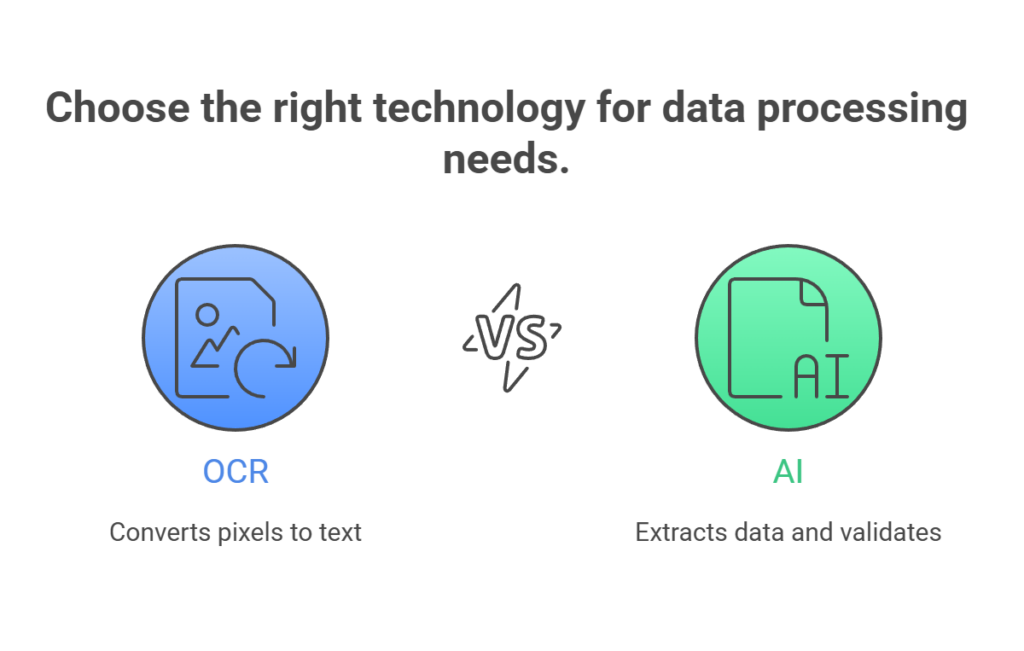
OCR turns pixels into characters. AI turns characters and layout, plus context, into usable data and decisions.
That sounds abstract, so anchor it to a basic product need. A workflow needs machine-readable data that your database and downstream services can trust. OCR gives you text. AI gives you data extraction, document labeling, and validation steps that match your business rules.
In many products, OCR is a front step. AI becomes the layer that turns text into actions.
Dimension
OCR
AI
What it does
Reads text from images and scans
Understands and uses the text
Output
Plain text
Structured data and decisions
Role in workflow
Converts documents into readable text
Turns text into actions
Understanding
No understanding of meaning or intent
Interprets context and relevance
Strengths
Simple, clean, predictable documents
Complex layouts and business rules
Limitations
Breaks on complexity and variation
Higher cost and operational effort
Best used as
A foundational input step
The intelligence layer on top of OCR
OCR (Optical Character Recognition) Overview
OCR detects text in an image or scanned document, then outputs machine text. It can run on a phone scan, a photographed street sign, a scanned PDF, or a camera frame from a kiosk. Google Cloud Vision, for example,exposes OCR features that detect and extract text from images, with word-level bounding boxes and full text output.
OCR sits at the “read” stage. It does not decide what the text means for your workflow. It does not know that “Total” on an invoice pairs with the amount two lines down. Some OCR products include table detection and form hints, but the base job stays the same.
Where OCR is strong
OCR shines in three places.
First, simple text extraction from clear scans. High-contrast prints, typed pages, and clean PDFs convert well. This includes basic invoice PDFs, ID cards with printed fields, and standard receipts from known merchants.
Second, capturing text in forms and fixed templates. Form-like documents often repeat labels in the same spots. Many OCR services expose key-value extraction for forms.Amazon Textract, for example, supports form data extraction as key-value pairs, which keeps label-value context tied together.
Third, batch digitization and file conversion. Tools such asABBYY FineReader focus on scanning, OCR, and conversion into searchable PDFs and editable formats.
Where OCR breaks down
OCR breaks in ways that feel random to product teams.
Layout chaos. Multi-column pages, nested tables, stamps, side notes, and repeated headers can scramble reading order.
Low-quality images. Motion blur, glare, shadows, skew, and low resolution drop accuracy.
Handwriting. Handwritten text recognition still faces wide variation across styles and layouts, even with modern methods. Research reviewshighlight handwriting variability and layout complexity as core challenges.
Multilingual documents. OCR can support many languages, yet mixed scripts and language switching inside one page raise errors. Open-source engines likeTesseract support many languages out of the box, but quality still ties tightly to image conditions and training data for each script.
No understanding of intent. OCR does not know what matters. It will read a footer disclaimer with the same weight as an account number.
So OCR can produce text that looks correct, yet your workflow still fails.
AI in This Context
In document-heavy products, “AI” usually means one or more of these layers:
Computer vision models that detect layout, tables, signatures, checkboxes, and regions.
NLP models that label entities and normalize values.
Document classification models that route files into the right processing path.
Large language models and multimodal models that read text plus layout signals, then map content into a structured schema.
This is the shift. The system moves from “read text” to “extract fields and verify them.”
Strengths of AI for document workflows
AI helps in the parts that OCR does not cover.
Document structure. AI models can tag headers, sections, tables, and line items. AzureAI Document Intelligence enables the extraction of text, tables, structure, and key/value pairs from documents, and it supports custom models for specific document types.
Field-level extraction beyond templates. A template-driven OCR pipeline can fail on small vendor changes. AI models trained across varied formats handle more variation, then map outputs into a stable JSON schema.
Entity recognition and normalization. NLP tasks like named entity recognition identify categories such as people, organizations, locations, dates, and more. IBMdescribes NER as an NLP component that identifies predefined categories of objects in text.
In document workflows, that can mean detecting invoice numbers, tax IDs, IBANs, ICD codes, and policy numbers, then normalizing formats.
Classification and routing. AI can decide “this is a bank statement,” “this is a pay stub,” or “this is a contract.” That routing step raises accuracy, since each class can use its own extraction model.
Fraud and anomaly signals. AI can flag mismatches, duplicated documents, altered fields, and suspicious patterns. OCR cannot do that alone.
Weaknesses product teams must plan for
AI brings friction that OCR alone does not.
Cost. AI extraction often costs more per page than basic OCR, and costs rise with higher-resolution images, larger pages, and add-on features. AWSTextract pricing examples show page-based costs that can scale fast at high volume.
Build complexity. Teams need data labeling, model evaluation, confidence scoring, and ongoing monitoring. That work does not end at launch.
Maintenance. Vendors change templates, customers upload new formats, and your error modes drift. Your system needs retraining cycles and feedback loops.
Risk controls. A system that “guesses” fields needs validation gates. That includes strict schema checks, regex checks, checksum checks, and cross-field logic.
For many product teams, the best move is not “OCR or AI.” It is “OCR plus AI with tight checks.”
If you want a faster path to that build, fram^ AI implementation services can handle the architecture, model selection, and validation design, then hand your team a maintainable pipeline.
How OCR and AI Work Together
Most modern document pipelines run as a staged system. OCR converts pixels to text and coordinates. AI uses the text plus coordinates plus layout clues to extract stable fields and route tasks.
A clean mental model is a three-layer stack.
Layer one is ingestion. It covers file upload, image cleanup, and page splitting.
Layer two is recognition. OCR runs here. It outputs text plus geometry.
Layer three is understanding. AI runs here. It outputs structured JSON, confidence scores, and flags.
A practical architecture overview
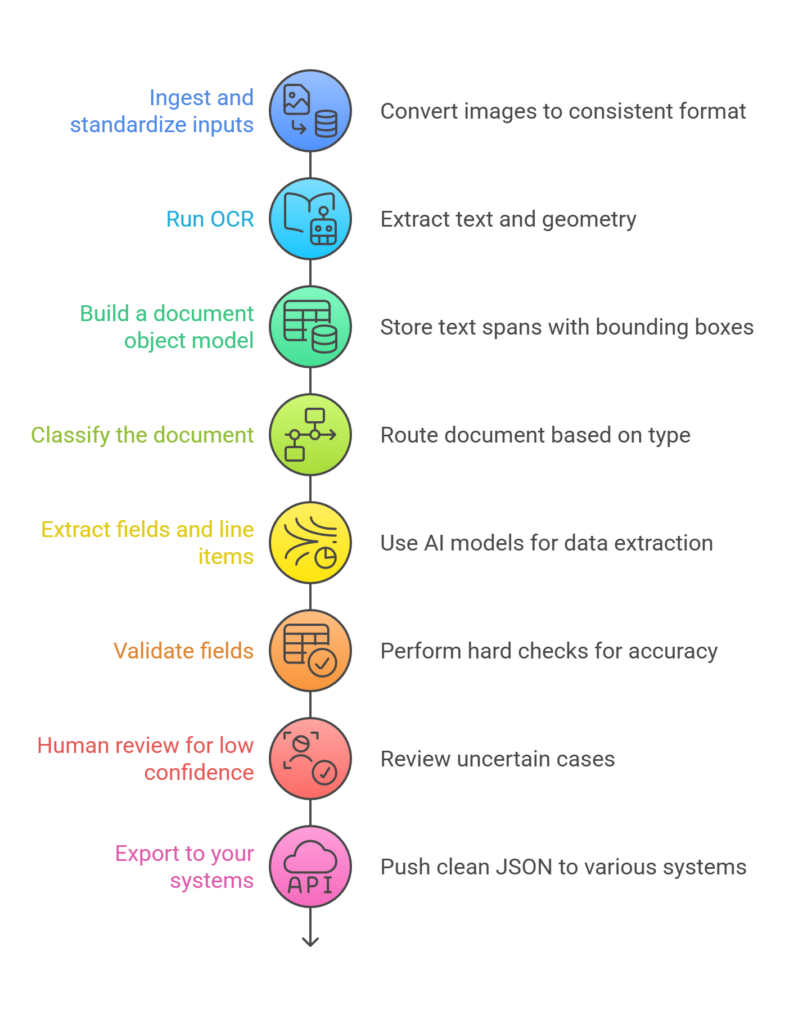
A scalable workflow often looks like this:
1) Ingest and standardize inputs
Convert images to a consistent format. Normalize DPI, rotate, deskew, and split PDFs into pages. Store originals and normalized versions.
2) Run OCR
Run a service like Google Vision OCR orAWS Textract. Google’s OCR features support text detection for general images and document-style extraction for dense text. Textract can return key-value pairs for forms, which helps preserve label relationships.
3) Build a document object model
Store text spans with bounding boxes, page numbers, and reading order.
4) Classify the document
A classifier picks a route: invoice path, bank statement path, claims path, contract path, or fallback.
5) Extract fields and line items
Use document intelligence models or custom machine learning models. Azure Document Intelligence supports extracting text, tables, structure, and key/value pairs, plus custom model training.
6) Validate fields
Run hard checks, not soft guesses. Examples include:
Date format and allowed ranges
Totals equal sum of line items
Account numbers pass checksum rules
Currency matches country context
7) Human review for low confidence
Send only uncertain cases to review. Store corrections as training data.
8) Export to your systems
Push clean JSON into billing, CRM, underwriting, EHR, LMS, or data warehouse.
This design scales. It keeps OCR as a utility step, then limits AI risk with gates and review loops.
OCR and AI Software Use Cases
Choosing the right pipeline starts with your industry patterns. Each sector has document types, error tolerance, and compliance rules that shape the build.
eCommerce and Retail
Retail teams deal with receipts, invoices, shipping labels, returns, and supplier docs. OCR handles basic receipt text extraction, then AI turns that into product-level data.
Typical product wins
Auto-categorize receipts for expense tracking.
Extract SKU lines from invoices and match to catalog.
Detect return fraud patterns across uploaded receipts and IDs.
Where AI adds real value
Line-item extraction across many receipt layouts.
Merchant normalization across spelling variants.
Matching extracted SKUs to product records when text is messy.
Healthcare
Healthcare runs on forms, scans, referrals, lab reports, and medical records. The tolerance for mistakes is low. Validation and audit trails matter.
Typical product wins
Digitize intake forms and map to EHR fields.
Extract key facts from referral letters and lab reports.
Classify documents for routing to the right team.
Azure Document Intelligence positions its service aroundOCR plus document understanding, with extraction of structure and key/value pairs. That maps well to healthcare document processing needs.
Where AI adds real value
Section detection across long reports.
Entity extraction for dates, clinician names, procedure codes, and medication names.
Field-level checks tied to clinical workflows.
Fintech
Fintech pipelines often start with bank statements, pay stubs, IDs, tax forms, and contracts. Most flows need both extraction and verification.
Typical product wins
Bank statement parsing for cashflow views.
Pay stub extraction for income verification.
ID document processing for onboarding.
AWS Textracthighlights extraction across forms and tables, and it supports key-value pairs that preserve document context.
Where AI adds real value
Statement normalization across banks and regions.
Detect salary credits, recurring bills, and overdraft patterns.
Flag mismatches between applicant claims and extracted data.
Edtech
Edtech sees transcripts, certificates, IDs, handwritten work, and assessment sheets.
Typical product wins
Extract student details from admission forms.
Read scanned transcripts into structured course records.
Index scanned lesson notes for search.
Where AI adds real value
Subject and grade extraction across transcript formats.
Handwriting recognition support for assignments, with strong human review.
Handwriting remains a hard area, driven by layout variation and style differences, so design for review and retries.
Wellness
Wellness products use intake questionnaires, lab reports, prescriptions, invoices, and identity checks for regulated services.
Typical product wins
Intake form digitization into profile fields.
Lab report extraction into trend charts.
Invoice parsing for reimbursement workflows.
Where AI adds real value
Mapping test results across lab templates.
Flagging out-of-range results and missing markers.
Routing documents to coaches, clinicians, or support.
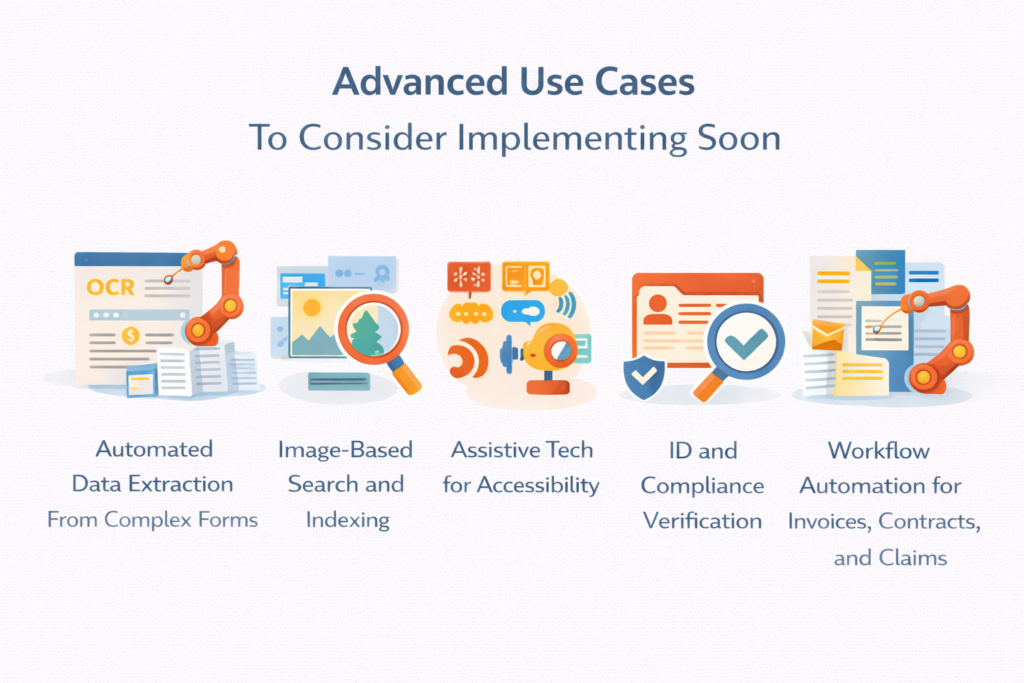
Advanced Use Cases To Consider Implementing Soon
Many teams stop at “extract fields.” The next wave is systems that treat documents as a living data stream. These use cases push ROI fast once your base extraction runs clean.
Automated Data Extraction From Complex Forms
Complex forms show up in insurance, healthcare, and regulated onboarding. They carry nested tables, checkboxes, signatures, and free-text notes.
A strong build path looks like this:
OCR for text and geometry
Layout detection for regions
Form field mapping into a fixed schema
Validation rules per field
Review queues for edge cases
Azure Document Intelligence allows extraction of text, tables, and structure, and it supports custom models that fit domain forms.
For support teams, the same pattern supports ticket triage from screenshots and scanned PDFs. You can extract order IDs, error codes, and product names, then route tickets to the right queue.
Image-Based Search and Indexing
Teams often store millions of images and scanned PDFs. Search fails when the content stays locked in pixels.
OCR creates searchable text. AI enriches that text with tags and entities.
Google Cloud fetures OCR that detects and extracts text, which is the base needed for indexing.
Once you have text, you can add:
Entity tags for people, orgs, dates
Document type labels
Topic labels per section
This turns a file store into a search product that feels instant.
Assistive Tech for Accessibility
Accessibility workflows benefit from reliable text extraction. OCR supports screen readers and text resizing for images of text.
AI extends this into better summaries, better navigation cues, and better labeling of sections. It can tag headings and tables, then present a structured reading flow to users.
This use case carries strong user value, and it often fits enterprise procurement checklists.
ID and Compliance Verification
KYC and compliance workflows need identity checks, document checks, and audit logs.
OCR extracts text from IDs and supporting documents. AI checks structure, detects missing fields, and compares extracted values across documents.
Key-value extraction helps preserve label meaning, which reduces mapping errors on ID-style documents.
For regulated industries, design for:
Immutable logs of inputs and outputs
Clear confidence scores per field
Review workflows with reason codes
Workflow Automation for Invoices, Contracts, and Claims
This is where ROI shows up clearly.
Invoices and claims often need:
Vendor name
Invoice number
Dates
Totals
Line items
Tax fields
OCR captures text. AI extracts and validates fields. Then the workflow can auto-post to finance tools or queue exceptions.
Textract supports extraction of forms and tables and can output key-value pairs that map well to invoice-style fields.
Contracts add clauses, sections, and obligations. AI can classify clause types and tag key dates. It still needs strict checks, plus human review for high-risk outputs.
How To Know When You Just Need OCR vs When You Need Both?
Teams waste time when they pick AI too early, then spend months building data ops. Teams lose customers when they pick OCR only, then fail on real-world variation.
Use a simple decision grid: document variability, required accuracy, and downstream risk.
OCR is enough when these traits hold
Your documents share fixed layouts. You control the template, or the sender follows a strict template. Example: your own internal forms, fixed shipping labels, fixed invoice templates from one vendor.
Your workflow tolerates light cleanup. A human can spot-check, or errors do not cause money loss.
You only need text search. Your feature is searchable archives, not automated posting or compliance actions.
Invoicing fits here only when vendors stay stable. Many teams start with OCR for invoices, then add AI when vendor diversity grows.
OCR plus AI fits when these traits hold
You have many layouts. Think multi-bank statements, varied pay stubs, or mixed insurance forms.
You need structured fields, not text blobs. Your UI needs line items, totals, and normalized dates.
You need validation. Money movement, credit risk, medical workflows, and compliance checks need strict field gates.
Your scale demands automation. At volume, manual cleanup becomes the real cost.
AI adds value when it cuts human review volume without raising risk.
How to Choose Between APIs, Off-The-Shelf Platforms, and a Custom In-House Build
Most teams do not need a fully custom model on day one. Many teams do need a custom pipeline design, even if they use vendor APIs.
Think in three layers. Vendor services can cover recognition and base extraction. Your product still needs workflow logic, checks, and monitoring.
Option
Best for
Strengths
Limits
Cloud APIs
Fast product launch on common docs
Quick setup. Managed infra. Forms and tables built in.
Costs rise at scale. Vendor lock-in. Weak on niche layouts.
Off-the-shelf tools
Internal scanning and PDF cleanup
Cheap. Zero setup. Good for bulk conversion.
No product-grade API. Manual review needed.
Custom in-house build
Core document workflows at scale
Full control. Handles niche formats. Lower long-term cost.
High build effort. Needs labeled data and upkeep.
Hybrid
Teams that want speed plus control
Ship fast with vendor OCR. Add custom logic only where needed.
Still tied to vendor OCR quality.
Option 1: APIs from major cloud vendors
This path fits teams that need fast shipping and predictable infrastructure.
Azure Document Intelligence supports OCR plus structure, tables, key/value pairs, and custom model training.
This option wins when:
Your formats match common document types.
Your security team accepts cloud processing under your controls.
You want a managed service path.
Watch for:
Per-page cost at high volume. AWS pricing examples show how page volume scales costs fast.
Vendor lock-in at the data format level.
Limits around custom fields and niche layouts.
Option 2: Off-the-shelf OCR tools and platforms
This fits internal teams, ops teams, and document digitization projects. Examples include tools likeABBYY FineReader for conversion and scanning workflows.
Consumer scanning apps can support lighter use cases, and 2025reviews list products like Adobe Scan and ABBYY FineReader among top OCR tools.
This option wins when:
A human still reviews the output.
You need scanning, PDF editing, and bulk conversion.
You want a fast internal rollout.
It fails when:
You need a product-grade API with strict SLAs.
You need deep schema extraction into your database.
Option 3: Custom in-house build
This path fits teams with one or more hard constraints:
Sensitive data with strict control requirements
Niche layouts that vendors fail on
High volume where cost per page dominates
Domain rules that need tight coupling to extraction
A custom build still uses components. Many teams pair OCR engines with custom classifiers, extraction models, and validation code. Open-sourceOCR engines like Tesseract support many languages, which can help in self-hosted workflows.
Custom builds cost more in engineering time, data labeling, evaluation, and maintenance. They pay off when your pipeline becomes core IP.
A practical hybrid that works for most teams
A common path looks like this:
Start with a vendor OCR or document API
Build your own routing, schema mapping, and validation
Add custom models only where vendor output fails
Store review corrections as training data
That hybrid keeps time-to-market tight and keeps control in your hands.
OCR and AI: FAQs
What’s the difference between OCR and document intelligence?
OCR reads text from images and scanned documents. Document intelligence reads text and extracts structure and fields. Azure Document Intelligence frames this asmachine-learning based OCR plus document understanding that extracts text, tables, structure, and key/value pairs into structured output.
Is OCR good enough for simple document reading?
Yes, for clean text extraction and search indexing. Google Vision OCR supports text detection for images and document-style extraction for dense documents.
If your workflow needs reliable totals, line items, and strict field mapping, add AI extraction and validation.
What are the security and compliance concerns I need to know about?
Focus on four controls:
Data retention rules and storage locations
Access controls and audit logs
Encryption in transit and at rest
Review workflows that document decisions
If you use cloud APIs, your compliance work ties to vendor terms, regional processing options, and your own data handling design. Keep originals and derived outputs with clear access boundaries.
Is this secure enough for healthcare or financial data?
It can be, with strict controls and review. Many healthcare and finance teams use managed document services, then wrap them in compliance controls, logging, and field validation. Azure and AWS position their document services for structured extraction and automation use cases, which often sit inside regulated workflows.
How much estimated time does it take to build a custom, in-house AI-powered OCR system?
A realistic timeline breaks into phases:
2 to 4 weeks for ingestion, OCR integration, and baseline schema export
4 to 8 weeks for classification routes, field validation, and review tooling
6 to 12 weeks for custom model training, evaluation, and monitoring
The swing factor is data. If you already have labeled documents and stable schemas, the build moves faster. If you start from zero labels, plan more time for annotation and iteration.
OCR vs AI for Your Software Needs
OCR and AI are not rivals. They are layers.
Use OCR when you need text extraction and search. Add AI when you need structure, stable fields, and automation that touches money, compliance, or core records. Keep validation gates tight, and keep a review loop for low-confidence cases.
If you’re exploring ways to integrate AI-powered automation into your SaaS or software product, fram^ can help design and implement a flexible build. One that fits your budget, tech stack, workflow, and industry needs. Connect today for a free consultation.
Automated ticket triage is the process of using software to sort, tag, prioritize, and route incoming support tickets with minimal human effort. It turns the first mile of support into a repeatable system. The goal stays simple: get the right ticket to the right team fast, with the right context. Most support teams feel the […]
AI integration works best when product teams start with one measurable workflow, choose the simplest technical pattern, and pilot the feature before full rollout. Artificial intelligence improves software in specific, measurable ways: sharper search, generative content, real-time recommendations, and faster support. But none of those happen by accident. Every gain comes from applying machine learning […]
Every AI coding tool ad ends at the same place: a working product in 48 hours. What they skip is week eight, when real users arrive, payment flows fail silently, and an enterprise prospect asks for your SOC2 documentation. If you’re reading this, you may be somewhere in that gap. Maybe you tried Lovable, Cursor, […]