The Best React Frameworks, Tools, and Libraries to Use in 2026
May 13, 2025
React remains the dominant front-end JavaScript library for building dynamic user interfaces and single-page applications. Its component-based architecture, strong performance, and massive developer community make it the default choice for modern web development.
Several frameworks extend React’s capabilities for specific use cases, server-side rendering for SEO, static site generation for performance, or full-stack development with integrated backends. After all, content-heavy marketing sites require different tools than real-time dashboards or AI-powered applications.
So, this guide will share an overview of the leading React frameworks, their trade-offs, and when each one solves your specific problems.
Table of Contents
Key Takeaways
Start with the use case, not the tool. React’s ecosystem includes different options for web apps, single-page apps, mobile apps, and supporting UI/state layers.
Choose Next.js for SEO-focused websites, SaaS products, and full-stack React apps that need flexibility and strong performance.
Choose Remix for interactive, data-heavy web apps where routing, mutations, and server-driven UX matter.
Choose Gatsby for static content sites like blogs, documentation hubs, and marketing pages with less frequent updates.
Choose Vite when you want a fast, lightweight setup for a React single-page app rather than a full web framework.
Choose React Native and Expo when your main goal is mobile app development. React Native is the core framework, while Expo makes setup and iteration easier for many teams.
Supporting tools still matter. UI libraries like Material UI and state/data tools like Redux, Zustand, and TanStack Query can significantly shape development speed and maintainability.
But keep reading for insights into these frameworks and more.
React Frameworks vs Tools and Libraries: What’s the Difference?
React is a library for building user interfaces, not a full application framework. That is why the React ecosystem includes several different categories of tools.
Frameworks like Next.js, Remix, and Gatsby provide structure for web applications, including routing, rendering, and data-loading patterns.
Build tools like Vite help developers set up and run React projects quickly, but they are not full frameworks.
Mobile platforms like Expo support React-based mobile development.
UI libraries like Material UI and Chakra UI provide ready-made components.
State and data libraries like Redux and TanStack Query help manage application state and async data.
If your main goal is to choose a React framework for a web project, the most relevant options are usually Next.js, Remix, and Gatsby.
Best React Framework by Use Case
If you are deciding quickly, here is the short version:
Use case
Best fit
Full-stack web app or SaaS product
Next.js
Data-heavy interactive app
Remix
Static content site or blog
Gatsby
Lightweight React single-page app
Vite
React-based mobile app
Expo
Choose Next.js for full-stack web apps, SaaS platforms, SEO-focused websites, and projects that need strong performance and flexibility.
Choose Remix for data-heavy apps, nested routing, and experiences where fast server interactions matter.
Choose Gatsby for static content sites, blogs, documentation, and marketing websites with less frequent updates.
Choose Vite if you are building a React single-page app and want a fast, lightweight development setup rather than a full framework.
Choose Expo if your main goal is building a React-based mobile app.
The best option depends on your product type, rendering needs, content model, and team workflow. The rest of this guide will help you choose more confidently.
React Frameworks for Web Apps
If you are choosing a React framework for a web project, the main options to compare are Next.js, Remix, and Gatsby. Each one fits a different type of application, depending on how much SEO, server rendering, dynamic data, and content scale your project needs.
Next.js: The SEO-Friendly Full-Stack React Framework
Next.js excels in server-side rendering (SSR) and static site generation (SSG), making it ideal for SEO-centric applications. It’s widely adopted for eCommerce websites, blogs, and corporate sites.
Key Features:
Built-in routing
Server-side rendering
Optimized performance with automatic code splitting
Pre-built components for rapid development
At fram^, we harnessed Next.js to revamp a corporate website for a leading financial services firm. By leveraging server-side rendering and static site generation, we improved their SEO rankings and reduced page load times by 40%. The optimized performance and streamlined routing system enhanced user engagement, providing a superior browsing experience for their clients worldwide.
Next.js is also one of the most common front-end layers for AI-powered applications – be sure to check out our AI white paper to learn more!
Remix: The Fast, Resilient Full-Stack React Framework
Remix focuses on server-side rendering (SSR) and progressive enhancement, making it great for building fast, scalable web applications. It prioritizes efficient data loading, seamless UX, and robust error handling.
Key Features:
Nested routing with data loading
Optimized performance with server-side rendering
Progressive enhancement for better resilience
Built-in error boundaries for stability
Seamless integration with modern web standards
Gatsby: Perfect for Static websites
Gatsby is a popular choice for creating high-performance static websites. It leverages GraphQL to fetch data and supports an extensive plugin ecosystem.
Key Features:
Static site generation
Rich plugin library
Fast loading times with smart preloading
Enhanced search engine optimization (SEO)
Fram^ utilized Gatsby to develop a content-focused website for a global education provider. By combining static site generation with Gatsby’s rich plugin library, we ensured lightning-fast loading speeds and seamless integration with third-party tools. This approach not only improved their SEO performance but also enhanced user satisfaction, driving a 25% increase in site engagement within the first month of launch.
Feature
Next.js
Remix
Gatsby
Best For
SEO-sensitive marketing sites, SaaS dashboards, eCommerce stores, and any app that mixes public pages with authenticated views and API routes.
Interactive web apps with complex routing and frequent data updates, such as internal tools, admin panels, and transactional user workflows.
Content-driven marketing sites, blogs, docs portals, campaign microsites, and other projects where most pages can be statically generated.
How It Works
Loads pages dynamically for better speed & SEO
Fetches & updates data efficiently
Pre-builds pages for lightning-fast loading
Performance
Strong performance for mixed SSR and SSG apps, with automatic code splitting, image optimization, and good defaults for caching and bundling.
High performance for data-heavy apps thanks to streaming SSR, route-level data loading, and smart caching that keeps dynamic pages fast
Very high perceived speed for mostly static sites (SSG), since it prebuilds HTML and aggressively prefetches assets for upcoming routes.
Speed
Fast, optimized for modern browsers
Fast, best for interactive content
Super fast for simple sites
Ecosystem
Backed by Vercel, strong community
Growing, modern web practices
Large plugin ecosystem, great for static sites
Ease of Use
Moderate (learning curve for SSR/SSG)
Moderate (nested routing, loaders)
Easy for static sites, more setup for dynamic content
Learning Curve, Complexity
Medium to high complexity. Easy to start, but the App Router, multiple rendering modes, and configuration surface introduce more decisions in larger apps, and requires understanding of SSR, SSG
The model is close to web standards and React Router, but nested routes plus loaders/actions need some learning before they feel natural.
Low for simple static sites but complexity rises as you add many plugins, CMS integrations, and dynamic features on top of the static build pipeline
Community & Adoption
Large, widely used in production
Growing but smaller than Next.js
Strong, but mainly for niche static site use cases
SEO/LLM Visibility Potential
Best choice when SEO is critical across many dynamic or hybrid pages, combining SSR, SSG, and image optimization for strong Core Web Vitals.
Still good SEO through server-side rendering, progressive enhancement, and standards-first HTML that still works with or without JavaScript.
Excellent SEO for content-heavy static sites and blogs, helped by static generation and a rich plugin ecosystem for metadata and sitemaps.
API Routing
Built-in API routes and Route Handlers let you define serverless endpoints under the same project, replacing many simple Node/Express backends
Uses loaders and actions on routes instead of a separate API layer, so UI routes and data mutations stay aligned while calling any backend service you choose
Primary data access is through GraphQL during build; for runtime APIs you typically rely on external backends or Gatsby Functions/serverless functions.
Build Tools for React Projects
Vite: Single Page Application (SPA) Building Tool
Not every React project needs a full framework. Some teams only need a fast, modern build tool for single-page applications or frontend-heavy products.
Vite isn’t a React framework. It’s a modern front-end tool that enhances the development experience with fast build times and hot module replacement. It’s perfect for projects requiring modern tooling and optimized workflows.
Key Features:
Instant server start
Built for modern browsers
Support for TypeScript and JSX
At fram^, we adopted Vite for a SaaS client looking to streamline their front-end development process. With Vite’s instant server start and optimized builds, we reduced development cycle times by 30%. The integration of TypeScript and JSX ensured the codebase remained scalable and maintainable, enabling the client to roll out new features with agility.
React Options for Mobile Apps
If your main goal is mobile development, the React ecosystem usually means React Native and, in many cases, Expo.
React Native is the core framework for building native mobile apps with React. It allows developers to create iOS and Android applications using familiar React principles and a shared JavaScript codebase.
Expo is a platform built on top of React Native that simplifies development. It gives teams a faster starting point with preconfigured tooling, built-in libraries, easier device testing, and smoother iteration workflows.
In simple terms, React Native is the foundation, while Expo is often the faster way to work with it.
React Native: The Core Mobile Framework
React Native is best when you want to build cross-platform mobile apps while keeping a strong connection to the React development model.
Best for:
iOS and Android apps built from one codebase
Teams are already comfortable with React
Mobile products that need custom interfaces and app-like experiences
Key strengths:
Cross-platform development
Reusable React patterns
Native mobile capabilities
Strong ecosystem and community adoption
Expo: A Faster Way to Build with React Native
Expo is a strong fit when you want to move faster and avoid unnecessary setup complexity.
Best for:
Teams that want a simpler React Native setup
Faster prototyping and iteration
Projects that benefit from built-in tooling and managed workflows
Key strengths:
Easier setup
Faster testing and iteration
Preconfigured libraries and tooling
Smoother development workflow for many common app needs
At Fram^, we used React Native to build a scalable e-commerce app for a retail client looking to strengthen its mobile presence. By using a shared cross-platform approach, we delivered a consistent shopping experience, real-time inventory visibility, and secure payment flows while reducing the overhead of maintaining separate native codebases.
UI Libraries for Faster Interface Development
MUI (Material UI): Provides a polished and modern design system with CSS modules.
Hero UI: A set of accessible UI components for React.
Shadcn: A utility-first component library for rapid UI development.
React Bootstrap: A fantastic choice for quick UI development.It combines the responsive design of Bootstrap with React’s component-based architecture.
At fram^, we employed React Bootstrap to redesign the interface for a retail client’s inventory management system. By leveraging its pre-designed components and customizable themes, we accelerated development by 40%, delivering a clean and intuitive UI that aligned perfectly with the client’s brand identity. React Bootstrap’s seamless integration also ensured consistent responsive behavior across devices, enhancing the user experience for their team.
State and Data Tools for React Apps
As React apps grow, teams often need extra help managing client state, server state, and async data flows. That is where state and data tools come in.
Redux: A widely used state management library for complex applications.
Zustand: A lightweight alternative for managing application state with minimal boilerplate.
Zustand and Redux are both React state management libraries, but Zustand prioritizes simplicity and ease of use, while Redux offers a more robust and scalable solution for complex applications.
TanStack Query: A powerful data-fetching and state management library that simplifies API interactions.
Key Features:
Efficient server-state management
Automatic caching and background updates
Optimized data fetching
Fram^ often combines these frameworks and tools to create tailored solutions for our clients. For example, we integrated Redux and Material UI to build a responsive CRM platform for a logistics client, enabling streamlined workflows and a visually appealing interface.
React for AI-Powered Interfaces
React now functions as the interface layer for AI-powered systems. Your components can connect users to agentic backends that handle logic, data retrieval, and autonomous decision-making.
A recent study with over 600 developers from companies of all sizes found that AI is now widely part of the core workflow, with 82% of them using AI coding assistants daily or weekly. And given its popularity, React development more than likely follows this trend.
The DeepSeek Coder open-source repo is a great example of this architecture. It’s an open-source AI agent framework that uses a React frontend with a LangGraph backend. Users interact with React components while agents handle complex reasoning, tool usage, and data synthesis behind the scenes.
Key Features
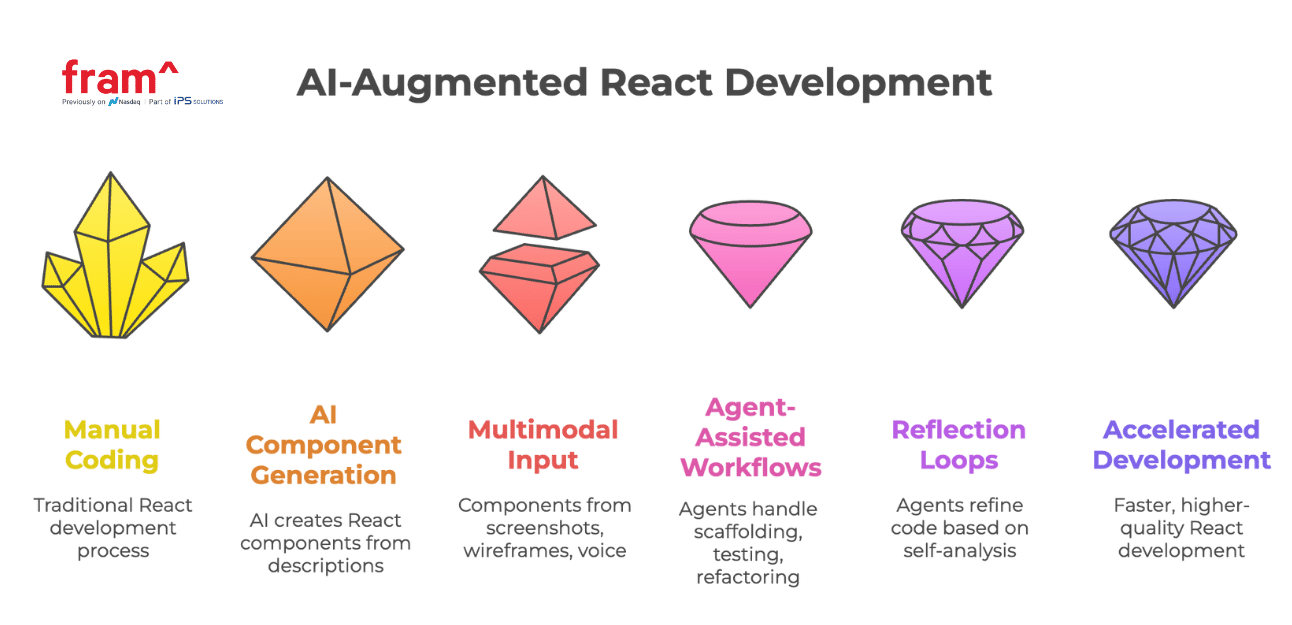
AI Component Generation
Describe your intent at a high level and receive complete React components. AI assistants scaffold layouts, styles, and interactions using Tailwind CSS, Shadcn, or Material UI based on natural language descriptions.
Multimodal Input
Generate components from screenshots, wireframes, or voice commands. Tools like Gemini CLI convert visual designs into working React code without manual translation.
Agent-Assisted Workflows
Specialized agents handle scaffolding, testing, and refactoring. A scaffolder creates initial structures, a test engineer writes test suites, and a reviewer evaluates quality and suggests improvements.
Reflection Loops
Agents follow generate-critique-refine cycles. They produce implementations, evaluate against best practices, then improve based on self-analysis using RAG (Retrieval-Augmented Generation) for context-aware refinements.
How This Works in Practice
AI Role
Function
Tools/Examples
Scaffolder Agent
Generates components/layouts
Copilot, GPT-4 Turbo, Gemini
Test Engineer Agent
Writes test suites + coverage
TestPilot, AutoDev, LangGraph
Reviewer Agent
Reviews & critiques generated code
Reflection pattern, LangChain
Documenter Agent
Documents props + usage
GPT-4 Assistants API, PromptLayer
UI Synthesizer
Builds from screenshots or sketches
Gemini CLI, Uizard, Galileo AI
You describe component requirements: “Create a dark-themed dashboard with real-time metrics.” The AI scaffolds the structure, applies styling conventions, and generates placeholder data. You review the output and refine through natural language edits.
Agents accelerate prototyping while maintaining code quality. A test agent writes comprehensive test coverage. A documentation agent generates component docs from props and usage patterns. You iterate on working code rather than starting from blank files.
This workflow increases velocity without sacrificing quality. You focus on architecture, user experience, and product decisions. AI handles boilerplate, repetitive patterns, and documentation generation when properly orchestrated with clear requirements and validation steps.
When Should You Use React?
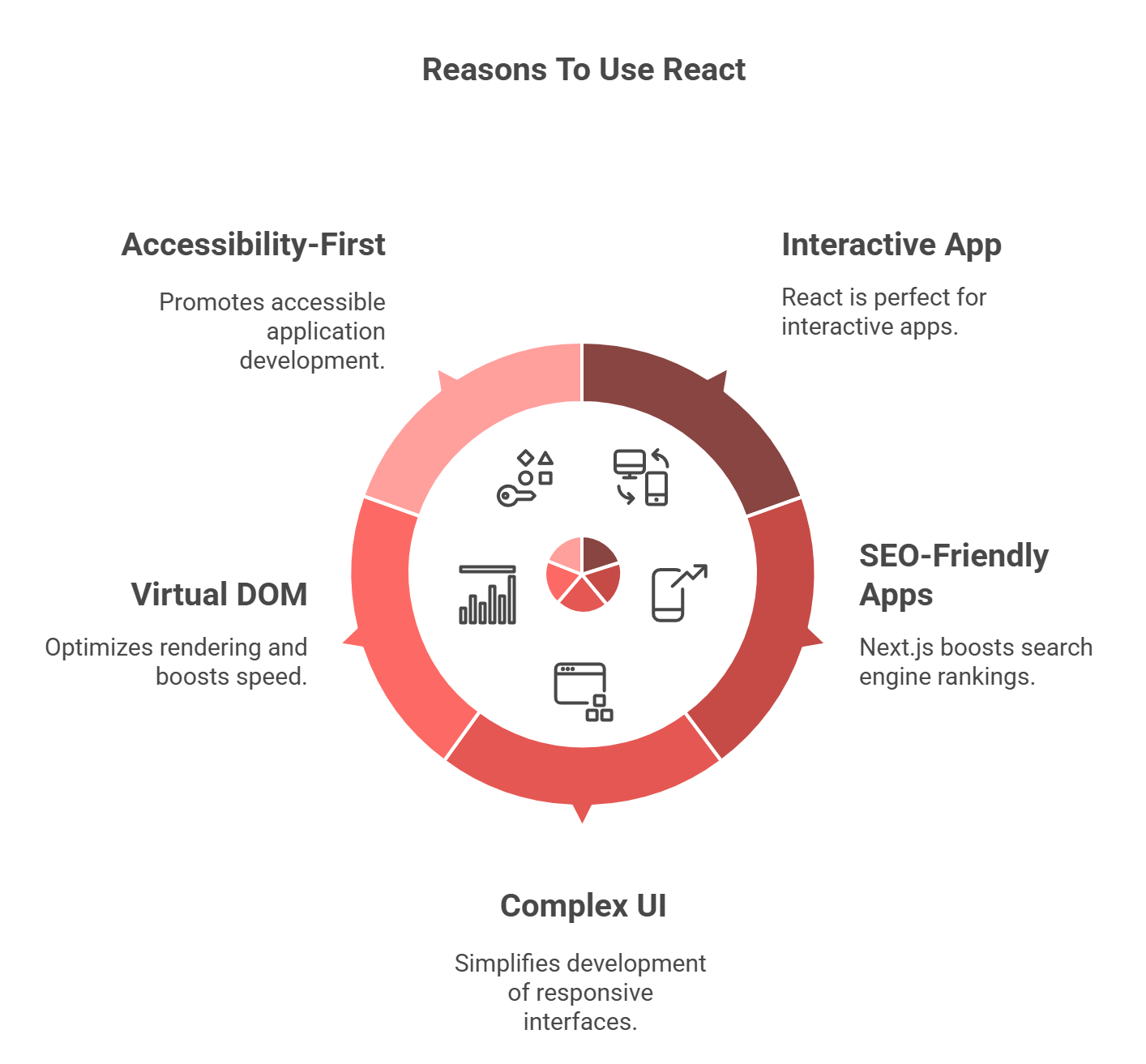
You Need Your App To Be Highly Interactive
React’s component-based architecture and reusable components are perfect for building dynamic user experiences. At fram^, we used React to develop a feature-rich e-learning platform, enabling real-time collaboration, interactive components like quizzes, and seamless navigation for an enhanced user journey.
You Want to Build an Interface for an AI Agent System
React excels at building frontends for agent-based applications. Your components handle real-time data from reasoning agents, display autonomous workflow status, and provide control panels for multi-agent orchestration.
React’s component architecture is very much compatible with AI system complexity. Each agent interaction becomes a discrete, testable component that updates independently as backend systems evolve.
You Want SEO-Friendly Web Apps
Frameworks like Next.js offer server-side rendering and static site generation, boosting search engine rankings and reducing bounce rates. At fram^, we leveraged Next.js to develop an SEO-optimized corporate site for a client, resulting in a 35% increase in organic traffic within the first quarter.
Your App Requires a Relatively Complex UI
React’s modular approach simplifies the development of sophisticated and responsive user interfaces with customizable components. To enable seamless navigation and real-time data visualization, we developed a custom dashboard for a fintech client using React, which significantly enhanced user engagement.
You Want to Leverage a Virtual DOM
React’s virtual DOM optimizes rendering, ensuring that only necessary components update. This boosts speed and responsiveness, making it ideal for applications with frequent data changes. At fram^, we leveraged this feature to maintain smooth performance, even during peak usage.
You Need an Accessibility-First, Components-Based Architecture
React promotes the development of accessible applications by allowing developers to create reusable components that can be designed with accessibility in mind. This modular approach helps ensure that best practices for accessibility are consistently applied across the application.
By utilizing React’s component-based architecture, we implemented features such as keyboard navigation and screen reader support, which not only improved user experience but also ensured compliance with accessibility standards. This approach not only made the app more inclusive but also broadened its reach to a wider audience.
When Should You Consider React Alternatives?
While React is a powerful choice for building interactive web applications, there are scenarios where other frameworks may be a better fit:
You Need a Simpler Approach for Basic Projects
If your project doesn’t require complex interactivity or advanced state management, simpler tools like vanilla JavaScript or jQuery may suffice. These lightweight options are ideal for quick prototypes, static sites, or small-scale applications where React’s additional overhead isn’t necessary.
You Prefer a More Structured Framework
For large-scale enterprise applications requiring built-in structure and opinionated architecture, Angular is a strong alternative. It includes built-in solutions for routing, state management, and dependency injection, making it well-suited for teams working on complex, scalable applications.
You Want an Easier Learning Curve
While React is flexible, it requires knowledge of concepts like JSX, hooks, and state management. Vue.js offers a gentler learning curve with simpler syntax and two-way data binding, making it a great choice for beginners or teams looking for fast adoption.
You Prioritize Performance Without a Virtual DOM
Svelte takes a different approach by compiling code at build time rather than using a virtual DOM. This leads to faster performance and smaller bundle sizes, making it an excellent choice for high-performance applications with minimal runtime overhead.
You Lack Experience with JavaScript
If you lack experience with JavaScript, learning React can be challenging due to its steep learning curve. Partnering with experienced developers, like teams available in Fram^, can help you navigate this complexity. Our team offers expert guidance to ensure smooth implementation, allowing you to focus on your project’s goals while we handle the technical intricacies.
FAQ on React Frameworks
Why Choose React over Other Javascript Options?
React’s flexibility, vibrant community, and reusable components make it an excellent choice for dynamic applications. At fram^, we leverage React’s strengths to deliver high-performance, user-friendly applications tailored to your business needs. Our team of experienced developers ensures seamless integration, scalability, and optimized framework with performance in mind, empowering you to create engaging user experiences. Whether you’re building a simple interface or a complex app, fram^ helps you unlock the full potential of React, guiding you through every step of the development process for a smooth and successful implementation.
Is React a NodeJS Framework?
No, React is a library for building user interfaces, primarily focusing on front-end development. It allows developers to create interactive and dynamic UIs using reusable components. On the other hand, NodeJS is a runtime environment that enables JavaScript to be run on the server-side. By integrating React with NodeJS, we develop scalable, full-stack applications that offer a seamless experience from front-end to back-end, ensuring both efficiency and performance for your business needs.
What is the best React Framework Overall?
The best React framework depends on the specific needs of your project. For SEO-driven applications, Next.js is a top choice due to its server-side rendering and static site generation capabilities. If you’re developing a mobile app, React Native extends React for building mobile applications. It allows developers to use React concepts to create native apps for iOS and Android.
At fram^, we use these frameworks to deliver tailored solutions that meet your unique business requirements, ensuring the right fit for your project goals.
How Does Code Splitting Improve Performance?
React’s code-splitting feature optimizes performance by breaking up large bundles into smaller, more manageable chunks. This reduces initial loading times, ensuring that only the necessary code is loaded at any given time. For SPAs and complex applications, this leads to faster page loads and a smoother user experience.
At fram^, we implement code splitting in our projects to enhance speed and efficiency, ensuring optimal performance for our client’s web applications.
Start Building with React
React powers modern web and mobile development through a mature ecosystem of frameworks and tools. Next.js handles server-side rendering and SEO. Remix optimizes data loading and mutations. Gatsby generates static sites at build time. React Native extends your components to iOS and Android.
Choose your framework based on project requirements. Content-heavy marketing sites benefit from Next.js or Gatsby. Interactive applications with complex state management work well with Remix. AI-powered interfaces leverage React’s component model to connect users with agentic backends.
Build Smarter Applications with fram^
fram^ helps companies integrate AI agents into React applications without sacrificing performance or user experience. We design orchestration systems, build custom agent workflows, and train teams on effective human-AI collaboration patterns.
A business and product guide to what actually needs to change The question isn’t whether your app supports one new device. It’s whether your product is ready to adapt when the context changes. Assessing iPhone Duo app readiness starts with a simple question: can your existing product adapt when the context changes? Apple’s iPhone Duo […]
A core app dashboard is a centralized interface that gives teams real-time visibility into the KPIs, workflows, and system signals that drive daily decisions. That can include revenue metrics, support queues, product events, operational alerts, or system health depending on the business. Dashboards serve different purposes, though. Some are built for reporting on past performance. […]
The main difference between Azure and AWS is that AWS offers more global flexibility and open-source options, while Azure provides seamless integration with Microsoft ecosystems and superior hybrid cloud solutions. So, the choice depends on your organizational needs and existing technology infrastructure. Amazon Web Services (AWS) and Microsoft Azure are leading cloud providers with vast, […]


 You Need Your App To Be Highly Interactive